

This week, Zwift released firmware version 1.3.0 for the Zwift Play Controllers. The update improves connection stability, adds diagnostics to streamline troubleshooting, and includes an updated LED status for firmware updates.
Zwift Play is still considered a beta feature. They were released to the public in June 2023, but I’ve been using them for nearly a year and have seen their stability and usefulness steadily increase month to month as new firmware and game updates roll out.
This latest firmware is the public release of an internal version I and other testers have been using for months. For me, primarily using Windows 11, it has delivered the most stable Play experience yet, with no noticeable hiccups.
I know some Zwifters have been plagued with Play disconnect issues and may even have set the Play controllers aside out of frustration. So I wanted to write a quick post about this latest firmware release to encourage Zwifters to update their Plays and see if things work more smoothly.
Here are more details…
Updating Zwift Play Controller Firmware
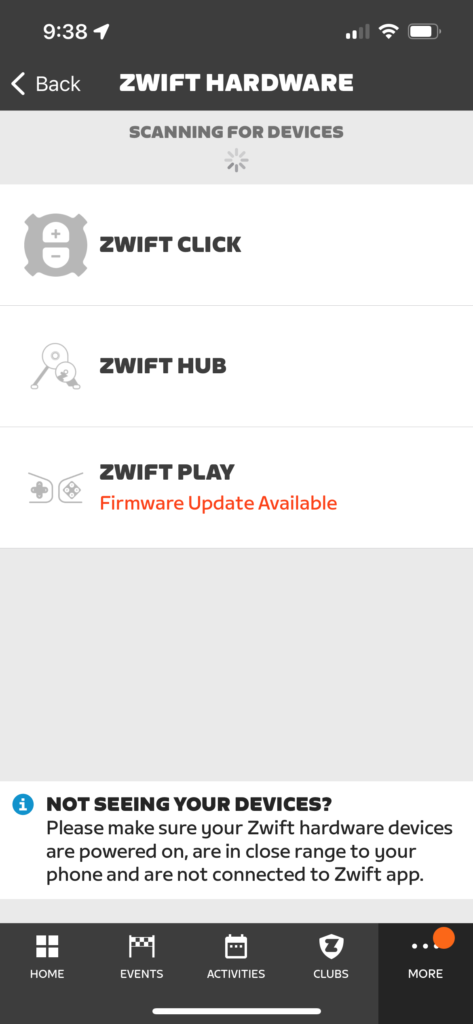
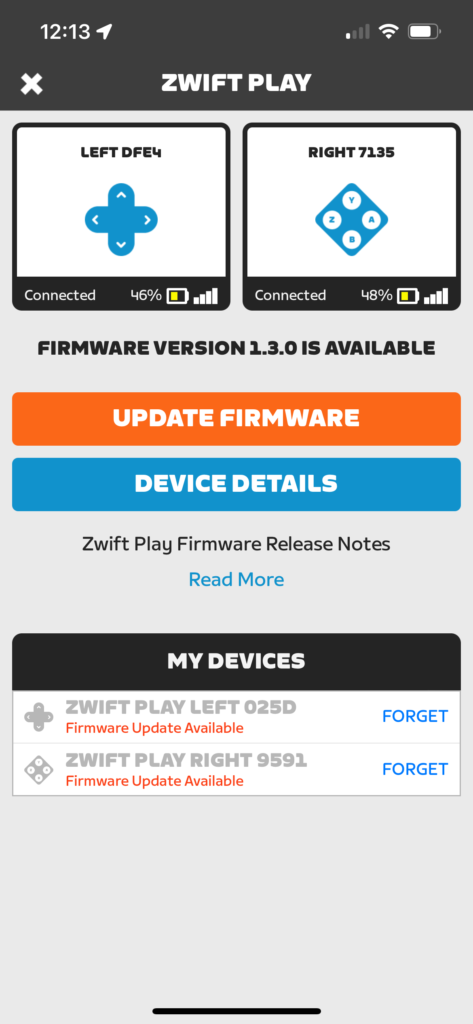
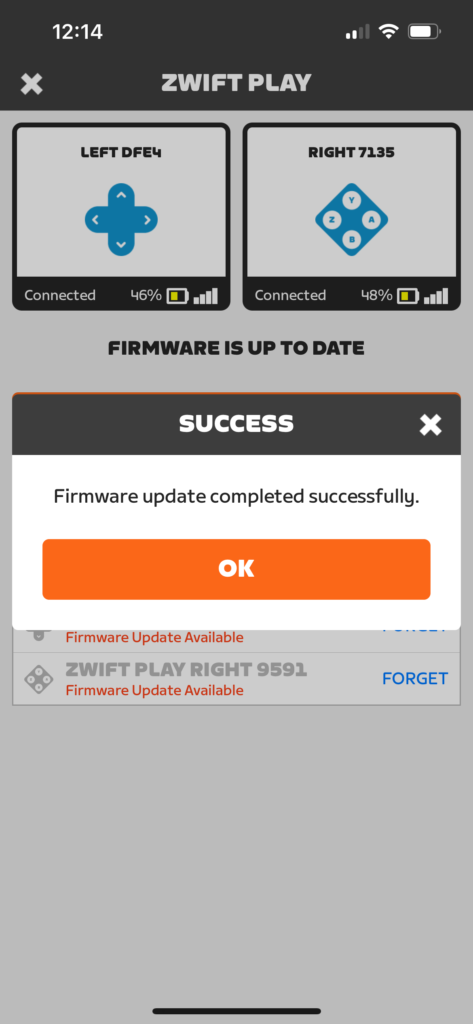
Play firmware updates are easy! Just power on your Plays and open up the Companion app. (Don’t have Zwift running, as you can’t update your Play Controllers’ firmware if they’re connected to Zwift.)
Go to “Zwift Hardware” under the More menu, or click on the homescreen if prompted. Tap “Zwift Play”, then “Update Firmware” and follow the instructions. The whole process should only take a minute or two.
Connection Stability Improvements
Version 1.3.0 updates Bluetooth connection parameters for “slave latency,” which is basically the amount of time that can pass before your Zwift device pings the Play Controller to make sure it’s still turned on.
Decreasing this latency (reducing the time gap) uses more Play battery but also makes it less likely that your Play Controllers will lose connection/synchronization with Zwift. Zwift says the increased power consumption is acceptable since the additional power consumed is a mere fraction of what the haptic motors and LED lights on the controllers consume.
Additional Diagnostics
One of the more difficult things in hardware and software development is reproducing a bug. Users may report problems, but if the developer can’t replicate the issue on their side, it can be impossible to implement a fix.
This firmware update adds additional diagnostics to the Play Controllers to identify more types of device/controller failures (which often happen without the end user even noticing). The result, Zwift says, is that they’ll see more failure reports with more detailed diagnostic info so they can quickly track down the cause and release a fix before the failure affects more Zwifters.
New LED Status
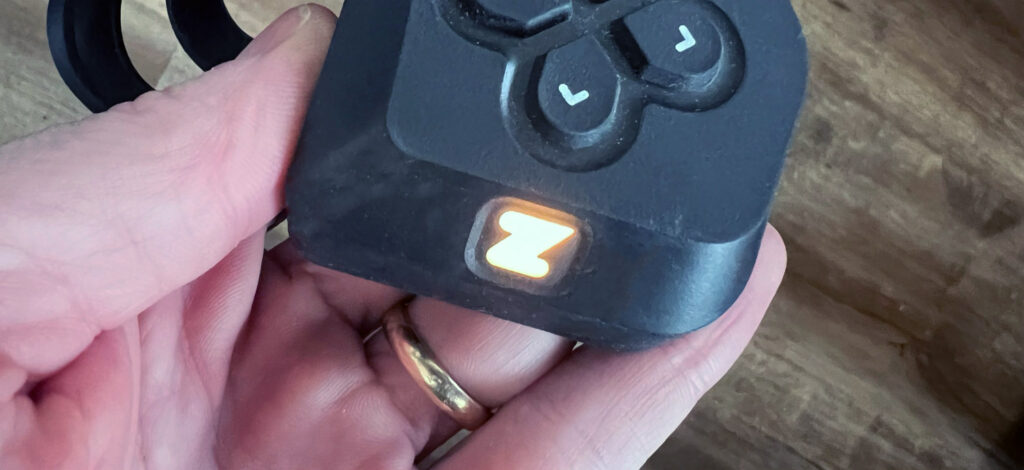
Play Controllers in device firmware update (DFU) mode will now show a yellow LED until the update is installed successfully. If an update fails because a controller turns off, powering the controller on will show a yellow light, and the controller can then be connected to Companion to finish the firmware update.
Questions or Comments?
If you’re curious, you can see the Zwift Play firmware release history. Got questions or comments about this firmware update? Share below!


I’ve been using the Zwift Play controllers for a couple months now and love them – especially now that I’ve updated my Kickr Core and have virtual shifting. Is it possible to use Zwift Play and Zwift Click simultaneously? I was considering adding that shifting option to the end of my aero bars…
Yes. I’ve been doing that for months.
Kool. Thanks!
Thanks! Generally, my Zwift Plays have been reasonably stable. But two days ago they (and the Sterzo) effectively crashed and burned with Zwift unable to use the Left controller and Sterzo, with the Right almost partially working. Fortunately well after my event had ended and during my cooldown. It appeared to take a Windows reboot to restore, restarting Zwift was not sufficient.
Thanks, I’d be interested to hear peoples experiences on the new firmware before I update…mine are currently working well and don’t fancy throwing a spanner in the works after switching up my setup to get some stability.
Mine were fine before and still seem fine after. Think i’ve been lucky had them since first release and not really had any issues with them.
I really enjoyed using the play controllers but some months ago straight after a firmware update they started loosing connectivity every 3 minutes. I worked with zwift support for a number of weeks to try to resolve the issue but in the end support offered to refund the cost of the controllers, as they couldn’t guarantee when or if the connectivity issue would be fixed for the android tablet I use for Zwift
Since I have used the Play controllers (and my primary reason was to control in game functions rather then the companion app or keyboard (like a ride on or to chose a turn, and most important navigate the main menu screen)) primarily to control my computer while sitting on my bike. I have had the plays cause all kinds of issues, and as of late have been causing connection issues with my controllable channel – using zwiftalizer I could track the time of the play discontent to the same general time my bike was having issues. I did the play update and have done 2 one hour rides now with no disconects that are noticeable and no issues on the bike – I have confirmed on zwiftalizer this seems smoother. Lets give it some time but if this keeps up it was a solid update.
I was about to loan my Play controllers out to friends.
I considered selling them but their poor performance (continously disconnecting and crashing the game) prevented me from doing that with a clear conscience.
However, Eric, I have faith in you and I am a fully paid up, totally addicted user of Zwift so… tomorrow, I shall unbox them (again) and give them another go.
Fingers crossed!
hmmmm… so I’ve just done 90 minutes of Zwift in various modes and initially, the Play controllers were better than previously.
One disconnection about 20 minutes in but only for a couple of seconds and it didn’t crash the game.
At 44 minutes, the game had a very brief wobble (screen freeze, objects disappeared) but again, only a couple of seconds and no disconnection/crash.
However, at the same place on the route during my second lap, the controllers disconnected and for much longer this time.
Definitely better but I’m still not a fan.
Mine won’t connect for the update but they’ll connect to the game. No issues with them at all. Talked to an Ambassador and tried everything but no luck. Was escalated to support. Fingers crossed.
I had to reboot my phone before it would see them for the upgrade – worth a try
Just installed the new FW. Previous revision with a BT5.3 dongle located separate from my PC finally give me the stability I need.
Have zwift play since May 23
Garmin/Tacx Neo bike smart
Zwift Windows i5-9500 + Radeon rx640
I updated this evening and after the update i did 3 sessions on zwift for a total of about 2 hours. Normally in 2 hours I had at least 7/8 disconnections, this evening after the update the controllers never disconnected. I really hope the problem is solved.
Never had an issue with disconnection mid ride, but a tad annoying is when the plays disconnect after a ride finishes and is saved. Don’t know if this is just on Apple TV. Is this issue fixed with this update too?
update: well I updated them and for first time ever had a dropout in middle of a race. My advice if they’re working, don’t bother updating
and they still disconnect after saving a ride- couldn’t be too tricky to direct screen straight to the pairing screen where they’ll re-connect automatically?
Have had mine play for about 4-5 months now. Uset to have lot of disconnect issues, but found a article saying that if you move your bluetooth reciver to a place in front of your plays and start with connecting all other things (power, cadence, heart rate) before connecting play then the disconnect issues were solved. This worked for me.
Running Zwift from Windows PC.
Does Companion need to be updated to 1.5.8 first? I’m still at 1.57. It shows that there is a Play update, but won’t install it. Otherwise everything is working fine.
I’ve had them for a month , running zwift on a mac, they constantly disconnect and seldom provide steering even when they are connected. Downloaded the firmware update and there’s no difference. Not ready for prime time in my world.
I experienced something similar If less severe. If you haven’t already taken a look at this Zwiftalizer video, especially the last bit about line of sight positioning of equipment solved my problems https://youtu.be/YW69ts_fvMA?si=p5ho2WVQ9y9QktGt
Is the Zwift Play for ATV good? I know there is trouble connecting multiple Bluetooth channels so curious.
I am very happy with the Play controllers with Apple TV. That’s actually the reason I bought them, as fumbling with the ATV remote when sweaty is hard. You can navigate the full “Menu” structure while riding, in addition to the Action bar, which is awesome.
I pair all BT devices through the Companion app and have zero issues.
The virtual shifting is also a game changer. I converted my dedicated trainer bike to a true singlespeed and love it.
I use Zwift with ATV and never had any connection problems until I started using the Zwift Play controllers. Previously, I connected my devices via the ATV, but had to switch to connecting via the Companion app due to the lack of Bluetooth channels on ATV. Now, I experience connection dropouts every 3 or 4 rides. Not as bad as some other people, but still annoying. I can re-establish a connection quickly by turning off the Play controllers – not ideal but better than the alternative.
I just completed the firmware update and will try it over the next week to see if I get fewer dropouts. Fingers crossed.
Install the update yesterday, even though didn’t need it. My controllers were fine.
The update is a total dud.
Don’t bother installing it.
I don’t know why they release updates that need immediate patch…
After install my right controller would not connect.
And the controllers could not be found by ZC app…
After numerous tries finally worked but you have to manuayturn on/off the controller, otherwise wouldn’t go off.
All In all S’#t show
Same here : right control doesn’t connect after the update:-(
Thanks folks, will definitely swerve it for now then as currently not broken after rejigging equipment.
Actually It was connected to both my iPhone and ATV thru that but it just did not do anything, not even show the battery level in the connection menu.
I tried restarting both the phone and the atv but that did not help.
I finally did a hard reset for the right controller and that solved it.
I do have periodic disconnection/reconnection issues. Computer is only 2-3 feet away. I hope this solves the issue or at least allows them to diagnose such issues and fix them in the future. But I’m going to wait a couple of weeks to update the firmware. Fool me once….
Ours wouldn’t update with the android tablet, but updated fine when I tried it on our phone. On the tablet, it said it was updating but nothing was happening. My wife did 2.5 hours today and no issues.
This latest update definitely helped with my connection issues. My right controller would lose connection 2-3 times every hour of riding. It was typically only about 10 seconds or so before it would automatically reconnect, but I’m very glad they seemed to have solved that issue. My last two rides were problem free.
This is what I had happening. I guess I’ll jump in. Thanks for the positive report.
no chance to update the controllers, as they don’t connect to the companion app anymore. zwift pc is turned off, so i‘ve got no clue what blocks them
Was using Play with ATV but gave up as readings to and from trainer (Neo) and my HR monitor seemed to get ‘blocked’ and I’d have a very slow response to changes I power or resistance in game when gradient changed. Everything would return to normal if I turned controllers off and had impression the companion app was prioritising the controllers over the trainer etc and in end I just gave up on them.
Bit the bullet and purchased Zwift Play last week, the carrot being auto shift. Installed with updated firmware, tested fine on my AppleTV set up and off I went happy as larry…. I was racing up AdZ yesterday afternoon heading for a sub 48min pb when I got disconnected and thrown out of the race on turn 6 from summit. I have never suffered disconnection issues before. Absolutely fuming…..
Try the Zwiftalizer 18 point avoid dropout video and pay particular attention to line of sight at the end of the video. Helped for me 🤞
Cheers Hybrid.
Took the plunge with the new firmware after getting a drop in a race the other day that required a panicked turn off of the Plays as power dropped out and constantly hard left turning as they lost connection. So far so good – an hour odd today and no drops, time will tell 🤞
…and two hours with a Pace Partner today and all good too 👍
I got mine when they came out and had so many connection issues, put them aside for months. Updated them a few weeks ago and work flawlessly now
What about Play Controller hardware version? Is ‘B.0’ current? I purchased mine in the first wave. Just curious if there has been a hardware update as well at some point.
I just received a set in the UK that came with firmware 1.1.1 and are hardware revision B.0. So from that I can guess they were at least still on B.0 by July 2023 which was when 1.1.1 was released.
After the update mine will not connect. Very frustrating.
Bought the controllers in September, got immediately disappointed because I believed I could connect a trainer and HR directly to Apple TV and bridge controllers through the Companion app. Unfortunately, it’s all or nothing, which is a deal breaker for me. Connecting Tacx Neo via Companion app introduces instabilities and significant lag. I love the UX of riding with the controllers, it makes the game so much more immersive, I won’t however use them unless I can connect the trainer and HR directly to Apple TV.
With both the new Play firmware update and the Wahoo new firmware supporting virtual shifting I had to get a pair in Canada (not an easy thing) and try them with my Kickr Move. Connecting to my computer via BT proved useless as the controllers kept disconnecting and reconnecting every few minutes throughout any rides. I finally got a stable connection by pairing the connectors through my phone/companion rather than the computer which is a bit of an inconvenience but workable for the moment. The trainer remains connected through WIFI.
What about 1.3.1?
From the issues and none issues, I’m going to wait until something snafu’s before trying to update firmware. Tried this a.m. but app couldn’t find my devices; it found click the other day fine. My 45min ride before trying an update was wonderful. Just got the Play controllers after receiving the Wahoo Kickr Core Hub combo (sale with Play thrown in). PC off and in another room so that wasn’t issue. If it ain’t broke…so I’ll be waiting and try again if issue pops up. Didn’t know about haptic, surprised me while riding and gave a ride on and it vibrated. Might turn off for power saving though.