

While it may seem logical that Zwift would automatically control treadmill incline for runners to simulate in-game hills, that feature has never been available until recent months. Despite many requests over the years, due to liability concerns, differing trainer protocols, and user experience issues due to delayed treadmill response, Zwift avoided implementing automatic incline control in the game, instead leaving it up to runners to control their incline as desired.
This changed back in September 2024, when, without any fanfare, Zwift released an “incline control” feature for a small set of Zwift runners. The vast majority of runners didn’t even know the feature existed until it was called out in a recent post in the Zwift Runners Facebook group which included this Zwift popup:
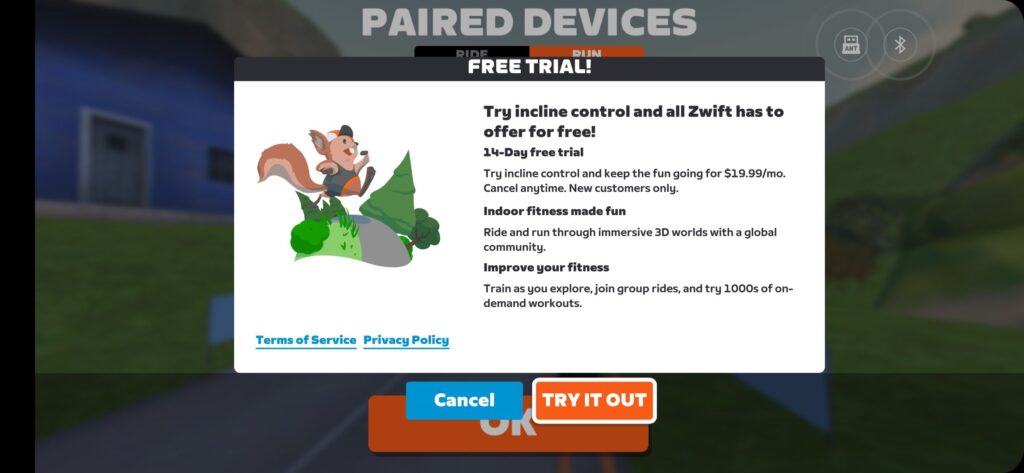
The poster asked, “Do you have to pay to have incline in Zwift when running?”
Fair question. Running has always been free on Zwift, but with Zwift not officially announcing this feature, runners were understandably confused.
Zwift has a support post explaining how it works. Stephen Cousins also shared a helpful post on Facebook. I’ll summarize these below.
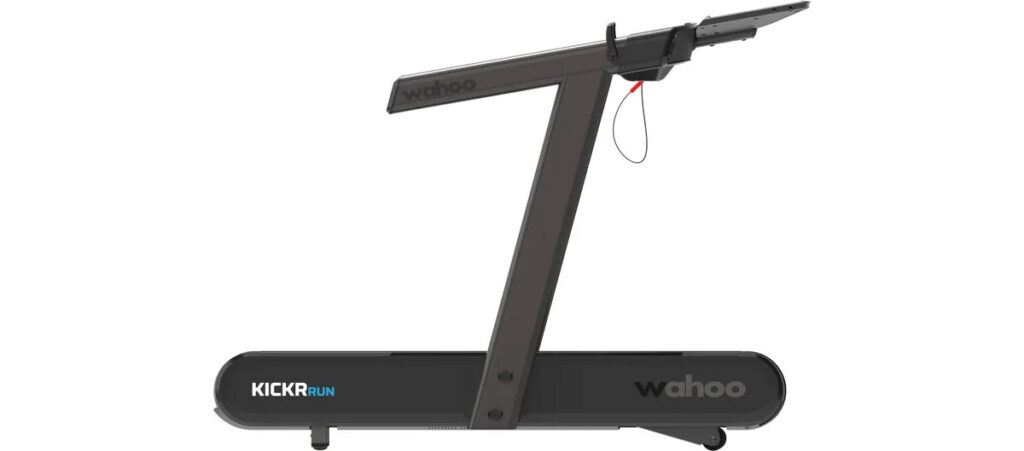
Incline control is a feature Zwift debuted in September, but only for users of the new Wahoo KICKR Run treadmill who are also paid Zwift subscribers. When incline control is enabled, Zwift’s software automatically changes your treadmill’s incline to match in-game gradients. If you use your treadmill’s incline paddles, Zwift gradient control is immediately disabled so you can set the gradient to whatever you’d like.
The logical follow-up question is, “What about runners on other treadmills? Is Zwift working to support additional hardware?” Zwift’s official response:
“We’re first and foremost focused on making it a great and safe experience for Zwifters before scaling with other partners. Features like automatic disabling when a user interacts with the treadmill paddles and opt-in incline control are key to ensuring Zwifters feel confident and in control.”
So it sounds like Zwift may very well roll out this feature for other treadmills in the future, but they’re focused on dialing it in with a small subset of users to make sure the experience is a good one.
Is Running Still Free?
If all you want to do is run on Zwift, that is still free. Even if you use a Wahoo KICKR Run treadmill, you can run for free on Zwift, but you won’t get access to the incline control feature.
Wahoo KICKR Run users who want access to incline control will need to have a paid Zwift subscription.
How to Enable Incline Control
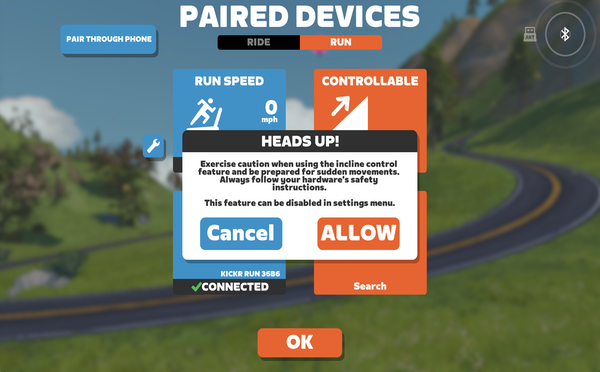
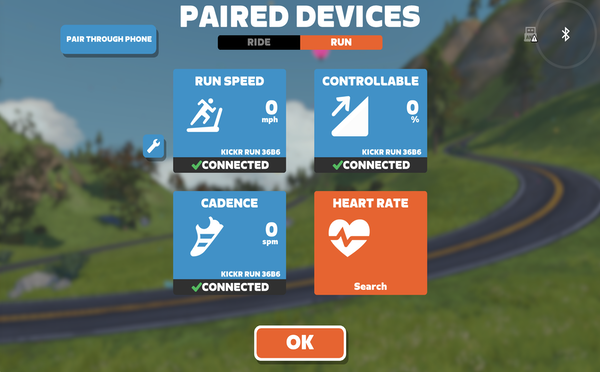
To enable incline control, you need to pair your Wahoo KICKR Run as “controllable” on the pairing screen. Click “Allow” in the Heads up! popup to allow incline control, which can always be turned off via in-game settings or the action bar:
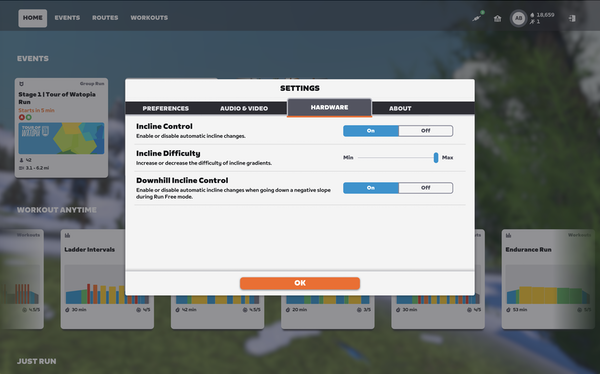
With your controllable trainer paired, you’ll have access to an “Incline Difficulty” setting under Settings>Hardware, which is analogous to the cycling “Trainer Difficulty” setting which scales the gradient sent to your trainer/treadmill:
The QZ App Hack
Runners with non-Wahoo smart treadmills can use the QZ qdomyos-zwift app in order to enable auto incline control of their treadmill. Fully documenting how this works is outside the scope of this post – and perhaps someday I’ll do a complete post about what the QZ app can do. But for now, I’ll just say that QZ is a “middleman” app which bridges Zwift and your trainer/treadmill in the same way PainSled or RowedBiker are used to enable rowing on Zwift.
It’s not the most elegant solution, but it may be one worth trying since the app is cheap.
And with that, I’ll wrap up this post. Stride on!
Questions or Comments?
Share below!



Kind of a bummer that it doesn’t work during workouts, but cool nonetheless. I also like that they’re keeping “run speed” and “controllable” separate like they do for rides, I very much prefer to continue to use my Runn sensor instead of the speed reported by the treadmill, so looks I’d continue to be able to do that.
I hope they add support for the Technogym MyRun soon (*cough* I’d love to beta test that if anyone from Zwift is reading 👀 *cough*)
I’m not so sure this is a feature that happens to be rolled out for one treadmill and withheld from others, or may later come to all. Think it’s important context to note that Wahoo’s treadmill has responsive speed control. In the same way a bike trainer’s flywheel slows down when you slow down and speeds up with you, their treadmill can do the same. Kind of important if a hill makes you start running a bit slower…It’s a pretty major development that I think is being overlooked (the first ‘smart’ treadmill).
Just wish it wasn’t so expensive.
Do you have to have a compatible treadmill paired before seeing the “controllable” option on the pairing screen? Does this come with a new update or is it only available on PC? I do a lot of running on Zwift (with run pods though so the whole thing isn’t relevant to me anyway) but have never seen this option on the pairing screen.
The option to pair a controllable treadmill will only appear of you are using a Wahoo treadmill OR it can be done using most smart treadmills using the QZ app under certain conditions.
I know cycling is zwifts core activity but things like pce groups drops etc could cross over, and stop runners feeling like 2md class citizens
The QZ qdomyos-zwift app is a one-time $5 USD purchase (not free).
I’ve been using QZ-Beta with my treadmill for a couple of months now, and with it properly configured I tend to get within 2% of the Zwift published elevation gain on most routes (flat routes tend to be off more the climbs). It makes running up AdZ more enjoyable than just setting the treadmill at 8.5%, and is a much better method than looking at the screen and adjusting the treadmill on the fly. As a runner, to me this feature is what would sell Zwift to me, but since I already have the cycling subscription, it is icing on the cake.
Great to see that Zwift is again investing some time and energy on the running side. However, I could easily name a number of more impactful improvements that users would benefit from with 1/100th the effort. (i.e. Bringing back the monthly race series …).
Still waiting for the automatic speed controller form a Zwift-workouts to my Tecnogym Myrun. Can’t figure out a working solution in the QZ app… Don’t need the incline control
Has there been any update on rolling this out to the wider audience? I’m on the fence between zwift and training peaks virtual because both are hinting at this functionality…