How To: Import a Strava Ride to Zwift for Accurate Fitness Tracking

Zwift has made big moves into the fitness tracking space in the last few months. To summarize:

  • Fitness Tracking was added to the Companion app, giving you a current training score and status, among other things (read more)
  • You can now automatically sync outdoor rides recorded on a Wahoo or Garmin head unit into Zwift’s ecosystem, so those workouts are factored into your Zwift training score/status (read more) (Note: Hammerhead support is coming very soon.)
  • A recent Companion update lets you see your historic fitness trend, giving you a historic view of your progression (read more)

There’s still work to be done in order for fitness tracking to work well for multi-sport athletes. But if your primary training is done on the bike, Zwift now tracks your fitness quite nicely using trusted, industry-standard, TSS-based metrics.

But it only works if you get all your bike rides (indoors and out) into Zwift’s fitness tracking system!

Recently, I ran into an issue when I found myself on a mountain bike ride without a head unit. (Most cyclists will know this is a rare but not unprecedented situation. It’s easy to find yourself on a bike without a head unit, perhaps when renting or borrowing a bike, or starting a ride only to realize your head unit battery is dead.)

No big deal: I opened the Strava app on my phone and recorded the ride. (Because if it’s not on Strava, it didn’t happen, right?) But when I finished the activity, it didn’t pop over to Zwift. Because Zwift’s fitness tracking only pulls in outdoor rides from Garmin and Wahoo – not Strava.

Why Not Strava?

Zwift has never said why they don’t support imports from Strava, but my hunch is it has to do with Strava’s API Agreement, which is so far-reaching that following it to the letter would mean you couldn’t do much of anything with the data pulled from their API. A few examples:

  • “You may not use the Strava API Materials in any manner that is competitive to Strava…”
  • “You may not use the Strava API Materials (including Strava Data), directly or indirectly, for any model training related to artificial intelligence, machine learning or similar applications.”
  • “You may not process or disclose Strava Data, even publically viewable Strava Data, including in an aggregated or de-identified manner, for the purposes of, including but not limited to, analytics, analyses, customer insights generation, and products or services improvements. Strava Data may not be combined with other customer data, for these or any other purposes.”

How could I get my ride from Strava to Zwift, so my Zwift training metrics would be accurate? I poked around and figured it out, and now I’m sharing the details with you. (This, incidentally, is how many articles on Zwift Insider come about.)

2 Steps: Download and Upload

As it turns out, the process is fairly straightforward – although not as simple as I’d like it to be.

The first step is to download your ride’s .fit file from Strava. You can’t do this from within the Strava app on your phone – you have to pull up the Strava website in a web browser, and go to your activity’s detail page. Use the 3-dot menu at the bottom-left to select “Export Original”, and you’ll download the .fit file:
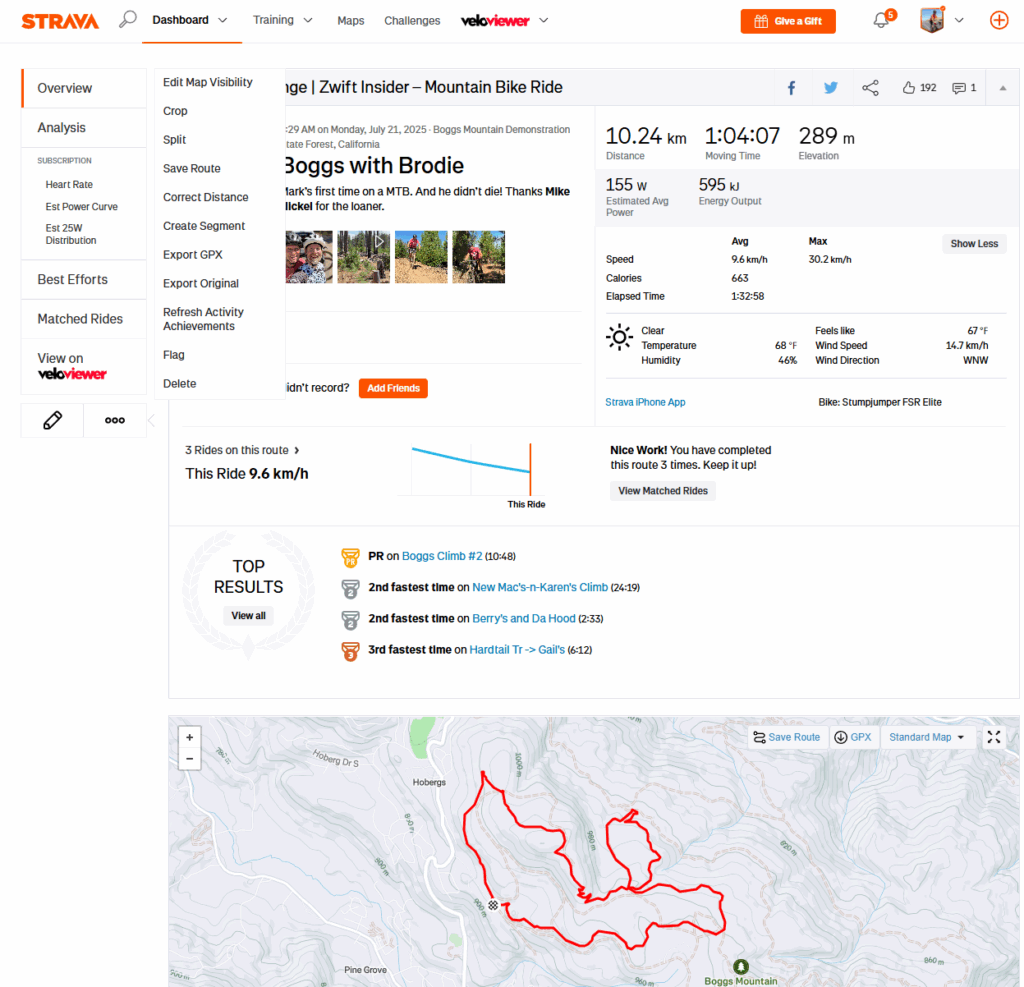
Read more about this process on Strava’s support site >

The second step is to upload that .fit file into your Garmin or Wahoo account.

Uploading to Wahoo

The only way to upload a .fit file to Wahoo is via the Wahoo app (note: this is different from Wahoo’s ELEMNT app.) In order to do this, you’ll need to have the .fit file saved on your phone (I did this by emailing myself the .fit file I had downloaded from Strava, and saving it to my phone).

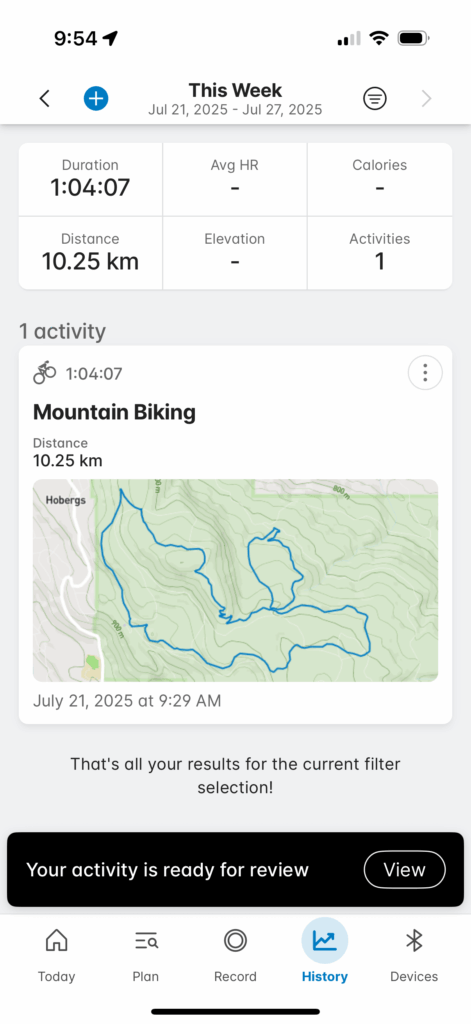
Here are the simple steps to upload your ride to Wahoo via their app:

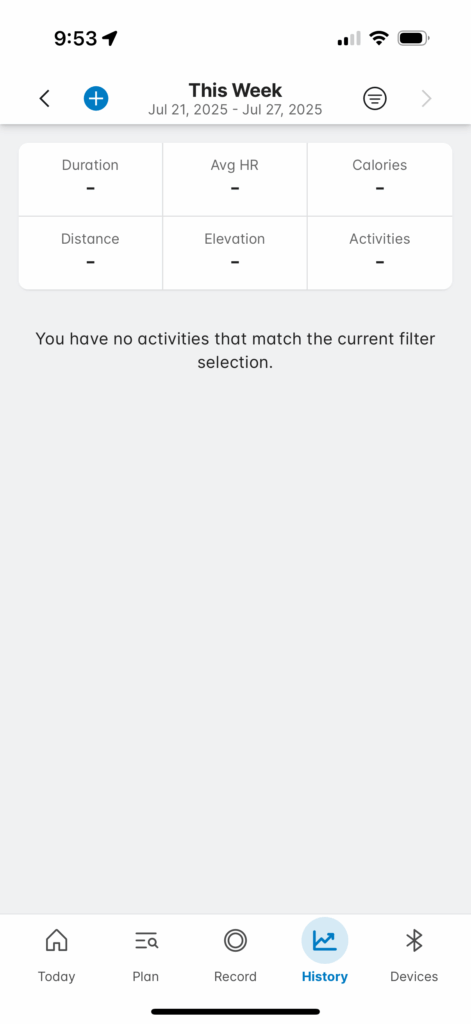
  • Open the app and tap “History” at the bottom
  • Tap the + sign at the top left
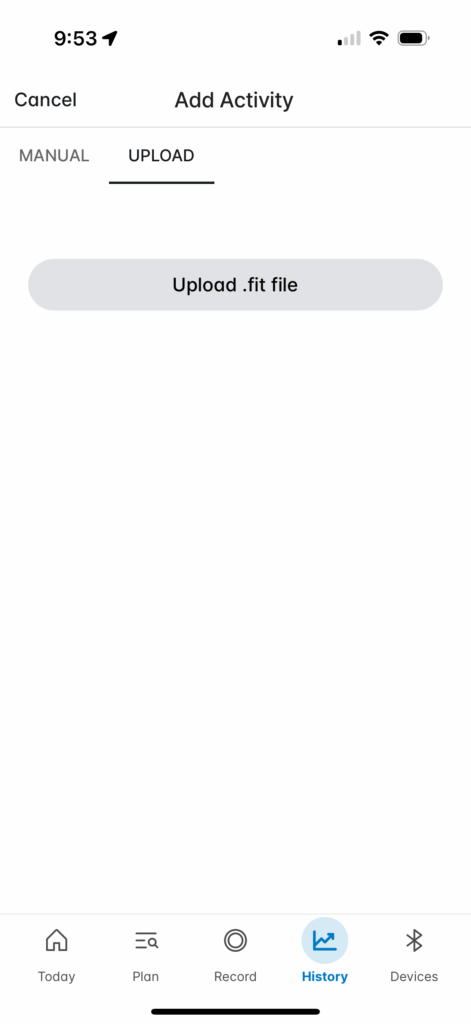
  • Select “Upload”, tap the upload button, and select the file saved on your phone
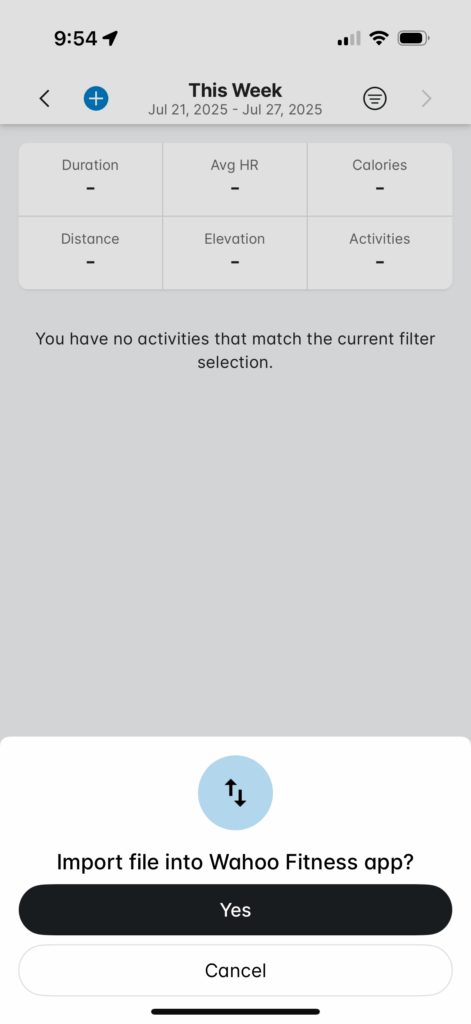
  • Click “Yes” to confirm the import

Read more about this process on Wahoo’s support site >

Uploading to Garmin

The only way to upload a .fit file to Garmin Connect is via a web browser (not the Garmin app). To do this, sign in to connect.garmin.com then click the cloud at the top-right and select “Import Data”. Choose your .fit file, and you’re all set!
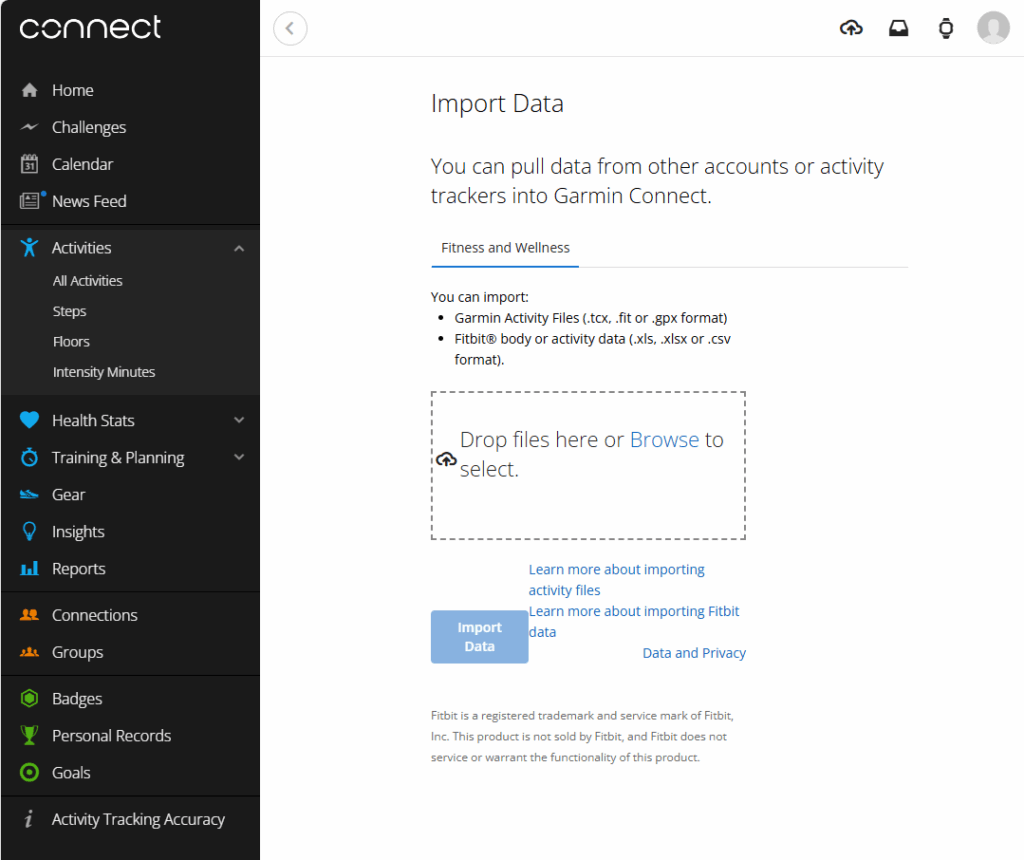
Read more about this process on Garmin’s support page >

Riding Headless

I should add that you don’t actually need to own or use a Garmin or Wahoo head unit in order to use their apps and import .fit files from Strava as outlined above. For the purpose of this post, the Wahoo app and Garmin Connect web interface are simply tools to get your Strava activity into Zwift.

These apps from Garmin and Wahoo are free, you just need to create an account to use them.

That’s all, folks!

Once you’ve uploaded your .fit file to Wahoo or Garmin (and soon Hammerhead), it will pop into Zwift’s ecosystem and appear in your Fitness Tracker in the Companion app, as long as you’ve properly connected your Zwift account to Wahoo or Garmin (instructions here).

Questions or Comments?

Share below!

Eric Schlange
Eric Schlangehttps://zwiftinsider.com
Eric runs Zwift Insider in the spare time he finds between riding his bike and managing various business interests. He lives in Northern California with his beautiful wife Monica. Follow on Strava

29 COMMENTS

Subscribe
Notify of
guest

29 Comments
Oldest
Newest Most Voted
Dan
Dan
1 year ago

You probably could have saved a step or two and just record the ride on the Wahoo App.

Last edited 1 year ago by Dan
Phil
Phil
1 year ago

Been using the Garmin method without the Strava step since it was available. Head unit is a cheap coospo unit that I just download the fit file and then upload as above. Nice part is it keeps stuff Strava strips out like L/R Balance etc.

RobG
RobG
1 year ago

Great, helpful article as always, Eric.
Two questions:
1.Am I correct to assume a ride done on another online riding platform could be uploaded to Zwift the same way?
2.Technically, the method you describe is probably in breach of the Strava API agreement. Does this open those who do it to prosecution from Strava?

Simone
Simone
1 year ago
Reply to  RobG

Hi,
the procedures just uploads a .fit file into the wahoo app. Any app/device/system that generates a .fit file should be supported. So q1 is a yes.
For q2, it is not in breach, as it’s not done automatically via API by the vendor, but by yourself manually.

KDS
KDS
1 year ago
Reply to  RobG

Answer to #1–yes—it happens now with rides on other platforms that are saved to Strava.

François L.
François L.
1 year ago

Hi Eric !

Truly an interesting topic ! Thanks for sharing, (I already do it with Garmin Connect and Strava. It works)

May I ask directly if in the upcoming future, does Zwift plan to accept .gpx files from outdoor to import on the platform, like concurrency does (but way better!) ? So basically, the question is, will Zwift extend the virtual routes in f.e. Watopia, as the main world to support the main real life routes ?

I personally think it may be a great idea, as long as the profile (km and %) and elevation gain are faithful as possible to reality. And like the Climb Portal, in can be included in the map Watopia…to have virtual landscapes.

It makes sense as Companion app does now support outside rides, for fitness tracking.

Marc Ashley
Marc Ashley
1 year ago

Sorry, I’m a beginner and new to the topic — do you get Zwift XP from an outdoor ride?

temps09
temps09
1 year ago

This is good for us using other companies bike computers too (lezyne, bryton, etc.)

Megan
Megan
1 year ago

Amazing, I swore I tried this when the outside feature was first integrated, but after I was uploading files to Garmin they were not showing in Zwift (in May), I just successfully downloaded FIT files from Strava that were recorded on my COROS DURA and then uploaded them to Garmin Connect and now I see them in Zwift Companion! 🙂

Don
Don
1 year ago

While waiting for the hammerhead integration, I just confirmed you can do this from your phone. Start from https://dashboard.hammerhead.io/activities, download your .fit file. Proceed with the rest of your instructions.

Last edited 1 year ago by Don
Steve Swindon
Steve Swindon
1 year ago

I was quite excited when I saw this article, but sadly it doesn’t work for me. There is a bug in the Wahoo app where it does not load long rides. I have a Wahoo Elemnt Bolt V2. I did a 416km ride last weekend which I successfully saved to my Bolt and synced with the Elemnt app which then synced it with Strava and Komoot. However it does not appear in the Wahoo app so it hasn’t been sent to Zwift. I have raised this with Wahoo support and they have recognised it as a bug and are working on it….apparently. I have tried to manually upload a .fit file to Wahoo but that hasn’t worked. As you know there is no way to manually upload a .fit file to Zwift which is very frustrating. My only option as far as I know is to dust off my old Garmin account and load it to Zwift via that. Any other ideas?

Steve Swindon
Steve Swindon
1 year ago
Reply to  Steve Swindon

Update: I did log into my Garmin Connect account and uploaded the .fit file and the ride is now recorded in Zwift – hurray! Thank you for the heads up.

RobG
RobG
1 year ago
Reply to  Steve Swindon

Great you got the ride uploaded via Garmin connect. Another solution (not as neat) if you only had access to Wahoo, would have been to crop your ride using Strava and upload it to Wahoo as 2 or 3 shorter rides.

Steve Swindon
Steve Swindon
1 year ago
Reply to  RobG

Thanks, I did think of doing that but wanted to keep the ride as one as it was my longest ride.

Ikcelaks
Ikcelaks
1 year ago

Does Zwift have any plans for incorporating Running (and other cardio) into it’s fitness tracking? As is, the feature is just a pile of garbage data for anyone who isn’t strictly cycling.

Tour de Garager
Tour de Garager
1 year ago

My opinion? Glad you asked. 😉 Using the Zwift Companion app as a fitness tracker for off Zwift activities seems like the answer to a request no one was making, and a big diversion of resource$ from development or improvements to Zwift itself. It’s something I’ll never use.

Chris
Chris
1 year ago

Went for a ride on the weekend, recorded it on my Garmin head unit which then saved and uploaded automatically to Strava but noticed it hasn’t pulled through to my Zwift fitness score.

Checked my Garmin profile and you need to make sure ‘Data shared from Garmin Connect to the Zwift app’ is enabled in your Account Information, Connected Apps in your Gamin settings.

Is there a way to backdate all the recent Garmin rides into the Zwift app or will this eventually sync or will it only record going forward?

Last edited 1 year ago by Chris
Pat Darby
Pat Darby
1 year ago

I was out of town and worried that I would not be able to keep my weekly streak alive in Zwift. I ended up returning on Sunday and got a (poor, jetlagged) ride in to keep my streak.

I knew you could have a ride count if it was recorded on a Garmin head unit (which I do not have). Would this Strava uploaded method still count for a weekly Zwift activity?

Todd Tannenbaum
Todd Tannenbaum
1 year ago

@Eric Schlange I did some investigation, and it looks like we can setup a system by which activities uploaded to Strava are automatically uploaded into the Wahoo Cloud, at which point Zwift will pull them from Wahoo Cloud as usual. So no manual work involved moving forward. Whatcha think? Here is the web page describing this capability on the Wahoo Support website:

https://support.wahoofitness.com/hc/en-us/articles/22537303967506-Auto-upload-completed-Strava-activities-to-Wahoo-app-SYSTM-history

“… You now have the ability to enable the automatic upload of any activities created in or uploaded to Strava into your Wahoo account. Once enabled, any new activities created in or uploaded to Strava will be imported into your Wahoo account history as they are uploaded to Strava. The activities are then included in your aggregate activity statistics and can be viewed in detail like activities recorded in/on Wahoo apps or computers in the Wahoo app History tab or SYSTM History Beta view

Since it says above that the activities are visible in Wahoo app History, I am hoping this is not specific to just SYSTM but the activities will also end up in the same place where Zwift pulls them.

I have not yet tried is personally, but it looks promising! My only cause for concern is down at the bottom of the above web page it says “Imported files cannot be shared to other third party apps”….

Last edited 1 year ago by Todd Tannenbaum
Todd Tannenbaum
Todd Tannenbaum
1 year ago
Reply to  Eric Schlange

Bummer! It was worth a try. Thanks for investigating and reporting back. Ride on!

Get Started on Zwift

Newest Featured Posts

Support This Site

Write a post, shop through us, donate or advertise. Learn more

NEWSLETTER SIGNUP

Zwift tips and news every 2 weeks! Click to subscribe.

More Posts