

This week Zwift rolled out a firmware update for the Zwift Hub which brings key new features to the smart trainer, plus some quality of life improvements. Let’s talk about the new features first!
10Hz Power Reporting (Race Mode)
Zwift Hub now broadcasts power data via Bluetooth at 10Hz (that is, 10x per second). If you use ANT+, it is now broadcasting at 4Hz.
Previously, the trainer broadcasted at 1Hz, which is sort of the industry standard. (The only trainers we know that do it differently are the Tacx NEO and some of the newest Wahoo KICKRs.)
What does faster power reporting get you? The ability to react faster in races (hence Wahoo calling it “race mode”)! It won’t change everyday riding, but it makes a noticeable difference in race situations where reacting quickly matters.
One thing Zwift needs to quickly fix, though, is the display of power numbers in game. I did a quick video demo below, but to put it simply, race mode on your Zwift Hub makes your power numbers change on screen at 10Hz, even if you have 3-second averaging enabled! The number you’re seeing is an accurate 3-second average, but Zwift is updating that average 10x per second, and displaying the updated numbers.
You can still get a good idea of what power you’re putting out, but having the number change so often feels unnatural and hectic. I’ve shared this feedback with Zwift, and my guess is this will be changed so the number is only updated once per second if you have 3-second averaging enabled. This is how bike head units handle it.
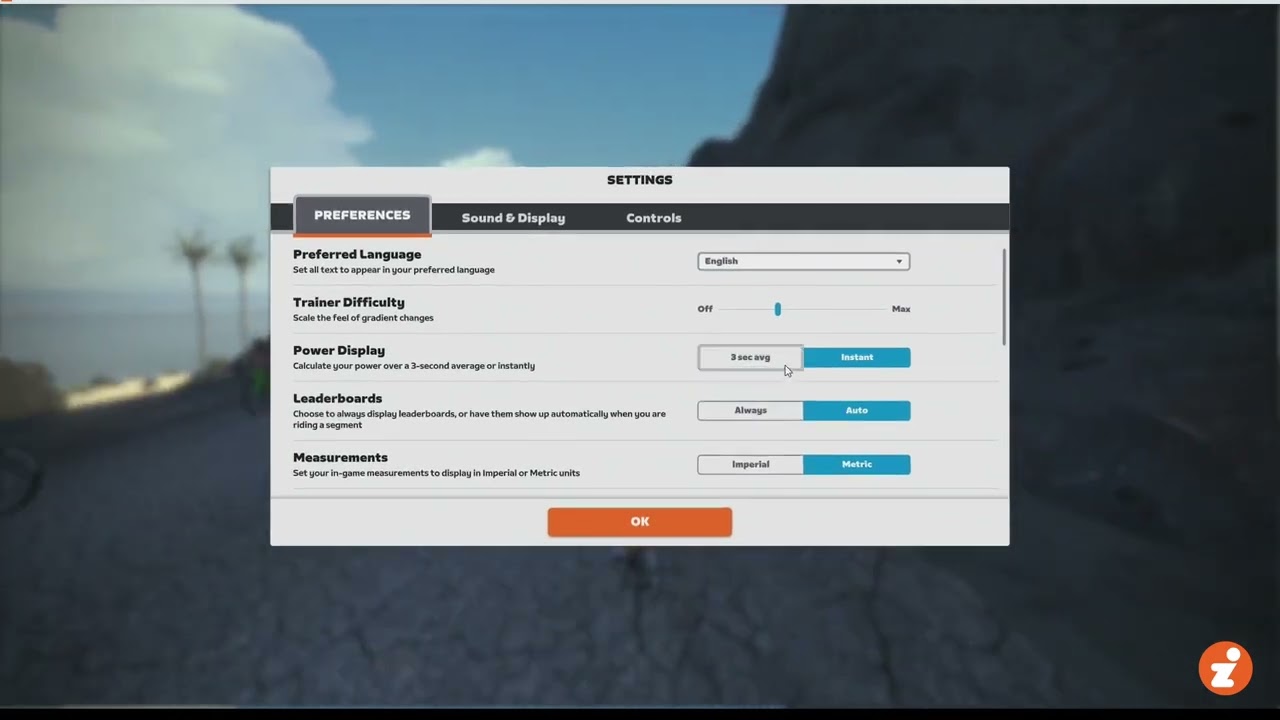
Some riders may not like how often Zwift changes the 10Hz power numbers on screen (I know I don’t). The problem is, there are only two possible fixes:
- Zwift makes race mode optional (like Wahoo did). But Zwift hasn’t done this. If you are on firmware version 5.2+, race mode is enabled and cannot be disabled.
- Zwift changes how 3-second average power is displayed so it only refreshes once per second. Again, this fix hasn’t been implemented, but I think Zwift should do it soon.
Virtual Shifting
The new firmware enables virtual shifting capabilities if you have the Zwift Hub and either Zwift’s Play controllers or the new Zwift Click.
So what exactly is virtual shifting… and do you need it?
With virtual shifting, your chain isn’t moving between different physical cassette cogs when you shift. Instead, a virtual shift changes the resistance of your smart trainer so it feels like you’ve changed cogs. This is how smart bikes like the Wahoo KICKR Bike, Wattbike, StagesBike, and Tacx NEO Bike have always worked.
There are many benefits to virtual shifting, including:
- Fast, smooth, quiet: with no chains skipping between cogs, your shifts are completely silent, perfectly smooth, and lightning-fast.
- Less wear and tear: your chain won’t wear out as quickly, and neither will the Zwift Cog, since it is built beefy because weight is not a concern.
- Shift under full load: no need to ease off the pedal when shifting under power, as your chain isn’t going to “skip” when virtual shifting like it can with mechanical shifting.
- Compatible across many bikes: no more spinning out on your low-geared mountain bike, or needing to swap cassettes if you swap bikes. The Hub One works with virtually any 8-12 speed bike and auto-calibrates to your physical gearing.
- No more fine-tuning: many riders find they have to fine-tune their physical shifting when they move between outdoor riding and a direct-drive trainer, since the cassettes aren’t lined up exactly the same. The Zwift Cog doesn’t require any such fine-tuning… just shift to a physical gear that has your chain lined up straight on the Cog and you’re ready to ride.
- Expanded shifting: at launch the Hub One supports a virtual 24-speed setup, which is more gears than most riders have on their outdoor setups. Additionally, the gear ratio range is very wide (from .75 to 5.49), meaning everyone should find that virtual shifting offers more easy gears and more hard gears than your mechanical gearing.
- In-game gear visualization: with Zwift’s virtual shifting, you can always see what gear you’re in on screen.
Time will tell, but I think virtual shifting is one of those features few Zwifters requested, but many will grow to love.
Two additional notes for firmware version 5.2 are worth mentioning since they relate to virtual shifting:
- Implemented Real Gear Ratio Auto Detection – calculates the physical gear ratio on the bicycle using pedal cadence and flywheel speed. This is what Zwift is doing in lieu of letting Zwifters set up their own customized virtual gearing. Zwift simply detects the physical gear ratio of your current gear, then sets your virtual gears up so you’ve got plenty of high and low gears as long as you remain in the same physical gear you started with. After many hundreds of miles, I’ll say this seems to work remarkably well. I have yet to even hit my hardest or easiest virtual gears, which means I’ve got plenty of room on my virtual gearing.
- Introduction of Zwift Protocol. This is the first time Zwift has publicly mentioned “Zwift Protocol,” but I’m sure it’s something we’ll hear about more in the future. Zwift Protocol is an application protocol Zwift has been developing for quite some time which allows the game to efficiently communicate with hardware. Its first use is in virtual shifting, and it may very well be that if third party trainer manufacturers want to support virtual shifting on Zwift, they’ll need to implement Zwift Protocol capabilities.
Quality of Life Improvements
On top of the new features, this firmware update includes improved Bluetooth connection parameters for a more consistent ride experience. It also implements better recovery processes to help the Hub not be “bricked” if a firmware update fails.
Checking and Updating Your Zwift Hub’s Firmware
To check your Zwift Hub’s firmware version, start the Companion app on your phone, go to More>Zwift Hardware, then click on your Hub. (Note: the Hub only allows one Bluetooth connection at a time, so if you already have Zwift running and are connected to your Hub there, it won’t show up in Companion. Close Zwift, then try connecting in Companion.)
Ready to update your Hub’s firmware? Here’s a quick video showing (among other things) how to upgrade your Hub’s firmware via the Companion app:
Tasty Features, Appealing Price
The simple truth is this: at $599/€599/£549 including 1 year of Zwift, most Zwifters will be hard-pressed to find a smarter buy than the Zwift Hub. While it may not pack the max wattage or 1% accuracy of the best direct-drive trainers, Zwift’s latest Hub upgrades make this already attractive smart trainer even more appealing.
Use discount code ZWIFTHUB for free shipping!
Questions or Comments?
Share below!


Jet black also does 10Hz.
zwift hub is a rebranded jetblack
Hmm… I just bought a Zwift Hub 2 weeks ago. Even though it was on firmware 4.0.1 it was doing that with the wattage. I thought it was weird. So i videoed it and send it to Zwift support. They agreed it wasn’t right so send me a replacement. It arrived. I upgraded it to version 5. Experienced the same thing. Thankfully your post sheds some light!
LOL. Silly Zwift support!
I wonder why a Kickr v5 needs a very expensive Direct Connect dongle to broadcast 10 Hz, while the Zwift Hub just managed to do this by a software update? Is this some new approach, and can Kickr-owners (without dongle) expect such an update too? Or was the Hub already designed to be able to do this one day, while the Kickr v5 simply wasn’t?
It’s a good question.
Im sitting with my kickr gen4 and kinda wondering the same thing. Even if they could they probably wont do it now.
And the EUR to SEK exchange rate is not backwards compatible with my bank account, to get a Zwift hub.
Can a superlong network cable to a Apple tv get the same snappy race feel, instead of little more shaky WiFi connection?
Is there a link to the release notes text somewhere? You just say “zwift protocol” without any context. The first thing that came to mind was the protocol that zwift talks to the zwift server with. But I’m guessing it’s a protocol implemented over Bluetooth, ant, or whatever zwift is talking to the trainer over? I’d like to see the full context.
“most Zwifters will be hard-pressed to find a smarter buy than the Zwift Hub”
Indeed! Just pulled the trigger to upgrade from my Snap.
I am still running a Snap and wondering how you feel about the Hub after 2.months? I’m pondering a Hub or Kickr v6, but the v6 doesn’t hsbe virtual shifting (yet) and the Play controllers make the game so much smoother than having to.wack a keyboard or touch a screen.
Good question ! Overall it’s a keeper but don’t expect to get an improved roadfeel, if anything it’s not as good as it feels “choppier” in a way: I haven’t used a Kickr so I don’t know if it would be better there but there was an old review of the Snap by GPLama or DCR and they said something along the lines of its roadfeel not feeling very different than the Kickr’s: Still it’s assumed by everyone that Direct Drive is going to be better for that:
Having said that it’s convenient to :
Thank you for your reply (sorry, I missed the email notification, hence the belated ‘thanks’)!
Interesting comments. I don’t think the ‘road feel’ on the Snap is much difference to the be on the road seeing as you are pedaling a real wheel! I get why having a big flywheel might be a better thing.
That said, the features that would draw me to a Hub seem to be working well for you; I do find in races try to snatch a different gear difficult especially in a sprint. I have heard about the ‘Cog’ being noisy due to resonance within the part, but as you say it is easily solved.
Thanks again!
Yes, it’s just that most people assume that the “road feel” of a “Direct Drive” is going to be better than a “Snap On”, while that may be true of cheaper systems like the Flux or the Vortex I didn’t find it to be the case with the Snap:
Let us know how you like the Hub if you get one, there seems to be a 10% these days 😉
With V1.50 and my TACX Neo Bike I do also have the „nervous wattage numbers“.
I like the 10Hz idea. Seems Zwift are developing some nice features for once. I’m still waiting for Steering on my Zwift approved Wattbike Atom V2 to be released. 3 years and counting and it’s in development so must be a challenge. I wonder if virtual gear changing would improve the ERG mode or slower response time that Wattbike owners endure? I wonder if anyone has Zwift steering and a Wattbike to test?
Campagnolo compatibility at last!
Will virtual shifting work on non-zwift trainers? I have an elite sumo. If so 😀 nvrst you n zwift controllers will this work?
No
Thanks Paul.
Eric, what is the Hz from tacx neo 2T for transmitting the power?
4Hz I believe. I think the Neo bike supports this now, too.
I have been riding last few days with virtual shifting using the Play controllers. It’s been great and can’t imagine ever going back. Very responsive. Easy to steer and align for better drafting positions. Allows for easy access to controls and menus.
it’s not nice to see the power going off everywhere LOL.
at 90 rpm they make 1.5 pedal strokes per second, what do you need to have power every 0.1 second? to be cool?
those numbers would be more distracting than the “race advantage” would be…
With regards to “Implemented Real Gear Ratio Auto Detection” and “Zwift simply detects the physical gear ratio of your current gear, then sets your virtual gears up so you’ve got plenty of high and low gears as long as you remain in the same physical gear you started with.”
… Does the “Gear Ratio Auto Detection” readjust if I change physical gears during a race or will the whole ratio curve move up or down?
It does not readjust, so if you change physical gears mid-ride it’ll move the whole ratio curve up or down.
To readjust, I think you would need to power cycle the Hub.
Does this gear auto detection work for other wahoo trainers? I can’t do any of the training modes because they force such a high cadence that I spin out
Does this gear auto detection work for other wahoo trainers? I can’t do any of the training modes because they force such a high cadence that I spin out.
Any of you worried with virtual shifting you’ll wear out 1 cog on your cassette?
You only use the one cog fitted on the Zwift hub, no cassette.
Article mentions it’s built beefier because weight doesn’t matter so I don’t see it being a problem but probably not that expensive to replace anyway?
What is the update frequency of tacx Neo? It says above that it’s not 1hz
4Hz, I think. If I recall, you need to enable the option in the Tacx app…
As others have noted, while the 10Hz responds more quickly when you speed up, it also responds rapidly if you stop pedaling. I liked the flywheel effect and longer “roll out” of the Hub but now I zero out to a stop quite suddenly. Wish I could turn off 10Hz.
This one may be a mistake on my part. I think the rapid slowdown resulted when I was using a Stages crank arm based power meter which would react immediately when pedaling stopped. Today linked to the Hub power meter, the slowdown was more gradual and manageable. My bad.
Hi Eric, you mention that the gear ratio auto detection uses cadence and flywheel speed.
I’m having issues with the resistance alternating between very hard (too hard to pedal) and very easy (not able to produce more than 50watts) as the algorithm hunts for the ratio.
When I think it has one, if I shift up a gear it gets incredibly difficulty to pedal, and if I shift down, I can’t produce watts.
This is especially a problem when loading Zwift straight into the Pen, I’ve been left behind on the start line and had to turn off virtual shifting so I could catch up.
Is it possible that it is also using in-game speed so calibration needs to be done while virtually moving?
Thanks
I don’t know if the switch to Bluetooth at 10Hz is to blame but my Zwift application keeps freezing. I use a new windows 11 PC and I have the latest firmware for my Zwift hub and play controllers.
My Elite Suito T packed up so I got the One. All I can say is that it is brilliant. Worth noting the resistance abour gear 19 is brutal. So while there are 24 gears you are not going any higher than 20. And 20 needs to be the radio tower descent on a Velodrome race. Did ask Zwift to make a Velodrome feature with races, Keirien, scratch and elimination
Can we get Zwift Hub One in Canada?
Doubt it. And zwift not selling hardware to canada is screwing Canada over on non-zwift hardware too. The price for the kickr core on the canadian wahoo site is CA$1289. The price of the kickr core in the US is US$599, which is about CA$830. 50% more and about CA$450 more because zwift won’t sell to canada.
Hello folks. Can anyone with a Garmin Tacx Neo Bike Plus confirm whether or not Zwift Race Mode at the full 10 Hz over bluetooth is working on the Neo Bike Plus as of 11/03/23?
I understand that bluetooth is capable of transmitting data at well above 10 Hz. I am curious if the Neo Bike Plus is broadcasting the power data Zwift needs for Race Mode at the full 10 Hz. Maybe there is a bottleneck somewhere in the hardware or firmware that would prevent the Neo Bike Plus from being able to support Zwift Race Mode at the current time pending an update from Garmin or this may not be possible due to hardware limitation.
Thanks in advance.
Ask Garmin about their plans. I think the only trainers that support 10Hz data transmission are the Kickr v5/v6, Kickr Bike with latest beta firmware, and the Zwift Hub.
Thank you Paul. I did ask Garmin Support and I did not get a useful responce, only a quote from Zwift on how race mode works 🙄. I figured if I wanted a straight answer I’d be better off asking the community where there are lots of smart folks with hours of hands-on experience.
I have been unable to find a difinitive answer on the topic of Tacx Neo Bike Plus capability of Zwift Race Mode. I first went to Ray’s & Shane’s posts and did not find a answer on this. Perhaps those two rockstars are not getting a straight answer from Garmin eirher and they have not had enough time to test this out yet. Although I think I would like the Tacx Neo Bike Plus more than the Kickr Bike, I may go with the kickr bike if I don’t find an answer in the next couple of weeks. Thank you again Paul for your time.
Most of the time the race mode on my Hub works fine, but every now and then it seems unreliable. Sometimes during a ride it will start fine then it will become laggy over time, even more so than the standard non-race mode. Also the opposite; earlier in the week I did a zwift race. At the start it was taking a good 3 or 4 seconds to update the watts shown on screen to my power changes. after about 40 minutes into race all of a sudden 10hz was engaged.