

Zwift connects to your sensors (smart trainer, power meter, heart rate monitor, cadence, speed) wirelessly using Bluetooth or ANT+. Usually this works well, but you may encounter a connection problem where Zwift stops receiving data from your sensor. What causes Bluetooth dropouts, and how can you avoid them?
Bluetooth or ANT+?
First, let’s make sure you’re using Bluetooth. You can tell what type of connection you’re on by the icon in the device list on your pairing screen:
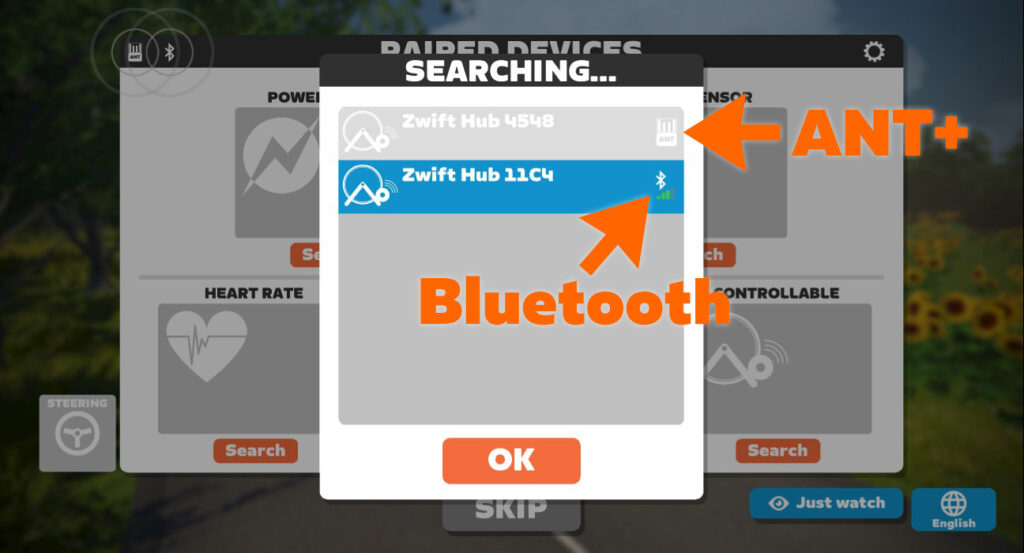
If you’re on a phone, tablet, or AppleTV, you’ll use Bluetooth for all connections (with some rare exceptions). On a Mac or PC? You can use both Bluetooth and ANT+ at the same time if you’d like.
If you have problems with your ANT+ connection, see How to Fix ANT+ Dropouts and Other Connection Problems in Zwift.
Already Paired To Another Device/App (the #1 Culprit)
Bluetooth, unlike ANT+, is a one-to-one connection. When you connect a Bluetooth device like your smart trainer to another device like your iPad, a connection “pairing” is negotiated back and forth between the two devices.
Once your trainer or other device is paired/connected to Zwift or some other app, it no longer broadcasts that it is available for connections. At that point, your trainer or other device won’t be available to connect to anything else until it is disconnected from whatever it is connected to.
It’s like being in an exclusive dating relationship. You can’t date someone else until you break up. (ANT+, on the other hand, is much more… promiscuous.)
Most Zwift-related hardware (trainers, heart rate monitors, etc) allows only one Bluetooth connection at a time, just like earbuds or those fancy little Bluetooth speakers that fit into your water bottle cage. (A few Zwifty devices allow multiple Bluetooth connections, including the Wahoo KICKR, KICKR Core, and their TICKR heartrate monitors. But those are currently the exception to the rule.)
So if you’re unable to connect to your Bluetooth device from the Zwift pairing screen, the first thing to do is to make sure your Bluetooth device isn’t connected to anything else.
Make sure it isn’t connected to another phone, tablet, or computer. Also, make sure it isn’t connected to an app other than Zwift on the device you’re currently using for Zwift! Because you could (for example) open TrainerRoad on your iPad, connect to your trainer, then be unable to connect to the trainer to Zwift on the same iPad.
Straightforward steps to troubleshoot “diverted pairing”:
- Turn Bluetooth off on all nearby devices that has ever been paired to your trainer (phones, tablets, computers, AppleTVs…)
- Close all apps on your Zwifting device other than Zwift, to make sure it’s not paired to another app
- Pull up the pairing screen in Zwift and connect your Bluetooth device
Zwift Companion App Not “Seeing” Your Game Session
If you run Zwift on a device that doesn’t support Bluetooth (like many Windows PCs) or perhaps supports only a limited number of Bluetooth connections (AppleTV), you may choose to use Zwift’s Companion app on your mobile device as a Bluetooth “bridge”. When this connection method is working properly, all of your Bluetooth devices are connected to the Companion app on your mobile device, then the Zwift game running on a separate device “sees” those connections.
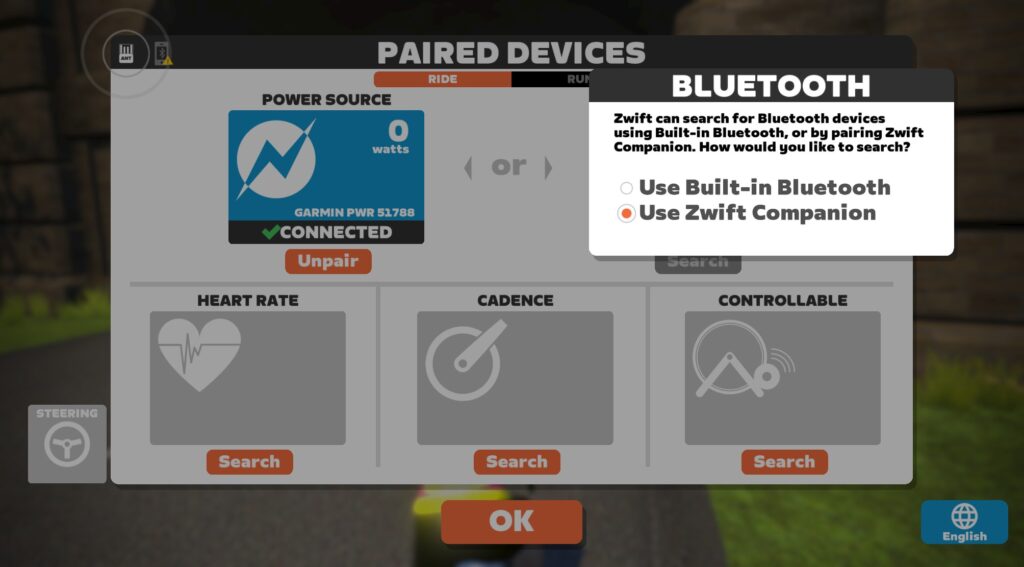
For this to work, though, the Companion app must be connected to the same local network as your Zwift device, allowing Companion to “see” your Zwift game activity. This will put the Companion app in “game mode”, where it shows a live map of your location in the game.
If your Companion app isn’t swapping over to game mode once you’ve got Zwift running, check out this comprehensive post from Zwift to troubleshoot why Companion isn’t seeing your Zwift session.
Physical Distance or Barriers
This isn’t a common problem for Bluetooth, since Zwifters generally have their hardware and the device running Zwift in close proximity. But it’s worth mentioning that Bluetooth, like any other wireless protocol, is weakened by distance and physical barriers.
The closer you can get your hardware (trainer, heart rate monitor, etc) to your Zwift device (PC, iPad, AppleTV, etc) the better. And if you can remove any physical barriers between the two, that’s a good thing too!
The pairing screen includes a signal strength meter for Bluetooth connections for this very reason. If it’s not showing full bars, try moving things around to improve signal strength.
Dying Battery
This is a recurring problem with devices like heart rate monitors, speed sensors, cadence sensors, and power meters. Many of these devices don’t include any sort of low-battery indicator, so you don’t know the battery is low until they simply stop working!
If you experience Bluetooth connection problems with a battery-powered device and haven’t put fresh batteries in recently, try swapping in fresh batteries for a quick fix.
Windows Bluetooth Issues
While mobile devices, AppleTV, and MacOS do a great job with Bluetooth, Windows is less consistent. The good news is, if you’re running Zwift on a PC and your PC shipped with Bluetooth capabilities, you’re probably not going to have any issues.
But if your PC didn’t ship with Bluetooth, and you want to add Bluetooth capabilities, you’ll need to buy a Bluetooth dongle or expansion card. This is where we’ve seen Bluetooth performance stumble on Windows, as these add-on devices don’t always perform consistently, sometimes requiring driver re-installation.
Troubleshooting these devices is outside the scope of this post, but one recommendation we will make is to buy devices from well-known brands so you can access reliable support/documentation if needed.
Wireless Signal Interference
Still having Bluetooth connection problems that aren’t caused by the abovementioned issues? Your problem may fall under the general heading of “signal interference”. It may be that other nearby devices are transmitting wireless signals or generating electromagnetic fields which interfere with your Bluetooth signals.
Examples include:
- Other active Bluetooth devices (headphones, speakers, hearing aids, etc)
- WiFi routers on the 2.4GHz spectrum (these interfere with ANT+ more than Bluetooth, but can still cause problems for Bluetooth)
- Fans
- Other USB Bluetooth dongles (for wireless keyboard, mouse, etc)
- Microwave ovens
- Direct Satellite Services
- Power sources
- Cordless telephones
- Wireless video transmitters (e.g. Chromecast, AirPlay, etc.)
- Wireless speakers
- Certain external monitors and LCD displays
- Any devices that use a cable to connect to a computer or power source
- Anything else that transmits a wireless signal
More Resources
- On Mac or PC and want a detailed look at your Bluetooth connection quality? Check out Zwiftalizer.
- Read Zwift’s official support page on ANT+ and Bluetooth connection problems
- Contact Zwift support
Questions or Comments?
Post below!



None of these tips are needed, as the correct protocol for when your devices aren’t pairing is to immediately jump on the forums and blame Zwift. Lol
Well, crap. I’ve been blaming my computer. Wish I’d have thought to blame Zwift first 🙂
When all others apps work fine, and only Zwift doesn’t, its fair to say blaming Zwift is sometimes justified…
Useful article, thanks. Just as an aside I recently started experiencing micro ANT+ dropouts after years of trouble free Zwifting. Finally figured out it was after I stuck an Echo Dot out in the pain cave, removed Alexa and suddenly back to normal again 🤷♂️
This article fails to address the connection issues related to the Companion App. I have never figured out the cluprit, but I have suffered days of outage due to Apple TV failing to connect to the Companion App. I’ve spent hours trying to problem-solve. Currently, I close the app, re-strat my iphone in airplane mode, open app, and connect, but that’s not foolproof. I’ve been unable to get anyone to help me who has diagnosed the problem. I’ve been a member for 6 yeas+, but a consistent rider for the past year, and I have never had this level of connection problems.
It sounds to me like your phone is intermittently connecting to a different network (or using mobile data). You want to make sure it is connected using the same WiFi network (SSID, gateway, etc.) as the one your Apple TV is on.
I am going through the exact same thing. it may due to an I phone update. Zwift told me that I may have to wait until a update happens for the companion app Been on zwift for 5 plus years never had a problem like this
I’ve always had cell data switched off for Companion app on my iPhone. That way I know it’s always connected to the same WiFi as my Windows PC running Zwift. Works perfectly.
I am having this exact problem too with Android and it not connecting or dropping out. It’s very annoying and only recently happened.
I’m currently having issues with the cadence. I’ll be doing 90+ rpm’s and it will read anywhere from zero to 45. This happens in the higher gears . Zwift replaced the first Hub but the second one is still the same. Thinking this was a trainer issue. Customer service was very good. Just very frustrating. Any thoughts ?
What is your cassette? If you go past 1;1 certain trainers can’t do the maths to figure your cadence. I put an 11-36 on for an Everesting on my kicker 5 and it either went to zero or read half of the actual cadence when I was in 34-36. It’s a known issue for wahoo and tax I think.
It’s probably just your pedal stroke. Most trainers, including the Hub, detect cadence by detecting oscillations in power. (Most riders push hardest on the downstroke.)
If your stroke is super smooth, the trainer won’t be able to find that oscillation. Or you may have one smooth leg and one less smooth, so it only detects the on leg’s oscillation, resulting in a cadence number that is 1/2 of what it should be.
I get this on the Wahoo KICKR a lot, but only when I ride out of the saddle. Which is goofy, since you’d think my power throughout each stroke would oscillate more out of the saddle than seated.
Easy enough to test – when it’s misbehaving, just try pedaling squares, where you only really just push hard on the downstroke. I bet it corrects your cadence quickly if you do that.
Polar H10 and Verity heart rate monitors support Heart Rate Measurement on multiple (two) connections. But multi-connect must be enabled via the Polar Flow App.
https://support.polar.com/ca-en/can-i-use-verity-sense-with-several-devices
https://support.polar.com/ca-en/support/can_i_pair_h10_with_several_devices
N.b. Multi-connect to be disabled when you insert a new battery. You need to re-enable it.
N.b. Polar Measurement Data (ECG and Accelerometer) is also available from the H10 and Verity but on only one connection.
Super helpful! I’ve been having issues when using my H10 with zwift and traineroad. Zwift kept dropping out. Hopefully this will solve it!
I have a tacx neo 2t and an elite Rizer, when I increase power through the pedals the Rizer increases the gradient, when I back off power it goes down. It still works as usual when climbing etc. but I can clearly feel a change in gradient with power. I run this through a iPhone. Is this normal or should I change something
Any comments on two Zwift setups in close proximity?…..my partner and I always Zwift together, Elite Diretto x2, one on Apple TV, one on iPad Wi-Fi, both with companion app, Wahoo cadence sensors, Apple Watch and Wahoo tickr!……we have problems connecting sometimes and have developed strict protocols on order of switching on and connecting things up!, mostly works but we still have dropouts and Apple Watch heart rate issues?
i have a Technogym Skillbike that runs perfectly on AppleTV. All sensors connected. When i try to set up on a PC, i can connect to all sensors but Zwift won’t make any changes to resistance. Tried a setup on a laptop as well with the same problem. Not sure what the issue is. Thinking about trying an Ant+ setup if it will work.
Dear Eric, or anyone else who can help…until very recently I had a foolproof order for turning on my phone, computer, trainer so I could turbo using Zwift Companion. Last month Zwift updated and the start-up screens now different. I’m now not sure how to do it…I’ve had two sessions where everything connected fine…BUT when the gradient changed on my ride, the resistance on the turbo did not. Very irritating as I’m currently trying to unlock the Tron bike and so doing lots of Alpe 🙂
Any help would be very gratefully received.
Sorry if this post appears twice, wasn’t sure how to msg.
Since the update to Zwift a few weeks ago (the one that changed the connection screen and started asking you to confirm that your phone and computer were on the same wireless network)) I have found that when riding, the resistance does not increase when the gradient goes up.
I am using the Companion app and suspect I may need to turn on/connect the laptop, phone and trainer in a certain order. Anyone got an answer please?
Order shouldn’t matter. You just need to pair your trainer as both POWER SOURCE and CONTROLLABLE. If you’re not feeling resistance changes that means it’s just paired as a power source (sending your watts to Zwift) but not as a controllable trainer. See attached…
Thanks Eric,
I’ll look for that next time 🙂
Best wishes Nick
Have been having intermittent connection lost between Zwift and my Wahoo Kickr.
I can be zwifting for 45min without issue, and the next minute it just says connection lost.
Other times I have managed to Zwift for over an hour without issues.
I have already switched off all other wireless devices around my home, and only leaving the device with Zwift on, but this still happens
Ive had issues with the connection with the resistance sensor on my zwift hub classic dropping out every 2 mins amd having to pause and reconnect. Tried all zwifts suggestions ie using companion on seperate device, no kther apps or devices attached to bluetooth, clearing my phones Bluetooth cache still no success but tried my sons phone amd no problems!
its sucks…… I did the Zwift update and since then nothing id pairing…. I am not even getting a Bluetooth signal!!!! I am trying to get support with someone all I can do is send emails!!!! it sucks!
Same problem here… TACX FLUX 2 working ok since 2 months ago… now zwift, most of the times, doesn t show the bluetooth connection on my tablet. Sometimes it does but the connection drops after some 40 to 60 minutes of riding and doesn´t reconnect.
Have to go back to the ANT+ receptor and the laptop…
A very tricky software for the money it costs.. and i booked 1 year subscription…
The connections are unreliable. Period. Everytime , I have to spend 15 mins trying to figure this out. I have had it with zwift now. Enough is enough.
I also have connection issues, I can’t listen to any music off a decent speaker when I’m zwifting because the echo or my paincave ceiling speakers are Bluetooth. I just wish the bike was hard wired into the laptop so that there were non of these connectivity issues. Zwift soundtrack it is then, how does everyone else listen to tunes without bringing out the decks, amp and speakers?
I have swift app on iPhone and iPad, but my controls won’t Bluetooth connect on my iPad. should I take swift off my iPhone?
Just make sure it isn’t running on the phone. Play controllers should connect just fine on the iPad, as long as they aren’t already connected to something else.
My connection between the Smart trainer and the Zwift program drops outs randomly. I know it’s not the wifi connection because the other apps on my apple TV are working fine when the drop outs occur. I had to power down then power back up my Direto XR today to get connection back again, but I lost my Garmin chest monitor in the process. It all feels like yogurt pots on strings sometimes.
Hi, My connection was lost today with 3 km to go on La Reine. I was able to reconnect but was put at the start not at 3 km to go. What now?
Was ridimg stage 4 Tour de Zwift La Reine.
My wife’s KickerSnap would connect to her iPad but then drop. I spent way too much time searching for solutions…. finally had success. Updated her OS to latest version. Sometimes it really is the basic stuff. Meanwhile had trashed her history and it still wants her to renew subscription every time she rides, So… will be haunted the hive mind more it appears.