

Last October, we shared a post introducing Sauce for Zwift (S4Z) to the Zwift community. Since then, creator Justin Mayfield has continued to improve the app, and its popularity has increased greatly among PC and Mac users. (Justin tells me there are approximately 4,000 active S4Z users today, up 571% from a year ago!)
Ever since S4Z arrived on the scene, I’ve heard complaints from Apple TV users along the lines of “If S4Z helps you in races, then it’s unfair because it doesn’t work on Apple TV!” But did you know Apple TV (or for that matter, Android or iOS) users can also use S4Z? You’ll need a PC or Mac to do it, but it doesn’t have to be a high-end machine.
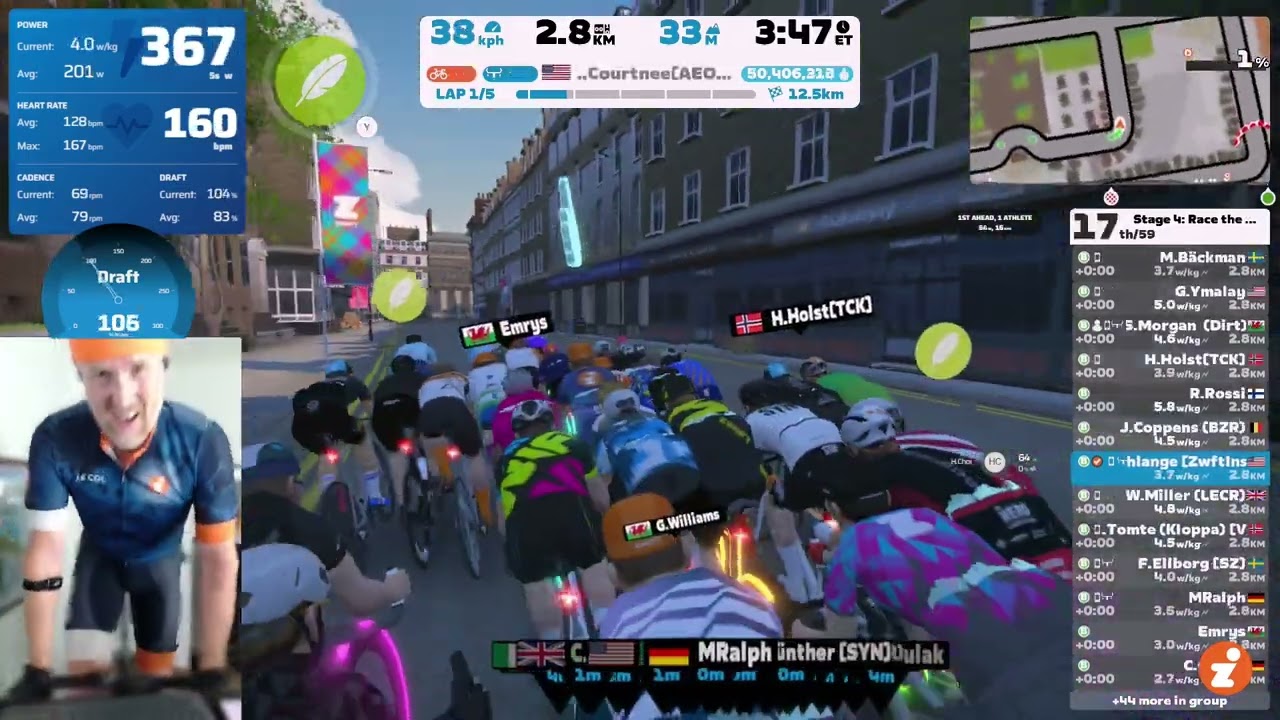
Here’s a recording of me Zwifting on Apple TV while using S4Z in a recent race:
How It Works
The big caveat is that you’ll need a Windows, Mac, or Linux box to use S4Z, even though you’re running Zwift on Apple TV. So this solution isn’t for everyone, but if you have a laptop or desktop available (even if it’s not very powerful), you can install S4Z on it and use it as a “second screen” to enhance your Zwift experience.
Read our intro post to learn how to set up Sauce for Zwift >
How can S4Z display your live Zwift data when it’s not running on Apple TV? When you set up the S4Z app, you enter the credentials for your Zwift account plus a second “monitor” account. These logins are used to query Zwift’s servers, grabbing your data in (near) real time.
So as you ride on Apple TV on one screen, your data is being sent to Zwift’s servers, then S4Z on your computer is grabbing and displaying that same data on the computer’s screen. Fancy, right?
One might think the data would be laggy, but S4Z is using Zwift’s high-performance custom UDP-based protocol, so there’s no discernable lag time.
(It’s worth mentioning that this is how S4Z works for everyone, even those running Zwift on a PC/Mac with S4Z on the same machine. S4Z emulates a Zwift game client and grabs your real-time data from Zwift’s servers to display on screen.)
Streaming AppleSauce
For my video above, I used free OBS software on a PC to combine audio from my microphone with several visuals: the Zwift session from Apple TV, S4Z windows from my PC, and a live camera.
How is that done? That’s outside the scope of this post, but I’ll write about Zwift Streaming with Apple TV soon. Stay tuned!
Questions or Comments?
Ever used S4Z with Apple TV? Or maybe you’re planning to try it now? Share below!


I now use a pc, having been an ATV user for a few years.
I sometimes use duplicate displays with Zwift running on my TV screen and Sauce on my laptop screen.
I find this gives me the best experience
But you have the option to overlay the Sauce windows over Zwift (on ATV) on the TV screen, while Sauce is running on the laptop? If so, how does the setup work?
In the video in this article , there are only two small windows open on the screen. Sauce has much more data available and you can enlarge the windows to see more clearly. Everyone has a different setup. There are no user guides etc for Sauce although there is a discord channel. I would say you need to have a decent level of technical knowledge to get the best out of it
thx for reply Alan … the video shows the Sauce window overlayed to Zwift, which is ideal. there is another post here https://zwiftinsider.com/sauce-for-zwift/ that says “don’t have the option to overlay the data on your Zwift screen”, which I gather what you meant by having Sauce on your laptop screen.
Hey Remy. I use my laptop these days. In Sauce For Zwift, there are 8 different data windows and a number of widgets. It is impossible to show more than a few of them on the Zwift screen and even then, they have to be reduced. You really need decidem from the volumes of data available, which is important to you. The windows include “Nearby Athletes” This is like the Zwift window but includes the riders full details such as name,distance ahead/ behind, current power, average power, watts /average watts, heart rate / average heart rate.. it goes on and on. And there are another 7 windows with similar levels of data. I’ve attached a screenshot of my pc with just a few windows open and they are also reduced to show just a small amount of the information available. If you use a laptop, you can extend the display to show Zwift on a TV and Sauce on the laptop. Even with this, you have to be selective in the data that you will be able to see on the laptop. On Apple TV, It will be similar. I like Sauce for Zwift but I only really use it in races or possibly in a workout. I don’t really see the benefit in a group ride. I would recommend trying it and seeing what works for you.
Sauce Screenshot
Thanks for sharing this Eric. While this is certainly a manageable workaround for some, my personal preference would be that many of the metrics available in Sauce be added to the Zwift platform thus eliminating the need for a separate platform to access the additional data. The recent changes to the group dynamics for example would really benefit from having a visual meter to see your real time performance in the draft. I guess what I’m saying, is workarounds are nice. But, I don’t consider them to be long term solutions and before I would consider investing in a more convoluted setup, personally I would hope these would be recognized as important enough by the Zwift team to add them as updates or enhancements to the existing platform.
As a non tech person, what difference does this make when racing??
Reading the main S4Z post may clarify it for you: https://zwiftinsider.com/s4z-apple-tv/
Basically it just gives you lots of useful info – about yourself and/or the competition.
It’s a data scraper that processes it locally and then generates an overlay.
I think the statement ‘grabbing your data in (near) real time.’ has the wrong caveat — it grabs a lot of data from a lot of people.
So far as I can tell it’s also completely against the Zwift ToS.
Ever here of the Cambridge Analytica scandal? They were doing with social media data what this does on every computer that runs it with Zwift data.
It would be essentially trivial to also store the data it scrapes for a lot of users on anyone who wanted to’s hard drives for present or future use and S4Z probably makes that easier in a couple of ways including by setting a widespread usage precedent and probably by tapping into the S4Z process directly.
Very nice. Now about that panel in the lower left…..
I get paid extra as an indoor cycling model.
😂😂
I used ATV for my first five years of Zwifting. Sauce looked tempting but I put off until I inherited an M1 iMac and an ATV update flat wouldn’t work with Wahoo’s WiFi connection and Zwift Play.
Now I have Zwift on a TV front and center with the iMac as a Sauce display to the right. No, it doesn’t have Ultra graphics, but I was never an online gamer, so I really don’t care much.
It’s really very nice.
So I bit the bullet and tried this during the Mad Monday race yesterday. I ran Zwift as usual on the Apple TV. Sauce was running on my desktop but that’s in another room so I screen shared onto an iPad – apart from the screen saving running a few times it was pretty good. Will continue to work on the setup but think the second screen running remotely is a goer.
Hi…
I’m still a little confused over the set up when running Zwift on the ATV and running Sauce on a pre-2020 Macbook Pro. While I am able to mirror the Macbook’s screen to ATV, Zwift (running on the ATV) gets overlaid. I was wondering if you could provide instructions on how to run Zwift on ATV while having the Sauce screen (running on my Mac) appear on top. Thanks a bunch in advance!
I don’t think that’s possible, Johnnie. You would have to just have S4Z stuff on that Macbook screen, and you can look at that screen to see the data.
My video above uses OBS to overlay various elements into one video stream. But it’s not what I see on my ATV.
Thanks Eric for the info!
Interested in your streaming applesauce article when it comes out
Hi
Thanks for sharing 🙂
So it’s NOT working as a “HUD” (overlaying the zwift screen) on Apple TV screen?
I thought this was a fix for us ATV users to get the info up as a layer on our main screen, as I understand S4Z works on a PC/MAC
And if you need a separate PC/MAC – would it not be easier to only use the PC/MAC with the tv as an external screen? instead of running both ATV and the PC/MAC?
Correct, it doesn’t overlay on your Zwift HUD on your TV.
It may be easier to use the PC/Mac… but it also may not. Some PC/Mac computers don’t run Zwift well, or people prefer ATV for its reliability/simplicity. The point of this post was simply to inform ATV users that there IS a way to access S4Z’s features… even if it’s a bit convoluted.
Agree with Soren above; the article gave the impression (certainly to me, anyway) that ATV users could take advantage of Sauce as a HUD. I’ve spent weeks trying to tweak and understand why I couldn’t see the overlays on my ATV; having it setup on a second device next to ATV doesn’t really scratch the itch – might as well use a single PC/Mac for both.
Agree with others hence my purchase last night 🙁 I thought it would transfer over to ATV – not to have another device separate.
Now understand why no web article or YouTube have a solution.
Wil cancel subscription.
I would really like to give Sauce 4 Zwift a try, but I’m not clear on opening a Zwift Free/Trial account, in effect, the trial account only lasts 14 days. So what happens after the 14 days? I haven’t tried opening the account yet as I’ve heard Zwift wants a credit card for the trial account. So, can anyone be super specific on how to open the trial account and what happens after the 14 days?
Sure. The trial account still works (in terms of what S4Z needs) after 14 days, because it’s just used to query Zwift’s system and get data – it’s not used to ride. You just need a second account because of how Zwift works with allowing multiple logins from one account…
Thanks Eric!
Unpopular opinion here: I think Zwift should ban Sauce from all races and/or provide the information from their HUD ingame. Seeing how close your competitor in a race is to blowing up (0 W’bal) is like having a wall hack in an egoshooter game. Most riders also never agreed to having their data displayed by Sauce for Zwift so there is a legal issue as well. If Sauce is tolerated by Zwift, it essentially means that Zwift subscriptions have become a bit more expensive since you need to pay for Sauce, too. Oh, and no, I don’t think Sauce is comparable to paying for other services (trainerroad, hexis, etc.) that improve your racing by training.
In other computer games it’s called ‘ghosting’ and it’s generally frowned upon.
On the legal side, all anyone (say an insurance provider, or a consultancy in a favourable jurisdiction that provides confidential advice to insurance companies) has to do is monitor the data that Sauce is scraping (e.g. via a side-channel) and they will have records on . Sauce is ‘legitimate’ traffic so this is the safest course to go undetected, but it would also be easy enough to use, for example, a bot like ZI uses to test routes to just patrol Zwift roads 24/7 and get data on all users. There are other ways too. Sauce makes them all easier and more legitimate.
So they could get ideas about how stressed anyone’s cardio/weight/strength etc etc is at any time or their weight or how things have changed over time. They could look for alarming patterns in HR changes.
This can be tied to Strava searches to find individual names easily enough. Plus if Zwift ever has a data leak showing usernames to actual names (or, say, credit card information as is more common) then any historical DB kept could be populated with that at will. So insurance companies or whoever would have a ‘score’ tied to your name you don’t know about in case they ever wanted to deny you coverage in the first place or raise your rates. If they are prepared to open the secret they could also retrospectively use it to contest/avoid paying out.
Nothing technically preventing any of that and it’s potentially a lot of money. So rest assured, it’s being done by someone.
Hello Eric, could you please elaborate on how you manage to OBS the apple tv?
I would like to stream my races but my computer is not powerful enough to run zwift. I want to keep using Apple tv, to run OBS on the computer and find a way to stream the apple tv… Any idea on this?
I run my Apple TV signal through an Elgato capture card, which runs to my PC that is running OBS.
I have an Elgato HD60 S+, but the newer HD60 X is much cheaper and even more capable: https://amzn.to/3vdBzrw
(My webcam and mic are also wired directly to the PC, BTW…)
Top, understood! Thank you
Does theh sauce actually overlay on the ATV screen or is it only overlayed when you ‘record’ as a video?
The latter.
I think it would be great if Sauce worked on my iPad or phone, so I could use it as a second screen to display Sauce data.