

Update: this hack is no longer needed, as Zwift has added “Hide the Display” mode in April 2021. Read all about how it works >
To run Zwift with minimal on-screen “heads up display” elements, add this line to the <config> section of your Zwift preferences file located at Documents/Zwift/prefs.xml:
<MINIMAL_UI>1</MINIMAL_UI>
This turns off the rider list, leaderboards, speed/rider timer, and more. Here’s a screenshot of the result:
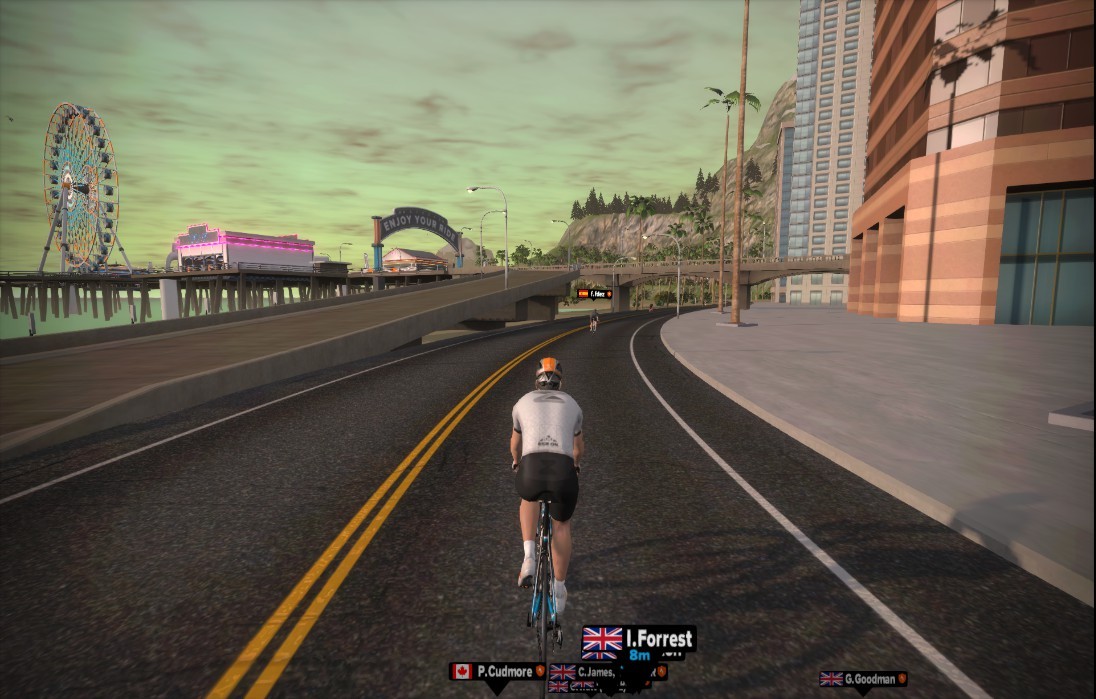
Here is my prefs.xml file with the line added. If you’ve never edited an XML file before, it is as easy as opening the file in a text editor (Notepad works great on a PC), editing the file and saving your changes. Saving a backup copy of the original file is always a good idea!
<ZWIFT>
 <DEVICES>
     <LASTCADENCEDEVICE>720996</LASTCADENCEDEVICE>
     <LASTPOWERDEVICE>720996</LASTPOWERDEVICE>
     <CTF>12543</CTF>
     <LASTHRMDEVICE>7891038</LASTHRMDEVICE>
     <LASTSPEEDDEVICE>9716</LASTSPEEDDEVICE>
     <LASTTRAINERDEVICE>2837993477</LASTTRAINERDEVICE>
 </DEVICES>
 <CONFIG>
     <MINIMAL_UI>1</MINIMAL_UI>
     <RICHMOND_BRANCH_PREFERENCE>0</RICHMOND_BRANCH_PREFERENCE>
     <BRANCH_PREFERENCE>3</BRANCH_PREFERENCE>
     <BATTPREFS>20</BATTPREFS>
     <PREFERRED_MONITOR>2147516416</PREFERRED_MONITOR>
     <TRAINER_EFFECT>0.5</TRAINER_EFFECT>
     <IMGPREFS>0</IMGPREFS>
     <USER_RESOLUTION_PREF>1920x1080</USER_RESOLUTION_PREF>
     <AMBIENT_VOL>0</AMBIENT_VOL>
     <SFX_VOL>0</SFX_VOL>
 </CONFIG>
 <WORKOUTS>
     <LAST_WORKOUT>4035902721</LAST_WORKOUT>
     <EDIT_IN_WATTS>1</EDIT_IN_WATTS>
     <USE_ERG>1</USE_ERG>
 </WORKOUTS>
</ZWIFT>

Can this be done so that it only turns off portions (leaderboards/nearby riders) rather than the whole HUD?
Unfortunately no. It’s all or nothing!
I tried this today for the Haute Route ven-top ride and while I certainly enjoyed riding without all the screen clutter, I am pretty certain it is not possible to get powerups with this hack enabled?
No powerups, and no spinner at the top of the alpe either! I almost always use the minimal UI now since I mostly do solo free-rides but missing out on bonus xp is kind of annoying. Also no good if one is doing laps for XP on the TT bike, there goes a good chunk of XP too!
Where is this file located on an Android phone? I’m not finding it.
It is on a PC. Are you running Zwift on a phone ?????
If seriously, on Android you can just swipe many of the elements of the user interface off the screen. This may require a little experimenting where to touch the screen to move UI elements off the screen, but it works for me with the running version of Zwift.
You can only move 2 of the elements the rest stay
Hi there,
With a Workout running in parallel, will the workout still trigger ERG mode and can i use the companion app to check the Watts while riding? Or will this setup also kill the companion app control for workouts?
That can also be done by switching off the HUD by key „H“.
I saw some modified HUDs recently with only one line at the top of the screen. How can this be activated?