

Zwift version 1.118 begins its phased rollout today. This minor update contains mostly minor UI tweaks and bug fixes. Read on for details!
Bike Color Changes
Zwift says, “When equipping a bike in the garage the last selected paint color for that frame will be restored. Clicking the paint icon to hide the color slider will also reset the equipped bike’s color to stock paint.”
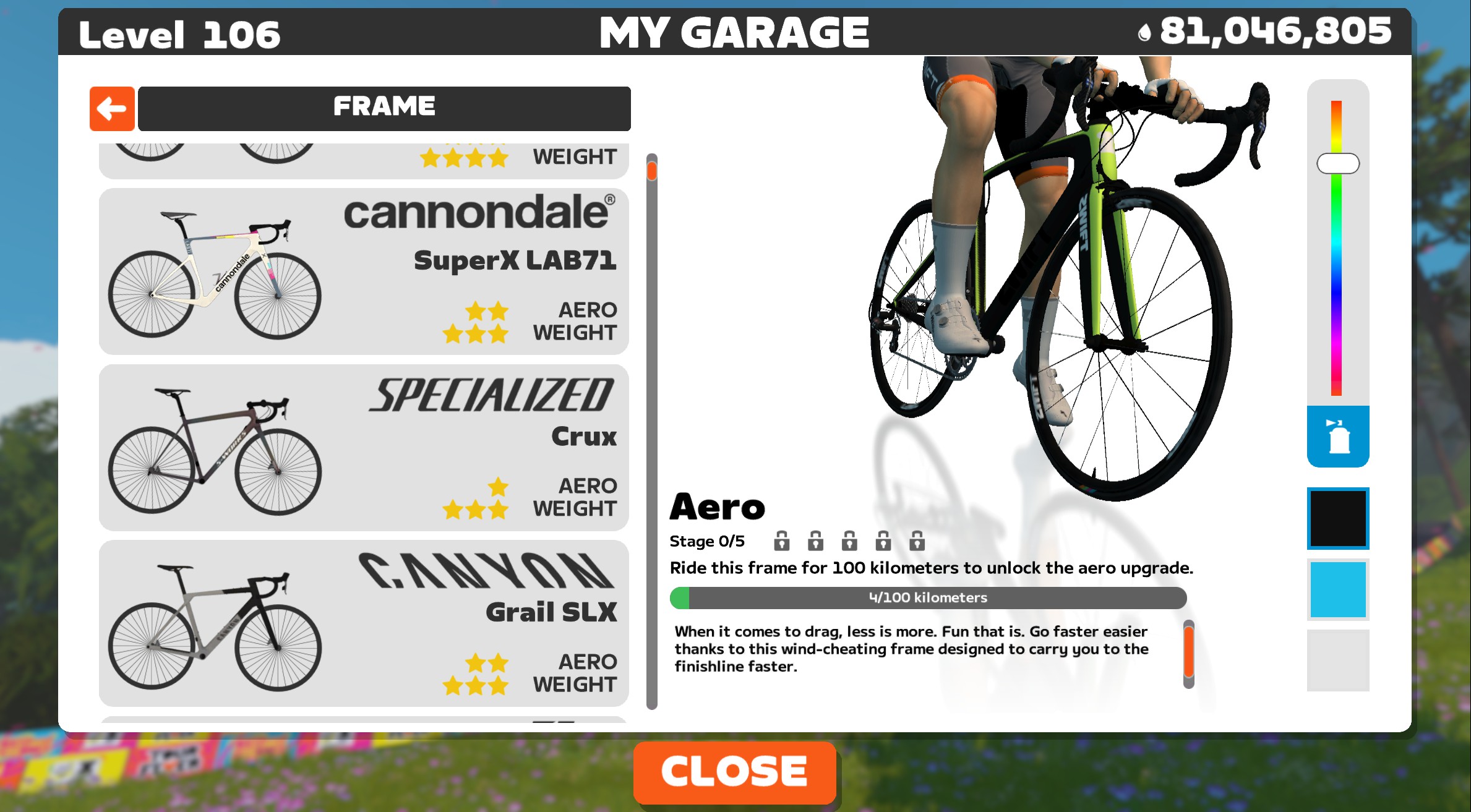
The color slider does indeed work as explained, saving your last-selected color for each frame with a slider. Clicking the paint icon has always restored the bike’s stock paint, so that’s not a new feature.
There is still an issue that needs to be resolved, however. If you have multiple colorways for a frame (like the Zwift Aero above, with the black, blue, and grey boxes shown below the slider), the game doesn’t save your last-used colorway. That means each time you return to the frame, you’ll have to pick the desired colorway.
Release Notes
Zwift supplied these additional release notes:
- Android/iPhone/iPad (touch devices) – Fixed end of ride screenshot selection toggling on drag instead of tap.
- Secure BLE connection improvements on Windows.
- Fixed reconnection bug with trainers’ relayed sensors.
- Fixed an issue where some riders would be facing in reverse in event paddock
Discuss this update in Zwift’s forum >
Questions or Comments?
If you spotted any other changes or bugs in the update, please comment below!


How about hiding or getting ride of bikes we’ll never use again!!!! (I know, this is a long time request/complaint.)
It would be nice if Zwift can come up with an auction house or a used bike frames/wheelsets shop where we can maybe auction of frames or wheelsets that we no longer need and someone that needs it can bid on it. It is just an idea, maybe this will help people get rid of unwanted frames and wheelsets and an opportunity for someone else to obtain frames & wheelsets.
Drops will be the currency.
I wish they’d change garage just so I didn’t have to read this comment every time an update happens. No offense to you personally. It’s just at this point they HAVE to know we all want it so we can stop screaming into a black hole about it…maybe?
I saw a rider on level 200 yesterday. Has any reward been given?
Would be nice to see if drops could be multiplied after certain level say after each 50 level, drops could be 1.25x more, since newer frames and wheels are getting more expensive and upgrading frames would cost even more now especially those Halo bikes. Though I do appreciate Zwift gifted us 50,000 drops every time we level up.
Is that a change on bikes that have color change enabled or does this apply to all bikes?
It only applies to bikes with a slider.
Ah bummer, was hoping to get the Aethos in something other than rusty brown (and in fact the ability to make all bikes match my outfit :p )
Any News about Test of Gravel Montain?
Nothing yet. Seems like it keeps getting pushed off.
How about asking Zwift Labs to to put it ask a club ride. The steering thing is done
I saw the reverse facing rider in the Tour Events today. I liked it; made me pay attention to figure out how they did it! 😉
I saw one too – and then I realized it was me when the event started
Any news about updating rider CdA calculations after the Wind Tunnel testing?
Nope. I think Zwift discovered they didn’t gather adequate Win Tunnel data on various rider types and postures… my guess is we won’t see any changes here soon. Or if we do, it won’t be based on the Win Tunnel data Zwift gathered in that one outing to Morgan Hill…
Even things like bike color, Zwift cannot get right: I can’t get red wheels for my Tron bike, only orange or pink ones. I guess there is some edge case with the color encoding they are using, which prevents selecting the #FF0000 color.
Color saving works correctly – thanks for adding this!
Would it also be possible to have the selected wheelset saved for each bike? I have a climbing bike that I use with one wheelset and a multi-purpose bike with another. Whenever I switch between the two bikes, I have to remember to change the wheelset manually.
Is this something that’s planned?
Thanks!