

Many Zwifters are already familiar with the Zwift Insider Route Hunter leaderboards hosted by Veloviewer. But this week, we took a new leaderboard live, featuring Zwift’s Climb Portal!
See the new Zwift Insider Climb Portal leaderboards >
How It Works
We’ve broken the list of Climb Portal climbs into two separate leaderboards: one for shorter climbs, the other for longer climbs. There are currently 18 climbs in each leaderboard, but this number will grow as Zwift expands their Climb Portal library.
Leaderboard rankings are points-based. You receive points for:
- Completing a particular climb (20 points each), and
- How quickly you completed the climb
Because of how Zwift’s Climb Portal works, Ben over at VeloViewer had to code up some fresh functionality that grabs your best effort for each climb, whether completed via the Watopia Climb Portal or the France Climb Portal. It works like a charm. Nice job, Ben!
Getting Yourself On the Leaderboard
Getting your data into the leaderboards is easy! Start by visiting the Zwift Insider Climb Portal leaderboards on VeloViewer.
- Click “Connect with Strava”. (If you’re already signed into your Strava account in your browser, skip to step 3.)
- Log into your Strava account. You will be redirected back to the leaderboard..
- Click “View” beneath one of the leaderboard titles.
- If you are not yet a member of the Zwift club on Strava, click to join the club then return to the leaderboard page and click “Recheck Club Membership”. (If you are already a member of the Zwift club on Strava, skip to step 5.)
- Click “Update Your Times” to import your Strava rides into whatever leaderboard you are currently viewing. You may only click this link once every 30 minutes per leaderboard.
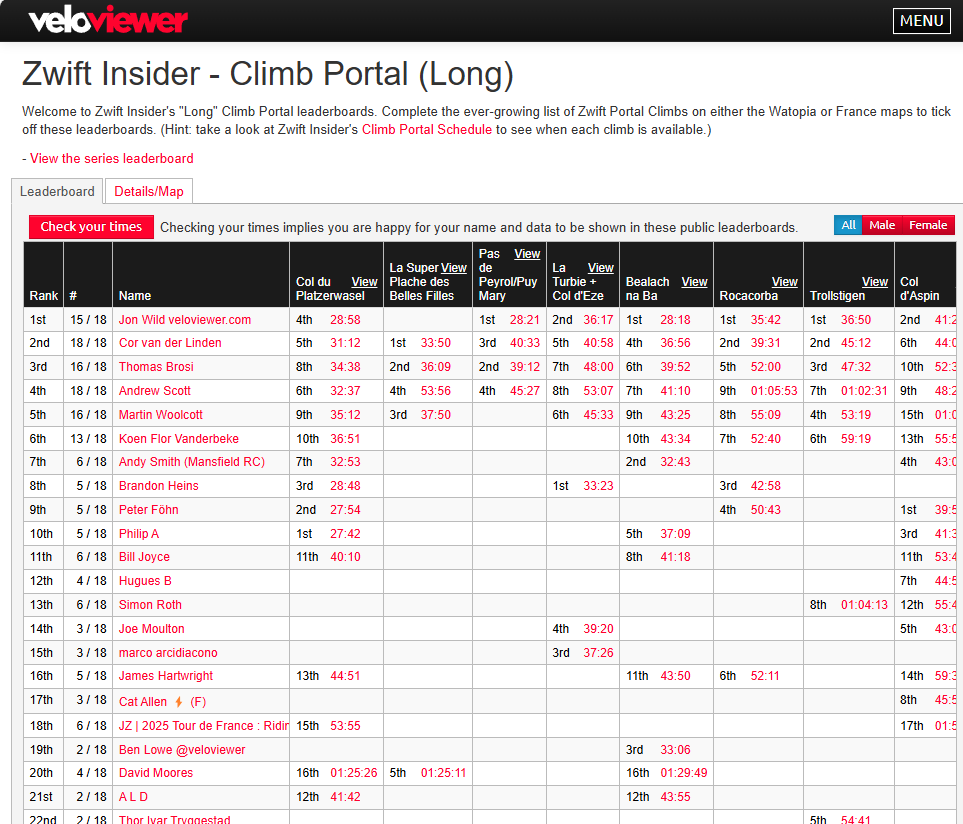

The leaderboards, before and after checking my own times. I’ve got work to do!
Using the Leaderboards
Here are a few tips for using the leaderboards:
- While they will work just fine on a smartphone, the leaderboards are much easier to browse on a large screen.
- Click any column title in a leaderboard to sort by that column.
- Click “View” next to the route title to view that segment’s details in VeloViewer.
- Filter by gender using the buttons at the top-right.
- Clicking a rider’s time for a particular route will take you to their Strava activity, where you can look for reasons to rationalize them beating your segment time 😄
Can You Ride Them All?
As of the writing of this post, nobody on the list has completed all 36 Climb Portals. It’s especially challenging to do so since you can only access particular climbs when Zwift schedules them!
See the Climb Portal schedule >
(On a related note, Zwift doesn’t currently provide a simple list of all Portal climbs with a completion indicator, so one side benefit of using these new VeloViewer leaderboards is that you can easily see which climbs you have left to check off.)

Free vs Subscriber Functionality
Due to Strava restrictions, you must be a Strava subscriber in order to see segment times and placings on VeloViewer’s leaderboards. If you only have a free Strava account, you will see check marks to show completion of each segment, and points totals based solely on whether segments have been completed.
Shout Out to VeloViewer
Ben over at VeloViewer is giving us this functionality free of charge. But if you find it useful, please consider upgrading your VeloViewer account to a Pro or Pro+ account. Cost is only £10-£20 per year, and you get lots of premium features – read more about those here.
Questions or Comments?
Share below!


How is the elevation scale handled in the leaderboards? Are they limited to 100% climbs?
If you ride the 50 or 75% versions your activity is marked as gamified and not included on Strava/Veloviewer leaderboards. 100 or 125% will be included on leaderboards.
If you ride the 100% and the 50% in the same ride, the whole activity seems to be marked gamified, and then the segment will not be registered for the 100% either 🙁
Yup I just figured this out as well. So if you want credit don’t do repeats at lower level in the same ride as a full climb at 100%
Finally! And thanks for keeping them separate from the other ZI route hunter leaderboard.
One question about the rebel routes: Should Castle Crit and Outer Scotland (and possibly some others) be moved to somewhere else since they’re now available in game?
I’m also wondering how you handle the «climb difficulty» setting (50%, 75%, 100%, 125%).
PS. Great job by Ben, avoiding the need for us to do all the climbs twice 😀 (it’s challenging enough to get on the trainer at the right date)
3rd (but not many people have posted their times)
Really great, thanks both 😁
And anyone who’s been recording their climbs elsewhere and not subscribed to Veloviewer really should do so – you’re going to love all the data it provides
I spy Hardknott Pass on the list. Not sure my Kickr bike has the tilt for that angry little climb!
This is great, thank you! Now the completist in me will have an incentive to do more climb portal routes.
On the regular leaderboards, are you planning to reorganize the routes at all? Some of the rebel routes are now regular routes (Outer Scotland, Petit Douleur) and Spiral into the Volcano is listed twice, both under Watopia and under rebel routes.
And will you be adding some of the routes that used to be event only but now seem to be available any time, like Libby Hill After Party and NYC KOM After Party?
Velo Viewer is great. Please subscribe to support it.
Great solution and super to keep this separate from the main Zwift leaderboard.
Kudo’s to Eric & Ben!
Just checked it out and signed up for the pro version. Wow! It is great. Thanks for writing it up Eric.
This is so very helpful- thanks! It shows me as completing 35 of 36 climbs. I have never seen Passo Dello Stelvio available, so I presume that’s the one I’m missing. Will the total number of climbs increase to 37 later this week when Hardknott Pass becomes available for the first time?
I see now that Hardknott Pass is the one I’m missing. Passo Dello Stelvio must not be on the list at this point. Well, I know what I’ll be doing this weekend!
Since before last year’s Giro, we ALL have been waiting on the Stelvio. They gave us Isola 2000 from the Tour for 3 days only before taking it away for six months (back in three weeks for a limited engagement). I’m afraid they’ll launch the Stelvio and it will only be available on the actual race day in the Giro.
Hey, just because you pay to use the software, doesn’t mean you get it use it all willy, nilly. go look at dinosaurs and take your mind off of it. You pay for dinosaurs too, you know.
This is awesome, and saves my clunky spreadsheet to check these off! Well done Eric and Ben. It’s finally made me sign up to Strava and I’ve added in the subscription to Veloviewer. I’m currently top of the leaderboard overall which I’m over the moon with, but surely won’t last as more sign up! I’ve been committed to doing these each month, but I’m still waiting for a couple I missed with injury to come up again to complete the set.
Veloviewer (like intervals.icu) is some of the best-value subscriptions anyone can take on, regardless of your skill level. Their dashboard is simply the best. And if you’re outdoors, their tile-hunting is top-flight.
This is great, no need to keep my excel spreadsheet running. Would be great if the other leader boards could be reorganised as others have suggested, with a separate board for those routes which are event only or at least some notification that the route is event only
A wonderful addition, thanks Eric and Ben. Another reason to love Veloviewer!
Zwift need to release Stelvio climb. Never seen available yet.
Well that’s opened up a whole new world of pain. Thanks, Ben & Eric
Did Hardknott pass today and got the QOM. But cannot get it in VeloViewer
Nice work Cat! It’ll be updated on Veloviewer soon (swapping to a new segment).
In the same vein, I just did Poggio on Climb Portal today and it looks like its not listed amongst the climbs on the Veloviewer leaderboard either. Is it meant to be updated for all of the climbs that are available through Climb Portal over time?
Hi Eric, is there any way to easily upload all of my Zwift activities (years worth) to strava?
How do I ride the Richmond UCI Reverse – Banner to Banner Strava segment? I rode the Zwift Richmond UCI Reverse route recently in Zwift but it wasn’t added to my activities or segments in the VeloViewer leaderboard.
https://zwiftinsider.com/route/richmond-2015-worlds-reverse/#comment-174996
I have been keeping my own spreadsheet, trying to knock out my own PB times at all four elevation profile percentages. Later this month, I’ll fill in a gap or two when Rocacorba and Isola 2000 come around again (WHY is each only available for 2 days?). I found it interesting that all my times show for the long routes, but three of the shorter ones are missing, including Cheddar Gorge which I know I’ve done well over a hundred times in interval sessions. All told, though, I’m really happy with the VeloViewer update to track the climb portals on its own page as I’m a bit of a portal addict.
Maybe try hitting a PR without claiming you weigh 119lbs?
We have such a high level of artificial intelligence and here still on PORTAL generated colors and bubbles instead of the terrain of trees rocks. It’s really not difficult but well ZWIFT is clumsy to change.
It’s actually been awhile since I’ve used Climb Portal but for quite awhile I was doing each one when it came out. Currently have 16/18 short done and 13/18 long done according to Veloviewer. I guess this gives the completionist in me another reason to get back on it again 😅
With so many obvious weight dopers and or riders with inaccurate setups, I have to wonder what the point of this is?
ive riden all the climb portals and have the strava activities to prove so, but it says I’ve only riden 18/20 and 20/22. I’ve purchased the subscription and updated. And yet it still says the same. Can i
manually upload an activity?
Did you click to update your times? If that doesn’t fix it focus on one climb and try to figure out why it’s not included. Look at the strava activity and make sure the segment is matched to it and it’s marked public, and look for any differences between the ones that counted vs the ones that didn’t.
yea so for example, the couberg climb actually shows my 4 attempts through veloviewer but does not count it towards my overall when looking at it through the short climb portal leaderboards. Same goes for d’aspin and the long leaders. And my cipressa isn’t showing any of my attempts.
You can try deleting your ride from Strava, then re-uploading the .fit file. Could be the Strava segments were created after you rode it. Or you possibly road the climb at a different percentage than 100%, which marks your activity as “gamified” so it doesn’t count on Strava (and thus Veloviewer).
I’ll try that if my strava ticket doesn’t work. Just waiting for them to get back to me! Also, you could be right as far as my Cipressa ride goes, because back then, you could ride the 100% and then go strait to the 125% in the same ride. They fixed that pretty quickly if I remember correctly haha. Wasn’t sure why they did that, but it makes sense.
Also, I was made aware that my activities were flagged because of the “gamified” or improbable situations such as teleporting right after the climb. So I spliced my ride, but that still didn’t show up because they need to approve them through tickets.
I’ve now seen the September list and noticed that they are no new routes. That’s a 1st for a while. I’m looking for more to add to my list. Need to climb more as I’ve done them all at all perctiles.