
Zwift version 1.80 begins its phased rollout today. While not a major release, Zwifters will be happy to learn that this update brings the new minimap route profile view to all maps. Let’s dive into the details!
Minimap Route Profile Now On All Maps
The new minimap route profile was enabled for Watopia around a month ago, and today’s update rolls out that same view on all other Zwift maps. This will be especially helpful on confusing maps like Neokyo and NYC!
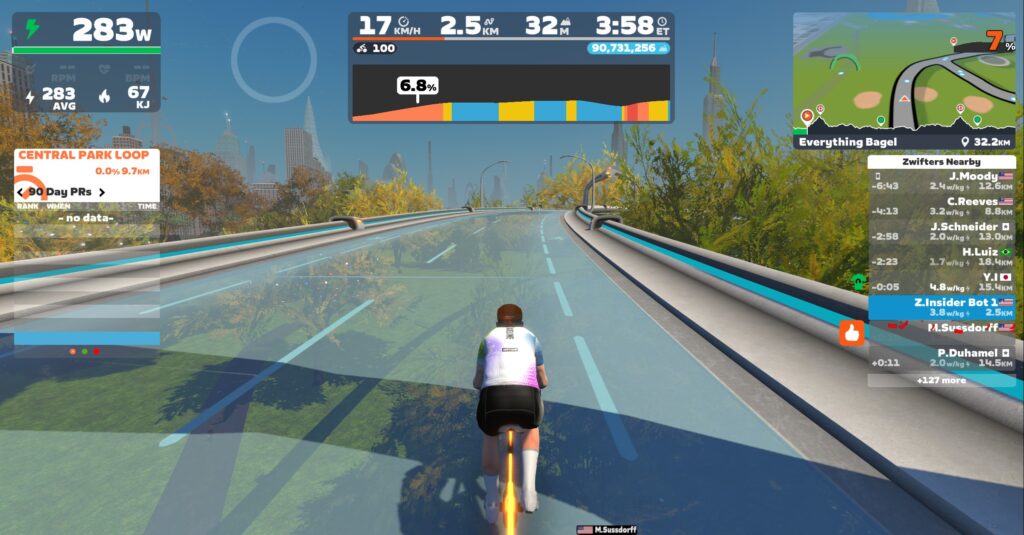
The new profile view clearly shows your full route, progress, any leaderboard segment banners, and how far you have left to go to finish the route. It also shows a lap counter in events, and a blue lead-in section for routes with lead-ins.
Note: if you make a manual turn and deviate from a route at an intersection, the original overview will be shown instead.
New “Screen Shake Effect” Toggle
The screen shake effect can now be disabled in Settings under the Audio & Video tab:
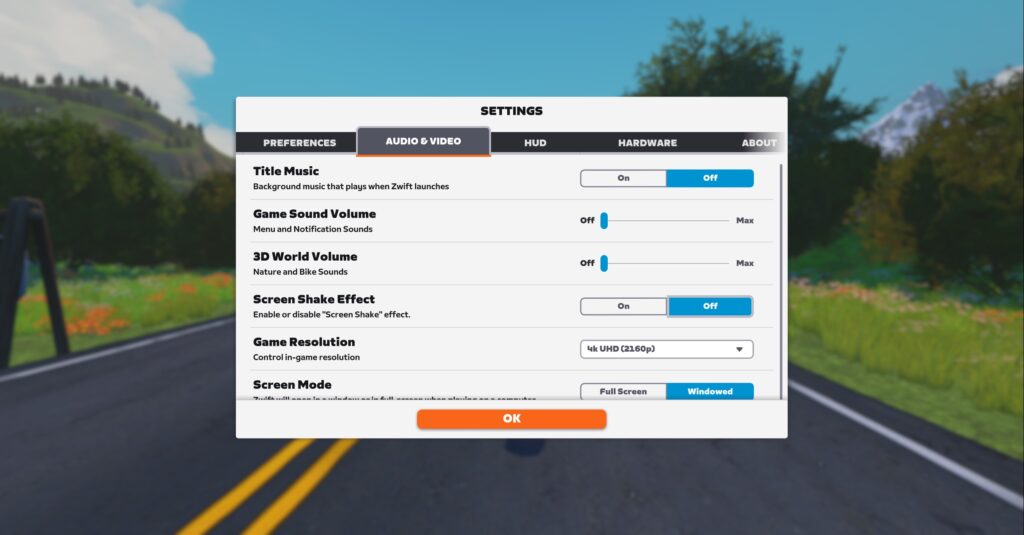
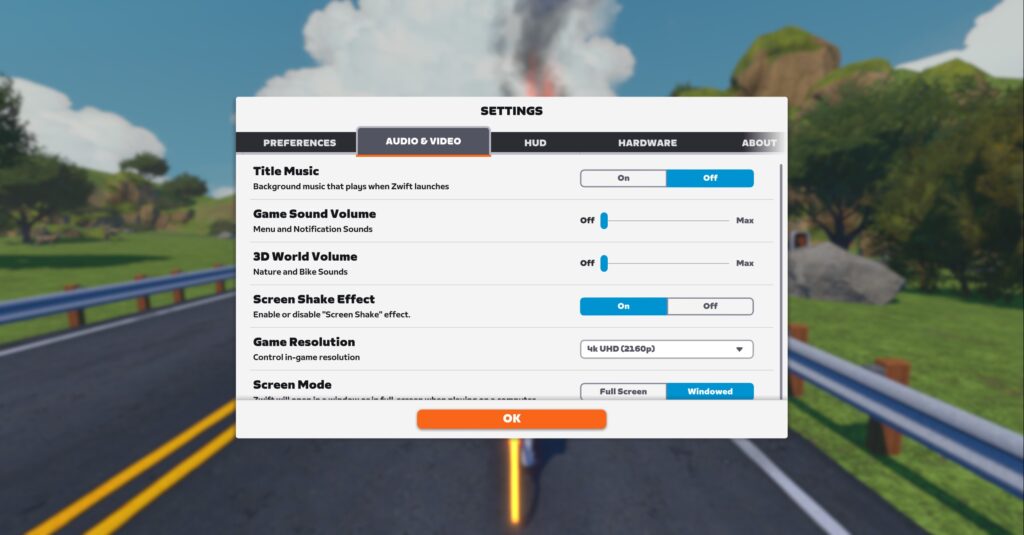
When disabled, the screen will no longer shake when riding on rough surfaces like cobblestones and wooden bridges. Here’s a quick demo showing how gameplay appears with it turned on and off:
More Release Notes
Zwift provided notes on additional tweaks and bug fixes in this update (notes in italics from me):
- Fixed an issue that could potentially show incorrect elevation in the dynamic elevation display for the climb in Jarvis and The Grade in Watopia.
- Fixed incorrect pedestrian walking animations in New York.
- Fixed an issue that could cause the elapsed time icon to overlap with the time value.
- Fixed an issue that could cause the “More Power!” alert to overlap with the average power value shown during ramp test workouts.
- Fixed an issue that could cause the speed unit shown in the HUD to overlap with the distance value.
- Fixed an issue that could cause the in-game leaderboard sidebar to overlap with the upcoming event countdown.
- Fixed an issue that could prevent the Shorelines and Summits route in Watopia from being completed if scheduled for multiple laps in an event.
- Corrected the peak difficulty of the Tractor Pulls workout which was previously higher than intended. (It asked for 25-second pulls, at 50rpm and 300% of FTP!)
- Training Stress Score (TSS) has been renamed to Stress Points (SP). (This is surely a result of TrainingPeaks acquiring IndieVelo…)
- Android
- Fixed missing bridge railings in the Shisa Shakedown route in Makuri Islands.
- Fixed an issue that could cause the Zwifter’s level to not be shown in the HUD after receiving a Ride On.
- iOS, tvOS
Discuss this update in Zwift’s forum >
Questions or Comments?
If you spotted any other changes or bugs in the update, please comment below!


when are they going to fix the power discrepencies between different platforms? Zwift web, Zwift Companion and Strava can often show different power figures, especially with max power. I messaged them about this months ago, providing evidence, and they acknowledged the issue, and said they would fix it but it hasn’t been fixed yet. Every platform should be the same, surely!
I would love be able to reset max power curve shown at the end of the ride. Mine is still using z power from 7 years ago so it’s not very helpful.
I have approached this problem several times – contacting support.
Until probably 3/4 years ago, in order to ‘reset’ the maximum powers in the application profile it was enough to delete the directory from the disk 🙂
So after contacting support they always ended up stating that there is no way for the user to do such a reset themselves, they cannot do it either.
Then I requested to ‘manually’ change these few values in my profile database – they also stated that there is no possibility to do so. In the end, they wished me to continue driving and believe that I will make a correction to my maximum powers (the ones they cannot supposedly change).
Drama.
I had same issue when I tried to get them to reset it. I wish we had ability to reset it. It’d be more valuable if it listed just the last year’s values or something more recent. As we approach lots of years of data and get older some of the peak values are no longer relevant.
As Eric mentioned, we (Zwift Community Support) can reset your All Time Best values and also remove certain rides from your Power Curve if for example a trainer or power meter fault causes an erroneously high value to register. You were provided incorrect information unfortunately, but we’ll be reminding our team that we have both of these capabilities. If you are able to send me an email at [email protected] I can reach out to you and help reset your All Time Best values.
Also, just confirming that we can’t set manual values for the All Time Best values nor is this currently available to reset on the Zwifter’s side.
Hello Alan.
Thank you very much for your response and willingness to help.
I appreciate your commitment.
I have written to you at the email address provided.
greetings
Artur
It was always surprising that they removed the ability to reset these figures on your device by taking them server side, and then to not provide a reset method
100% agree, strange and unhelpful decision
Unhelpful for people who want to sandbag raced. I suspect may have contributed.
For me it’s a quirk with my power meters. When they come online after a turn or two they sometimes shoot up to 2000W for a few seconds. As such my 1-5s all time best is 2000W. Would be nice to have that reset.
I reached out to Zwift, and they told me customer support can reset your power curve for ya. Once they do that, the new power curve will start building from that date onward.
I let them know that some of you have been told by support that this isn’t possible… and ZHQ folks told me they would get the word out to the support team that it is indeed doable.
So, there ya go. Good luck!
Awesome, thanks for confirming Eric!
You are amazing Eric!!!
I appreciate and respect your commitment.
kind regards
Artur
I wanted to take this opportunity to thank @eric Schlange for intervening with ZHQ and @Alan Z for acting.
I have the ‘your best’ section reset 🙂
Now these values will be real and relevant to age and fitness, capacity 🙂
Once again, thanks and greetings and happy, joyful upcoming Christmas and a happy New Year!
greetings
Artur
I’m glad we can finally control the screen-shake, but I’d love to have a sub-setting to turn it on/off by default in 1st-person view. Seems kinda silly that my avatar is perfectly stable in a wibbly-wobbly world in 3rd-person.
Hadn’t zwift promised the bike upgrades/Halo bikes for the Fall 2024? So I guess we are not going to see any of it before next year.
Are we actually dealing with a billion-dollar company or a bunch of amateurs who can’t seem to deliver anything on time or as advertised?
And I bet they will release a half baked result and wait for ZI to do the actual testing before they adjust the performances after we have all already spent our drops.
No, you’re not dealing with a billion dollar company (anymore). You’re also not dealing with a profitable company.
Zwift hasn’t raised money since their $450m Series C more than 4 years ago. That was shortly before Peloton reached a $50bln valuation. Earlier this year Peloton’s market cap went down to $1bln before recovering to $4bln as of today. Do the math what that means for Zwift.
It was already reported that bike adjustments was being postponed while more research was underway.
when was that?
There was a lot of frame updates for something in the update. Not sure what for but hopefully part of it and we’ll see it in the new year
i also read they were pushing frame updates back into 2025. it was a few weeks ago.
most normal zwiftinsider poster
I imagine the screen shake effect would appeal most to those who Zwift with the Neo trainers and bike that allows the palpable feeling of that.
Wrong… Most of us turned off Road feel within minutes of trying it…
I have a neobike and turned off road feel, and can’t wait to be able to turn off screen-shake in 1.81. It’s a gimmick, sometimes an interesting one but gets annoying if you’re in the jungle for a while, or riding Paris.
Hallelujah. That screen shake effect makes me dizzy. I look away from the screen every race that starts on the downtown watopia pier.
Improvements always welcome talking of which, on Android Companion App, Under ‘Profile View’ my Racing score is _ _ 9. The first two figures are not displayed (I have to go on the desktop to find out). Anyone else experiencing this?🍺
This mini map profile view was such an improvement that I had stopped riding routes outside of Watopia. Glad that it’s now system-wide.
Would be nice to have an on screen toggle to turn the elevation profile drop down on or off.
Still no news of a fix for the memory leak resulting in repeated ride freezing/crashes for those on integrated AMD GPU’s 😞
Cold reboot before starting the App did the trick for me. No crashes for the last 5 rides.
Glad that’s worked for you but unfortunately not that simple for me and many others who have tried cold boots, reinstallation etc. etc. Known memory leak issue for weeks now means a memory related freeze is inevitable, in my case typically around just 30 minutes into a ride. Hopefully they manage to isolate and fix it soon…
For reference I’ve been happily Zwifting on the same hardware for years and until the abrupt issue it happily ran at over 60 fps in the busiest mass starts through the jungle dust etc.
Time to buy a replacement for the potato…
Thanks for the advice @Tony that’s tempting but performance was and is absolutely fine – so today’s ride was over 60 fps throughout at 1080 in a big pace partner group but a memory leak means a crash is inevitable – so today was after 35 minutes. It’s affecting other AMD options too, many higher spec then my example. The hardware is running things just fine, the software is not playing nicely with said hardware.
That said I have just been looking at GTX 4070 laptops because it’s Christmas and I may actually want to play some AAA games once in a blue moon too!
I like the new profile of the route at the bottom of the minimap, but I miss seeing the rest of the dots indicating the position of the other riders, especially in races. @Eric Schlange do you know if they plan to get that back?
thats what i was going to write. i liked seeing where abouts on course other bunches were, so you know if they are on a climb decent etc as just relying on seeing gaps fluctuate without context is misleading.
This reminds me. I would much prefer Zwift give actual time gaps rather than some estimate based on speed. If a true time gap isn’t possible due to courses merging for example, they could then give a distance until a gap is available.
I know this isn’t specifically about the update but do you know anything about the new pack dynamics (PD5?) Eric? Pace partners and group rides have suddenly become much more fragmented, more string than blob. Lots of complaints (particularly from lighter riders) of not being able to stay with a group. I led a couple of rides in the part couple of days and it’s very apparent. Can’t seem to find any news though. Do have any insight? Thank you, David
Yes, I do. PD5 is live in Watopia (has been for a few weeks) but only for free rides, not events.
It’s supposed to result in more natural-looking ride movement and packs. I think it does. Riders have more space around them, and don’t ride through each other as much. But yeah, that would mean blobs are probably less blobby and a bit more school-of-fishy. 😀
Has ZHQ mentioned when they plan to tell the community about PD5 instead of quietly testing it in production?
It appears to have already been rolled out Mike. Looking at the code, V5 has been enabled on Pack group rides in all worlds for a couple of days and it’s certainly made a negative difference. They certainly kept it quiet!
Appreciate the reply Eric, thank you. Hmmmm might work better in smaller groups or race scenarios but I fear it will affect the larger groups detrimentally. Oh well guess we’ll have to get used to it but it’s a shame those big blobs with pacer bots or groups like Pack or Herd might be a thing of the past 🤷♂️ Cheers
Personally, I don’t like the big, tightly-packed blob thing. It doesn’t look realistic… it feels crowded. I often switch to first-person view when riding with pace partners because the blobs aren’t pleasing to watch.
Now, whether it’s a bit harder now than it used to be… that’s another question entirely, I suppose. I haven’t noticed a difference myself, but I could see how less blobby blobs might make it a bit tougher. I don’t think it’s much different, though. Mostly visual.
Eric when is ZHQ going to tell users about what PD5 consists of? I assume you have a post ready to go when the media embargo ends, when will that be?
I don’t have a post ready… and there’s no media embargo. 😀 Not sure yet when I’ll write about it.
Lately I had some strange effects trying to close in to a blob. The effort was unnaturally high, never experienced anything like that before, like a repellent force at work.
From riding in many group rides this week Uli riders are constantly being pushed to the side and losing draft and having to work harder to regain it. I’m surprised nothing has been said about it. In the past Zwift has included the larger community groups in testing the new dynamics. They didn’t this time, which is disappointing.
As a lighter rider, pace partner rides with steeper downhill sections have become very challenging because I’m getting dropped there unless I gear up and put out much more w/kg than others around me.
On uphills it feels like I have to work harder on working less hard to not drop the pacer because they don’t catch up as fast anymore.
I have two issues, not with the latest update, haven’t ridden with it yet. First I can no longer see my favorite riders (or riders I am following) on the mini map, not sure if that is the same mentioned by Emilio Lence. Yet when riding with friends they say they can still see them. Second videos no longer appear at the end of a ride so I can choose which ones to update up load.
Call me a weirdo, but I do appreciate all the hard work that goes into bug fix and minor updates like this one. Yeah, yeah, better testing by ZHQ up front would fix them pre-release. But there is a tension between speed and accuracy, and the perfect is the enemy of the good (or the good enough, I suppose). Ride on and such.
Where can I find my XP? I have reached the end of the status bar 7 or 8 times after level 100 but don’t know what my XP is?
I’m not 100% sure if it’s a bug, but I had a strange behavior when recording my activity today (to strava and Garmin). I did the 4th step of the fresh outta and I noticed a problem with the zwift export to Strava and Garmin. I got the new zwift update just before the race, did my race, finished in 38:39 and immediately after the finish line I did “End Ride” (it was less than 30 seconds between crossing the line and ending the ride. Yet in Strava (and Garmin) I can see that I stopped pedaling (0W power) at 38:03 (whereas on the zwift video I can see that I’m at 407W at 38:39) and then I have 2 minutes at 0W (until 39:53) of power and I can see that my person has gone all the way down the hill whereas I stopped zwift at the top.
In short, I have the impression that exporting with the new update is a bit buggy.
I checked the strava curves of the group riding with me. And some have exactly the same final curve as me (2 minutes at 0W), others also continued their ride, but those who stopped immediately after the line have those 2 minutes “empty”.
Unable to Connect my HRM and Power meter pedals on AppleTV app since the update. Bluetooth is turned on on AppleTV. Help!
Caroline, My Apple TV has not been able to pair my HRM with version 1.80 either. I can get the HRM to pair using an iPad then mirror it to a smart TV. It seems with every update new challenges arise.
Not used Zwift since September, yesterday I rode and did a few video screenshots, this has worked perfectly in the past and now they’re only saved as a 0 bytes mp4 file on my laptop on yesterday’s ride, windows 11 navidia Geforce GTX3050, 13th Gen Intel core i7. There is a couple of posts about the 0 bytes video files on the Zwift forums from October but doesn’t seem to be a fix? I’m nn zwift 1.80. Anyone know of a fix/ workaround?
When are the mini map updates going to roll out to Apple TV ? I was on Neokyo today and still didn’t see them.
Already there, far as I know. Make sure you’re running the latest version of the app!
Yes, I am on the latest version. But, what I noticed is that if you select the route from the Sprinter’s Challenge, at least for me, the updated map did not show up. However, if you select the exact same route as a free ride from the Makuri map, it does. Weird.
Really? That IS weird.