
The second Zwift update of 2024 begins its phased rollout today. This is a minor update which fixes various bugs and makes some small quality of life changes. See details below…
XP Doubling Removed For Streak Bonuses
Zwift’s update notes say, “Fixed an issue where XP bonuses were getting doubled for Zwifters who were level-capped in the past.”
This fix only impacts Zwifters who were level-capped in the past and built up “extra” XP which Zwift is now using to accelerate your level-ups (read all about Zwift’s accelerated leveling scheme on this post). According to our contacts within Zwift, the only change here is that XP bonuses given for continuing your Streak will no longer be doubled. Other XP earnings, including distance-based XP, will still be doubled.
Seems like a good move to us, as it will slow the level progression for accelerated Zwifters.
UPDATE: some Zwifters have reported that this change does not appear to have taken effect yet, so Zwift has removed it from their update notes while they investigate.
Streaks Screen Fixes
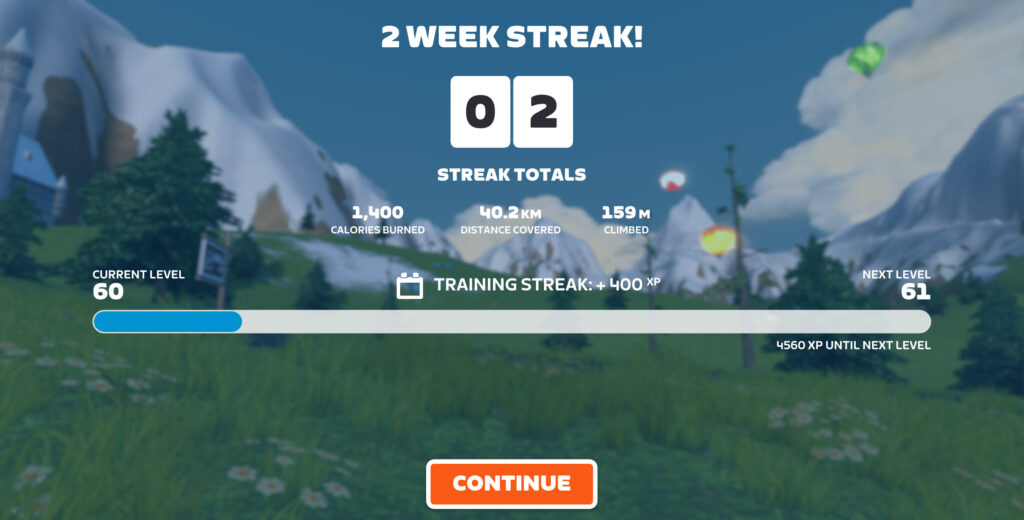
Some Zwifters have noticed that the cumulative stats shown on the Streak Summary screen aren’t accurate, as if certain activities aren’t being included in the totals. Zwift is on the case, and this update cleans up some of the bugs impacting these stats, including rides not being included in the totals after using “Just Watch” mode or after joining an event from a free ride.
Zwift tells us the next update will resolve some or all of the remaining issues.
10Hz Fix For Erg Mode
Zwift says, “Power values displayed during Workouts are now more stable when using devices that broadcast power readings at 10 Hz with the “3-second power average” setting enabled.”
This is the same display issue fixed back in November’s 1.52 update, where power numbers were updating rapidly (several times per second) when connected to trainers like the Zwift Hub or Wahoo KICKR which broadcast at higher frequencies (aka 10Hz “race mode”). November’s update fixed it for non-workout events, and today’s update fixes it for workouts.
Read details on this forum topic >
More Release Notes
Zwift provided notes on additional tweaks and bug fixes in this update:
- Fixed an issue where the cycling level shown on the Ride Streaks screen counted up from Level 1 after using “Just Watch” mode.
- Fixed an issue where the Ride Streak screen could potentially not be dismissed via the Zwift Companion app.
- Fixed an issue where the Repack Rush Report screen could potentially not be dismissed via the Zwift Companion app.
- Fixed an issue that caused the “Enroll” button to appear when already enrolled in the Fast Track Fitness training plan.
- Visual improvements to the Repack Rush Report, including improved leaderboard readability.
- Android: Fixed a potential crash that could occur in the Pairing screen.
Discuss this release on Zwift’s forum >
Questions or Comments?
If you spotted any other changes or bugs in the update, please comment below!
Have they fixed out the workout icon on the Zwifters nearby list yet? – it only seems to show up for other Zwifters when I’m also doing a workout, but not when I’m in a free ride.
No, this is not fixed 🙁
Has the distance for following a pace partner changed, I was 15 meters and got a warning I am sure it used to be 40?
That distance actually varies dynamically based on pack size.
But I would argue that it still needs to be increased by 50% or so. When cruising along holding constant w/kg equivalent to the pp, the bonus can easily get nixed if:
you’re as little as 10m from the pp in a small packthe algorithm happens to shuffle you to different parts of a single larger pack
Not sure why I’m complaining about the drop multiplier – not much interesting to do with all those drops after a while anyway, except to further clog up my garage.
What I would really like to see is, instead of your drop multiplier just going straight back to zero when you’re out of range of the pace partner, it could maybe start reducing until you’re back within range. It’s fun to sometimes just jump out of the bunch and take part in a sprint segment and then join back in, but if you’ve gone hard enough you’ll definitely lose touch with the PP and lose whatever your multiplier was before they catch you back up.
I would still love to turn the streaks “thing” off in my settings, how hard can that be??????
Probably harder than clicking a button?
Yeah specially when that skip button is a flash…..oops gone 😆
maybe when you go look in your settings… you will see a surprise???
Since the previous update, in Zwift running I have been unable to set my daily run target in km. If I choose it in km it changes to miles on the game screen, so I have to enter it in miles (after working the equivalent km distance out) and then it displays the correct km target. Very strange!
Also had a problem yesterday with the average heart rate in the km side graph displaying hugely inflated average heart rate (even though displayed real time heart rate was also much lower)don’t know if this is something particular to me or anyone else had similar?
The Daily Target thing has impacted me, too.I actually mind less because I’m starting from a marathon plan that has the daily targets in miles, but my Zwift settings are metric. Confusing, though, to have to remember each day to set the goal in miles, as it will always default to km.
I already earned the XP to become level 100 by reaching the original level 60. Then I kept riding to earn more than enough XP to immediately go from the new level 60 to level 100. Ok, then Zwift decided that I would get rewarded for part of these XP but only in doubling the new XP that I earn. But apparently now that is also too much, and we are not even getting our already earned XP for doubling the streak bonus. Why?
This could have been handled soo much better by Zwift, like giving all original level 60 riders some recognizable token (somebody suggested a white Tron bike).
100% agreed.
There’s no such thing as accelerated progress. It’s either instantaneous or delayed.
At 62693km / 504400m it can be frustrating to be L74 when I see a zwifter at 38000km who’s L100 already…
Is there a way to delay the upgrade to 1.57?
Maybe they can fix the coffee break as well?
easy way to not get frustrated – don’t pay any attention to what level other riders are, and certainly don’t go digging in their stats to see what their total distance ridden is.
the riders you encounter are either faster than you, or not, or are faster than you and taking it easy. anything else is irrelevant, isn’t it?
Seen several people using the coffee break as a cheat in competitive rides, getting their heart rates down and recharging then smashing the last km. Needs removing from competitive rides.
Everyone has the same opportunity in a ‘ride’, no matter the ‘type’. Races are a different issue.
That is NOT a cheat. Everyone can do it and it’s part of the game. As long as there’s no rule against it, doing that is perfectly fine.
Would be different if people found a way doing it in races. That would be cheating.
Can’t coffee break in a race. If you can take a coffee break – it’s not a race.
There’s no such thing as a competitive ride. It’s either a race or a ride. You can’t win a ride. If you can’t win something then you can’t really be cheating.
The only situation I see this changing is in group/club rides, where there are mini races at the end, or designated intervals. Most allow coffee breaks for intervals, and the community respects the ride enough not the coffee break while competing in the mini race as well.
You’re welcome to your opinion, however wrong you may be! 😂
So you are not XP farming. Im at level 80 with 24700km, and I was at level 57 before the change happened.
My sense is it’s a function of how much riding one has done while level-capped.
I’m at a bit over 70,000km, L55. At this point, distance and level are not correlated other than for new riders, making level pretty meaningless. That’s ok! It’s a game! But it’s kinda broken, as gaming things go.
Maybe just be grateful you have the time and money to ride that much and stop spending so much mental and emotional capital accounting for the fairness of a made up system of points in a video game.
This is no big deal but video captures still don’t work on my Apple TV. Will they ever? Or have they stopped trying to integrate them on older models?
Why doesn’t the workout from my training peaks that I’m going to do on that day load up onto zwift so I can do it indoors that day
If you’re workout is in your trainingspeaks calendar for today and you start up zwift. You find the workout under workout section, plans and again workout at the top. You only see the workout for “today” not future workouts.
Still no fix for re-enabling the Apple Watch for HR via companion app 🙁
Even downloaded 1.57.1 Companion today & Apple Watch not able to pair. It is recognized in pairing mode but doesn’t pair.
Re “XP Doubling Removed For Streak Bonuses”:
Is that server or client side? In other words, if I do a workout before updating the client do I still get double XP? For some reason I never want to give up free XP 🙂
FWIW, I did get double XP for the streak. Let’s see if I’m forced to update before the next streak week rolls around!
Would appreciate not being leveled up after a ride during the streak screen thing. Level ups should be while riding only.
The whole streak thing should be handled while riding — exactly like all the other things you get on the road (route badge, goals achieved …).
But this is another usability/user experience issue like there are many others in Zwift. It simply lacks consistency and clear structure.
Does the Streak “skip” button skip all of the Streak screens now?
I don’t know what the skip button does? I don’t see a difference except you could push a button on companion? Streak screen is still annoying, and it still has to save, calculate and ….
Hello Eric. My name is Stas. Last summer we were doing the Build me up program at Zwift at the same time and I was constantly commenting on your posts on Zwift Insider. I have a favor to ask.On July 7th I will take part in the Maratona Dles Dolomites event in Italy. I want to cycle the maximum route Length: 138 km with altitude gain: 4230 m. Now I’m in bad shape, I haven’t trained for a long time and I set myself the task of preparing for the event. What program would you recommend?
No matter what plan you choose. It is important that you are systematic and ride until the very start.
It’s all about endurance. You want to gradually build to 138 km in a day, around twice that (276 km) in a week, and be separately able to do at least half the event climbing (2115 meters) in a day, around 3 weeks before. Then hold that level, tapering in the last week. I wouldn’t worry about high intensity work.
Are they working on account holders being able to name bluetooth devices for multi-zwift households?
I’d like to see age group results added too.
Two times my watts have frozen right at the beginning of a Crit (in Glasgow)
Never happened before (just updated before first of two races)
First race stuck at 137w in the beginning. After that I sat up. Tried again 2 hours later. Worked fine during warmups with both high and low watts. Then the race started and it froze at 234 watts for a minute (even when not pedalling), and then suddenly it didn’t register any watts even though my cadence was the same.
Then I rode the free world, and it worked again.
Anyone else with this problem?
My setup has been the same since I started in 2020, and I’ve never had this issue before.
I just had the same problem. I’m using iOS. What about you?
iOS
You tried different races or also Crits?
Happened to me too. Stuck at 238w for the long stage 5 of TdZ. I’m using an iPad. I then tried it on my iPhone and got the same issue. Deleted Zwift from my iPad and then reinstalled it and still the same issue. I then went into settings and changed power read out from 3 second average to ‘instant’ and that seemed to fix it
an idea… once the weekly streak problems are sorted, how about three streaks being tracked – daily, weekly, and monthly. All the data has to be there to track the weekly streak, so for the more (or less) committed, adding daily and monthly on the same screen would be positive.
Yes! They added steering to Wattbike Atom V2 users
Oh really? That’s big news if so… checking with Zwift…
Have they just rolled back 1.57? It updated this morning and now it updated again but back to 1.56
Yup.
Solve important problems …. loool
Posting here as well as the Zwift forum about an Apple Watch heart rate issue. I know it’s never been reliable and they are working on an update. But for the past year I have made do with it, and even rode a century using it as the HR data. On 1.57.0 I have not successfully gotten it to pair a single time, and having rolled back to 1.56.0 today I can confirm it still works.
Prior to this update (which my Mac received 1/23/24) I could use the Apple Watch Companion app + iPhone Companion for semi-reliable heart rate data. Today, having downgraded back to 1.56.0 (because they paused the rollout for trainer resistance issues) I connected it and it paired up immediately.
On 1.57.0 I could occasionally get the pairing screen to show “Apple Watch” under heart rate sources. But it would never show my actual heart rate, no matter how many times I tried restarting the app (phone, watch, or computer). Maybe there’s a wider Bluetooth issue besides my theory stated below, that is also causing the trainer resistance issues.
My theory is they are working on the new app and somehow broke support for the old version in this update. If any Zwift devs or community members can relay this to the team, please don’t break support for the legacy Apple Watch HR system prior to releasing the updated system!
Weekly email from Zwift…
“Turn your sweat into currency (Drops) and buy a new bike, wheelset, or accessory to not only show off but also help you race and ride faster!”
There are no “accessories”, thanks for wasting my time looking.
LOL
FWIW, roll back is absolutely not the right way to fix issues.
If you can’t QA code properly prior to roll out, then you need to roll out the fix next. Roll back risks breaking everything, and I do mean everything.
This is fundamental stuff.
Agreed Harry but normally that is what UAT and regression testing should be for. To do that properly requires like for like environments and thorough testing otherwise you end up like this. Also to fix a failed rollout requires knowledge of what has broken and how implementing a fix will fix it without breaking something else.
Does anyone what’s the 211 badge is? With the 3 new rebel routes and repack rush it was 210 (183 cycling, 27 running), Suddenly its 211?
Is it Castle Crit but for running?
Good one, could be, but than its the first route badge for running in Makuri. Cant find anything about it.
Eric, I got this response yesterday that Apple Watch is temporarily unsupported and it seems since the last update. Any insight on when they will bring it back?
I think you’ll be seeing something very soon! Within a few weeks, I would bet…
The latest update appears to have broken the workouts and ERG mode. I’m using a Saris Hammer and an iPad. Firmware is up to date and have calibrated several times. Was working great until the last update. ERG doesn’t work at all and wattage is way high for the gearing. Once I go to free ride, the wattage returns to normal in the same gear ratio.
After a weeks break due to injury 3 weeks back I’m no longer seeing or receiving ride streak XP. Can anyone help?