

The latest Zwift update is now available on all platforms: Mac, PC, Android, iOS, and AppleTV.
Not sure if your Zwift install is up-to-date? Here’s how to check >
This update doesn’t deliver much that Zwifters can immediately enjoy in game, although there are various bug fixes, a fresh and BIG bug introduced, and certainly some new assets behind the scenes. Here are the details…
New Bike Frames
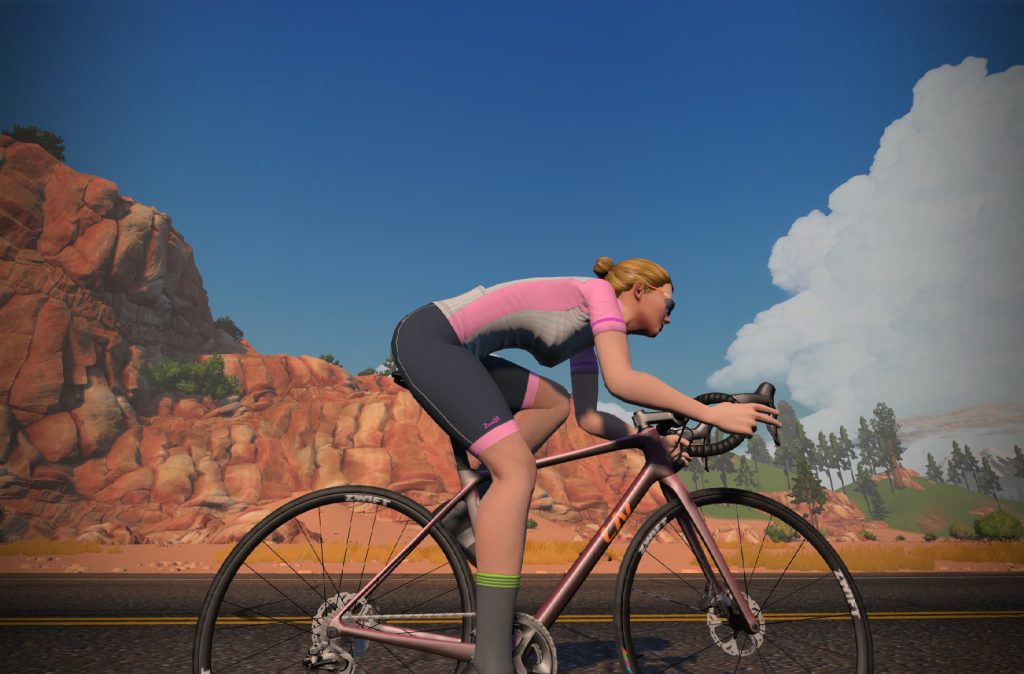
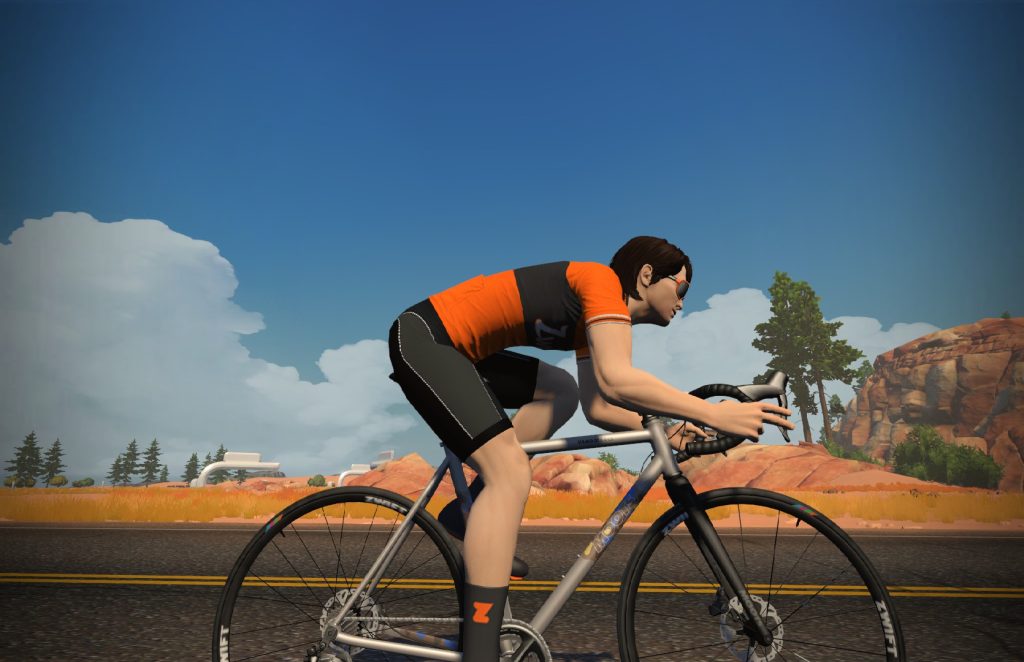
This update includes two new frames:
- Liv Langma SL Advanced Disc: 745,500 Drops, 3 stars for aero, 3 stars for weight
- Moots Vamoots: 852,000 Drops, 2 stars for aero, 2 stars for weight
Neither frame looks to be a top performer based on star ratings, but we’ll test them using our standard protocol and publish the results ASAP.
Bug Fixes and Misc Improvements
Here’s Zwift’s list of fixes and improvements included in this update:
- Fixed an issue which would sometimes cause long straight lines to appear on the map during route selection.
- Fixed an issue that would sometimes cause a crash when returning to the home screen after ending an activity on PC and Mac.
- Fixed an issue which caused Zwifters to be unable to use their phone as a steering device on Repack Ridge.
- Fixed an issue which caused dialogue to go missing on the first ride tutorial.
- Fixed an issue where gravity would play favorites with some lucky Zwifters, giving them the power of flight. Since Zwift is not a flight simulator (yet?!), we had to put a stop to that.
- Fixed an issue which caused a delay in the Pace Partners appearing in the home screen.
- Fixed an issue where pedal assist would not activate when joining a Pace Partner in certain situations.
- Fixed an issue which allowed Zwifters to do a quick u-turn on a route and get the achievement for the reverse version of their current route.
- Fixed an issue where Bluetooth devices could not be detected for Zwifters running MacOS Monterey.
See Wes Salmon’s notes on this update release in the Zwift forum >
Still Not Fixed
The bug in Zwift’s implementation of the Dura-Ace 9200 groupset in last month’s update caused the Specialized Tarmac SL7, Pinarello Dogma F, and Canyon Aeroad 2021 frames to climb a bit slower because they’re a bit heavier. This issue has not been resolved with today’s update.
In fact, it’s been made worse – because both of this month’s new frames (Liv Langma SL Advanced Disc and Moots Vamoots) use the new Dura-Ace 9200 groupset.
Questions or Comments?
If you spotted any other changes or bugs in the update, please comment below!


Why wasn’t that pairing screen bug introduced yesterday!? It would have been super handy for zrl last night 😂
At least it is hard to disguise, as your real watts is still what is shown to the other riders…
oh god i am worry to upgrade, every time they do a change they break more, i have no faith in those devs looool
THAT is a spectacular Bugdate! Might be the best ever. I’m gonna go home and set a PR on The Alpe!
As Aoi Niigaki posited on the Zwift Forum moments ago: “I’ve gotta give Zwift credit where it’s due. They always seem to find new and interesting ways to have bugs.”
Everyone who races in the WTRL Team Time Trials is hoping that bug gets fixed before tomorrow. If you enter the pairing screen at 0 W and not moving, will you stay at 0W and not moving until you leave it no matter how much you pedal? At least that won’t screw up warmups. Still allow cheating though.
Pace partners got weird in this update. I found joining both Dan and Coco to be even more sketchy than before; mostly involved dumping in a bunch of watts and still getting dropped almost immediately. Also the join screen has them in a pretty random order:
I can confirm that the pairing cruise bug issue is also an issue on Mac
It seems the distance do not change in your video. It is the same distance before and after the pairing screen. So it seems the rider freeze (but keeps moving 🙂 ). But distance seems the same before and after. So maybe not so much of a problem anyway – just seems so.
Yes, I noticed the same thing. I tried it tonight and started at .2 miles and let it go for about a mile. You don’t get the distance even though you’re still travelling on the map, when I stopped the pairing screen, I was still at .2 miles, but the time was still counting so the avg would drop, etc. just like you were stopped. Not sure why the rider keeps going on the map, but it doesn’t seem to “count” your distance. Not sure what it would do in a race. The companion app will still show you moving and you can give Ride Ons, etc. but the distance never increases until you get out of the pariing screen and start riding again.
In a race the distance also does not count when the pairing screen is open, but the finish line is still the same place, so you can still win/lose races due to this bug.
Yep confirmed this pairing screen bug – got my speed up to 35mph prior to the uphill start of Alp d’Zwift and indeed it locked in at that – zoomed upwards like I was on a motorbike.
Did you get credit for the completion of the Alpe d’Zwift though?
Yeah, inquiring minds want to know this for sure!!!
I’ve been riding on the Liv Langma Advanced SL disc for 2 weeks now so it must have been introduced in a previous release of Zwift
You sure it wasn’t the old Liv Langma? There are two…
With the new update I have black boxes over other riders and the rendering of terrain is also black.I have attached a screen shot to show and example. Any idea why this is happening and if it is a problem with the update? I am on a MacBookAir6,2 using OS Sierra 10.12.6
Looks like an issue with game files. I’d try reinstall.
Lots of Mac users reporting similar issues. See Zwift forum for the update…
Thank you. It looks like a lot people had similar issues and Zwift put out another update that fixed the issue.
I’m having the same issue, only with the entire world being black. I left it running and in 10 minutes everything turned green, then red!
same. and after about 30 mins riding Zwift crashed. on High Sierra OS. Zwift tech support just recommended to update graphics driver.
Same for me – black – green then red
I know several Zwifters, including myself with the following problem: After completing the AdZ and the recovery lap upstairs just before the downhill, the screen froze and I couldn’t get to the well-deserved downhill. That only happens at AdZ, not even at VenTop. After trying again to log in to end the ride, everything will appear three or four times in companion. Last time I always ended up in a meadow in the middle of nowhere. It’s annoying, has this been fixed or do we have to expect it to happen again? I play on the iPad.
I have never had such a situation on apple tv.
Shame I cannot use Apple tv due to lack of space.
Several friends have had this issue for weeks. I have not encountered it but it affects Apple TV and iPad for sure
@Fossil 66 Thanks for your reply. I was sure that we are not the only ones who this happened.
Ive had this too
Who needs these bikes? nobody
I couldn’t scroll in the route selection screen after the update ?!? Very annoying, since I planned to ride the PRL half this morning, but that route was not available to me … 😢
Same here. You could create a meet up on the companion app and then join that to get round it, until they fix it.
Interestingly the scroll bar is on the mobile app but not on my windows pc, but I’m not doing a ride looking at a 5″ screen for a couple of hours!
Same here
Same for me only half a dozen routes available from drop down list
I have this same issue on windows PC. I found if you select and hold down on a route you can drag up or down through the routes. Not as intuitive as a scroll bar but should get you where you need to be until they fix it. Also experienced drop outs and wattage freezes (Saris H2) that I’ve never experienced before.
I’m surprised no one is annoyed by these sounds of picking up RideOn other riders. They are there all the time. It is impossible to silence them.
Turn off the sound. If you listen to something on your phone with the Companion app turned on, disable ingame sounds in Companion too. I can’t stop wondering what idiot came up with that idea to put sounds from game (rideons) in the Companion app.
Not a bug as such… More a request/fix.
During any group ride/race, as a colour blind zwifter I NEVER get a chance to show of any sprinting ability due to never seeing the coloured arch/bridge/line etc….
Would it be possible to incorporate a finish line beacon or numbered Road side count down in the future.
Kind regards… Keep up the good work.
I don’t work on Zwift’s game – just run this fan site about Zwift!
That said, your best chance of good sprint times is to learn the routes. They always have finish banners, and start lines with stanchions. Once you’ve ridden them a few times you should be able to lock them into memory.
Also, I noticed yesterday that the Flatland Loop does not have the distance bar for the ride in either direction. You get the time counter but no bar to show distance travelled.
Is the heavier 9200 groupset even a bug? I mean it’s heavier than the old one anyway, especially in with disc brakes.
Yes, it’s a bug. Confirmed by Zwift.
It’s true, but disc brakes appears t be independent of the component group. Each group works with either disc or rim brakes, depending on the frame. Until recently, rim brake frames were better climbers, but this year, the top climbing bikes are disc brake bikes.
Since the month of July in the Specialized Roval Climbing Challenge event they have not yet fixed the results that are marked with UPG and it must be a problem. Today is October 21 and there is still nothing problem
Another Zwift update. A few bugs “fixed” and a few more introduced.
In the past, if I remember correctly when you joined up with a pace partner you were on that route but this morning I was showing Tempus on my screen but chose the pace partner which was on TIck-Tock and when got to the the turns my avatar wanted to not follow the pace partner and had to choose the turn. Seemed later on some were good but still had to choose some.
It upgraded and now there’s no video. It looks like my screen is having a seizure. I think they just ended support for Macs. I have no control in my UI at all. How does one terminate a Zwift account?
I just got off of chat with them and they told me that, “yeah, we pushed out this update and now Macs don’t work. Just delete it and reinstall.” If I wanted technical incompetence and random interruption of service from a multi-billion-dollar tech company, I’d have opened my Facebook instead.
Did reinstalling fix it? Curious minds want to know.
https://support.zwift.com/en_us/canceling-your-membership-Sky82qONr?mobile_site=true I shut my account off in the summer months you can quit Zwift account and restart it at will no loss of data. Currently not on Zwift, this is a mess I’m glad to miss.
Anyone lose half of the routes after they updated?
Not on my ATV.
Yeap, half my routes missing too so your not alone. Annoyong. Hope they fix this double quick
Yep. Only have 12 routes now for Watopia. Lots missing, and scroll bar is gone now when i try to search for a route in Watopia
After a ride ATV seems to stall while saving a ride. Much longer than before last update.
Couldn’t free wheel down the Alpe tonight. Set him off to go inside for dinner, came back and he’s only got to the first corner and stopped! Jumped back on, pedalled to 24kph on a -9% and wouldn’t go any faster and gain speed, just slowed down again. Gave up. Did managed to no pedal up the last 5 corners on the pairing screen though.
Same here, absolutely annoying 😑
Me too – had it last night Oct 27. Had to pedal down the Alpe and it took nearly half an hour
Same here. I work hard to get all the up ADZ!
I really enjoyed free wheeling back down. They should enable freewheeling down ADZ again.
1000 kudos to Zwift! They have already fixed the display glitch (yellow, green, red, black world) many Mac user reported. Much appreciated.
Hi Eric. Are you able to pass on things that need fixing to them? If so, one is that the times shown when you cross the line/banner and the time on the leaderboard are not always the same. Yesterday I did the long desert TT and got to the banner at just under 10mins, but the leaderboard recorded my time as just over. A strange inconsistency. I think it happens elsewhere too (top of Sequoias road KOM). Please pass on if you can. Thanks
Yeah that “feature” has been around since I can remember. It just I guess never gets addressed fixed or even highlighted too much as we sort of grown to accept these things in the face of the avalanche of monthly more critical bugs and at least rom a user voice (forum) perspective unrequested and unwanted changes.
Haven’t seen it mentioned here but following the new update, anyone using macOS < 11.0 will have the app crash when opened. On the Zwift website it's listed as a known issue with instructions to use another OS until they get it fixed. Seems like this "bug" should be fixed ASAP.
Since i updated on tuesday I got an interesting bug: i could go up the Alpe without any problems but went down at only ~ 25 kmh. No full contol of the bike (no U-turns). Did this twice, companion was no help. Anyone else facing this problem?
Yes, others have reported the same.
I noticed a similar issue the past few days. On PC, riding with Candance for a couple of hours and tried a u-turn using keyboard arrow keys and nothing, opened the menu screen to do a u-turn and it didn’t work either. Then I noticed I started dropping of the group so upped the power and still losing the group. Doing 400w and only doing 24kph! Same thing today. Opened the menu to do a screenshot (which worked) but noticed the same loss of momentum back to around 24kph no matter what power. Very annoying and hope they fix this soon. In the meantime I’m not touching the keyboard or any in game functions whilst riding.
I think its tied to the U turn bug. For me, if I try a U turn (which doesn’t work), I then get locked at 24kph. Until fixed I’m going to avoid U turns.
Just updated to latest and, within 5 mins of riding the PC app is freezing, Android app and comp are fine, just PC seems to be beggered as soon as you start a course.
Ever since the update I can no longer scroll to change my FTP! I can scroll on the far right side of the screen where the workouts.garage, settings etc boxes are but it won’t let me move up to the top left of the screen to select my profile. I tried restarting the game but still no luck!
The Aeroad 2021 having the weight bug is potentially a real disadvantage for lower level racers as it’s the obvious choice for most races until you get Tron or level 33+. I think your charts show that ordinarily it’s climb time up AdZ is 2943 – do you know what it is currently?
In my tests the new Dura-Ace added ~19s to the Alpe climb for all affected frames…
Wow! (and thank you) – looks like the Izalco Max 2020 is on the purchase list!
Why would Zwift assign a weight to a groupset like Dura Ace instead of just assigning a single weight figure to the complete frame with all assessories except for the wheels? Splitting only makes sense if groupsets (or other assessories) can be chosen independently from the frame.
Is this a hint at future Zwift options/drop shop items, i.e. the chance to customize/ upgrade frames with optional groupsets just like we do with wheelsets these days?
Yes it is, Andreas. That’s their plan at some point, so it makes sense to have all components have their own weights. Same with tires vs wheels, etc…
The U turn thing is driving me crazy – could U turn at any speed – in the last week, out of the blue can’t U turn at all – next ride – I immediately do a U turn which should have been on my previous ride
since the upgrade Zwift will not recognise mouse clicks on my MacBook Air. I can’t even select a course with the mouse or the touchpad. Is there a way to roll back to an earlier version?