

I’ve been a fan of pedal-based power meters for several years ,because they can be easily swapped to another bike, and they’re measuring power right where it’s happening.
Garmin Vector 2 pedals were the first power meter I ever owned, and I used them for a few years, both indoors and out. And while they worked decently well, they were far from perfect – prone to accuracy problems if not properly torqued, chain clearance problems, and those annoying little plastic pods stick out weirdly and like to get bumped, which can affect accuracy as well.
So I went looking for a new set of power pedals in early 2020 – and the first place I looked was Favero. Their Assioma pedals seemed to have the best reputation of any in the Zwift Community, and they are also the most affordable. Here’s how the pricing shakes out for dual-sided power pedals currently on the market:
- SRM Look Exakt: $1700 USD (included just for grins – who is paying $1700 for power pedals?)
- Garmin Vector 3: $1000 USD
- Powertap P2: $900 USD
- Favero Assioma: $696 USD
Like the Garmin and Powertap offerings, Assioma isn’t a first-generation product. Favero’s initial power pedals were called the bePRO. Assioma is the next-generation product, released in 2017. And it’s clear this isn’t Favero’s first power pedal rodeo.
After spending hundreds of hours riding the Assioma both indoors and out, I figured it was time to write up a review post. I hope you find it useful!
Favero Assioma Specs
- Weight: 151.5 grams per pedal*
- Q Factor: +54mm
- Stack Height: 10.5mm
- Accuracy: +-1%
- Battery Life: ~500 recharge cycles at 50+ hours per charge
* At 303 grams per pair, the Assioma is the lightest power meter pedal on the market, beating out the Garmin Vector 3 (324 grams) and Powertap P2 (432 grams).
What’s In the Box?
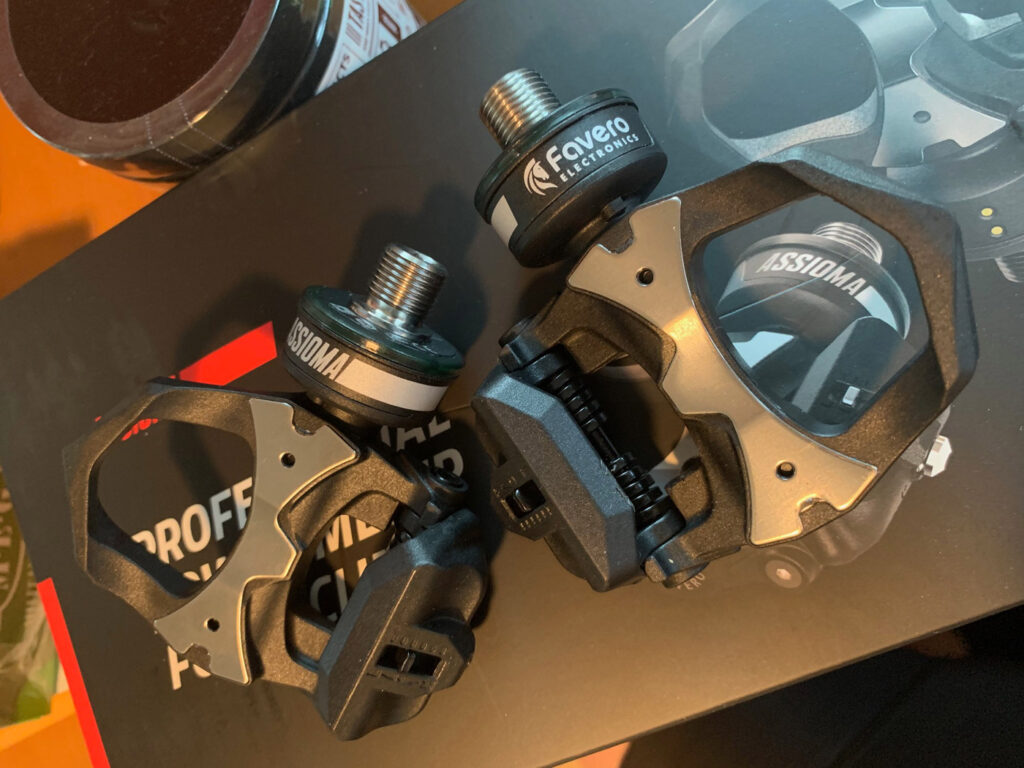
Whether you buy the single or dual-sided version, the pedals ship with all you need:
- The pedal(s) (of course)
- A USB charging cord for each pedal – with a cool magnetic connection (more on that later)
- A dual USB adapter to power the charger(s)
- A pedal wrench
- New cleats for your shoes: these are Xpedo-based cleats. Very similar to Look Keo cleats (which I already use) – but slightly different.
- Pedal washers
- Instruction booklets
- Adapters for various world outlet types
Getting Set Up
Set up is easy, provided you have a smart phone and the tool needed to remove your current pedals.
First, activate the pedals via the Assioma app on iOS or Android. This is easily done – you click to search for the pedals (wiggle them a bit if they aren’t awake), then click to activate each pedal. (Your pedals won’t broadcast power until activated, which I assume is Favero’s way of tracking/enforcing warranty periods.)
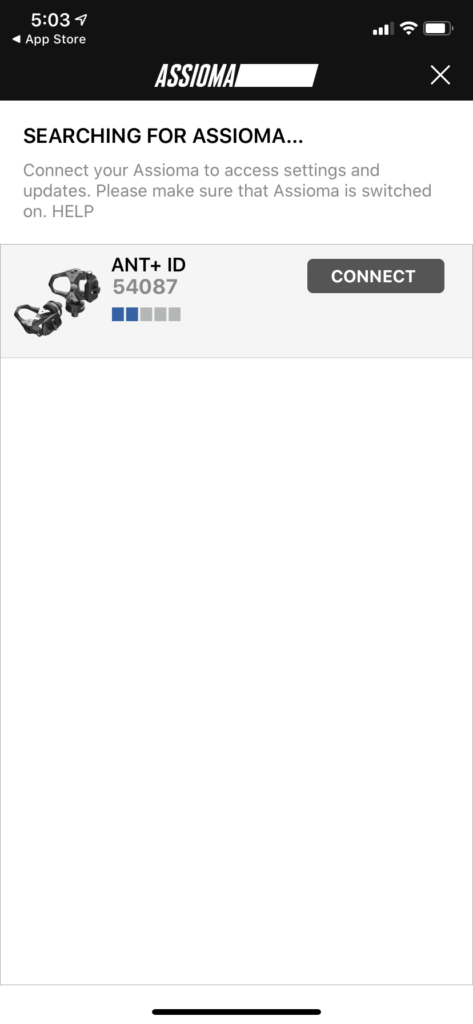
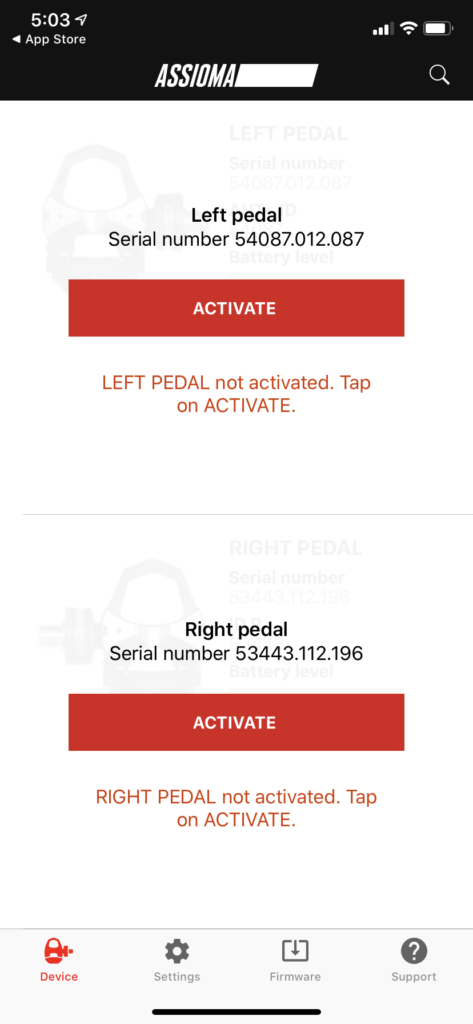
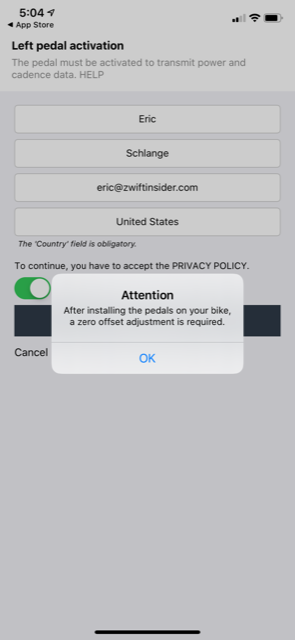
Next it’s time to install the pedals. First remove your current pedals – depending on your current pedals you may need a pedal wrench for the job, or you can use the 8mm allen wrench included with the Assioma pedals.
I like to apply a bit of grease to my pedals whenever I install them, just to keep things smooth and happy. Then use any washers needed in order to offset the pedal body from your crank, and twist the pedals on using the included allen wrench. Easy peasy!
Once the pedals are installed you’ll want to do a zero offset in the app. Super easy – just connect to the pedals, then click “Settings” the arrow on “Zero offset”.
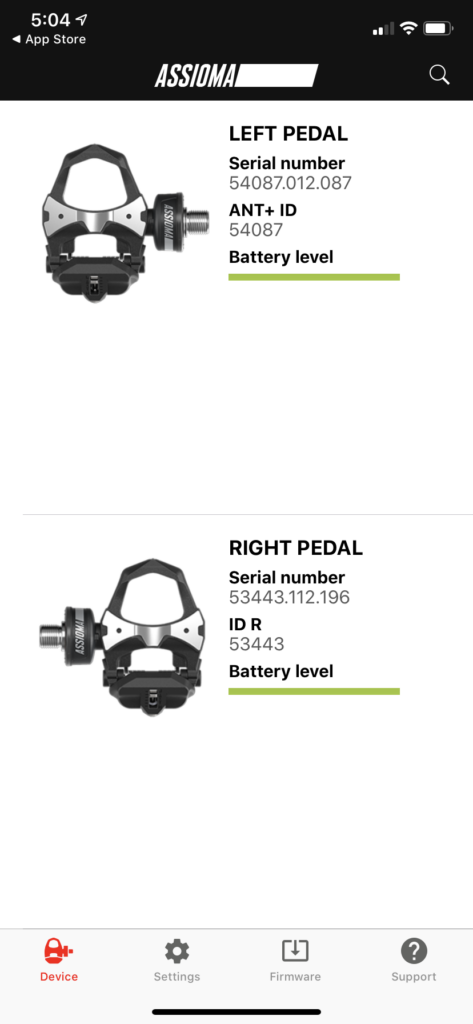
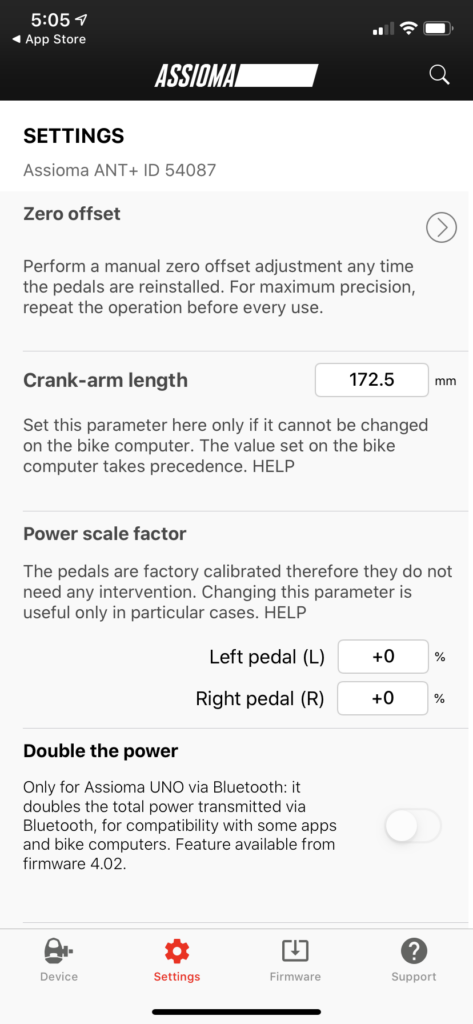
Unlike the Garmin Vector 2 pedals, Assiomas aren’t super picky about being torqued to a precise setting. So just snug them up like you would any other pedal, perform the zero offset, and ride.
Bedding In
With any power pedal, I recommend performing a zero offset before each ride, for the first several rides. Some riders will install the pedals and perform a few max effort sprints, then do the offset. Basically, what you’re wanting is to get the pedals “bedded in” – sometimes they move microscopically after being installed, and that affects the power readings. But typically after a few decent rides and hard sprints, pedals settle in and perform in a stable fashion moving forward.
Pairing in Zwift
Pairing in Zwift is super-simple as well. Just click “search” in the “Power Meter” box, and the Assioma will come up as an option. These pedals broadcast on both ANT+ and Bluetooth, so if your Zwift device supports both protocols, you’ll have the option of connecting via either method.
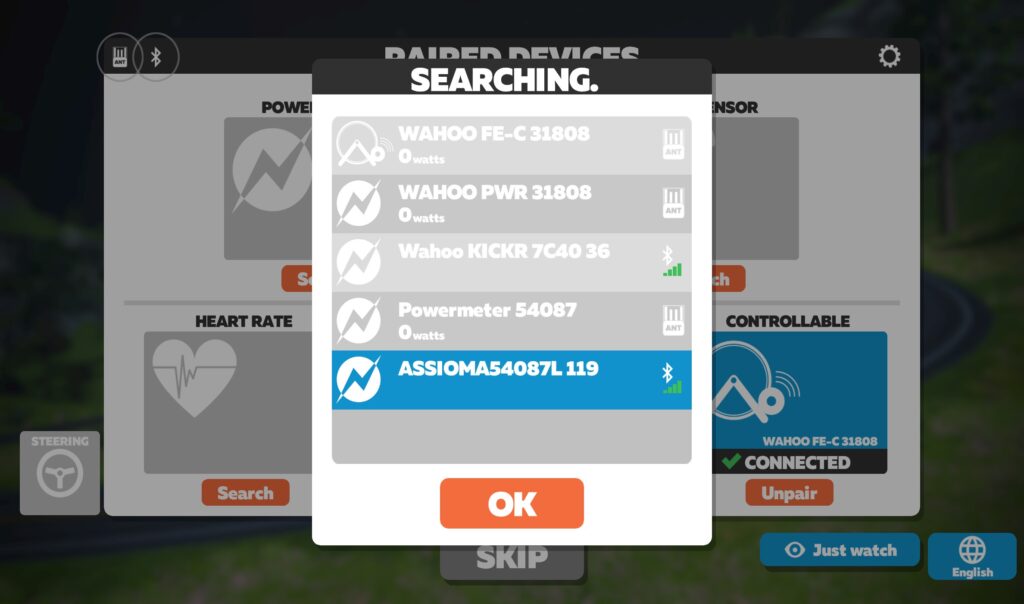
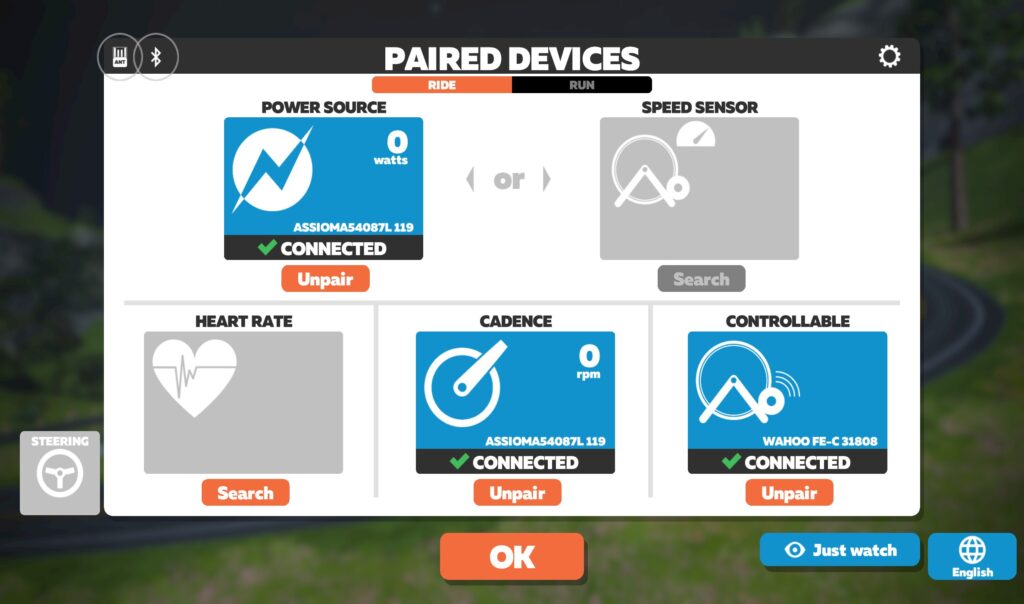
Many riders pair their power meter as the Power Source, and their smart trainer as “Controllable”. This is what I’ve done for years on Zwift, only recently switching to using my smart trainer’s power (more on that later). Riders do this for a few reasons:
- Because they use the same bike indoors and out, and want the same power meter used for all their efforts
- Because they trust the accuracy of their power meter over their smart trainer
- Because they want the extra watts of a pedal, crank, or spider-based power meter which reads wattage before drivetrain losses
Increasingly, though, we’re seeing racers dual-record their power, using their direct drive smart trainer as the power source in Zwift, and their power meter as the backup source, recorded on their bike computer. High-end Zwift Esports races now require that the direct-drive trainer as the primary power source, in fact, so we’ll probably see this practice continue to trickle down to the community racing level.
Charging
The pedals use a rechargeable built-in battery, unlike the Garmin and Powertap offerings which use replaceable batteries. Which is better? While there is something comfortable about the idea of being able to easily swap in fresh batteries, I lean toward built-in rechargeable batteries, for these reasons:
- Since the manufacturer knows the characteristics of their batteries, they can provide accurate battery charging readouts
- You don’t have to worry about “battery door” problems including water intrusion or oxidation which have plagued other pedal models
- No need to buy batteries
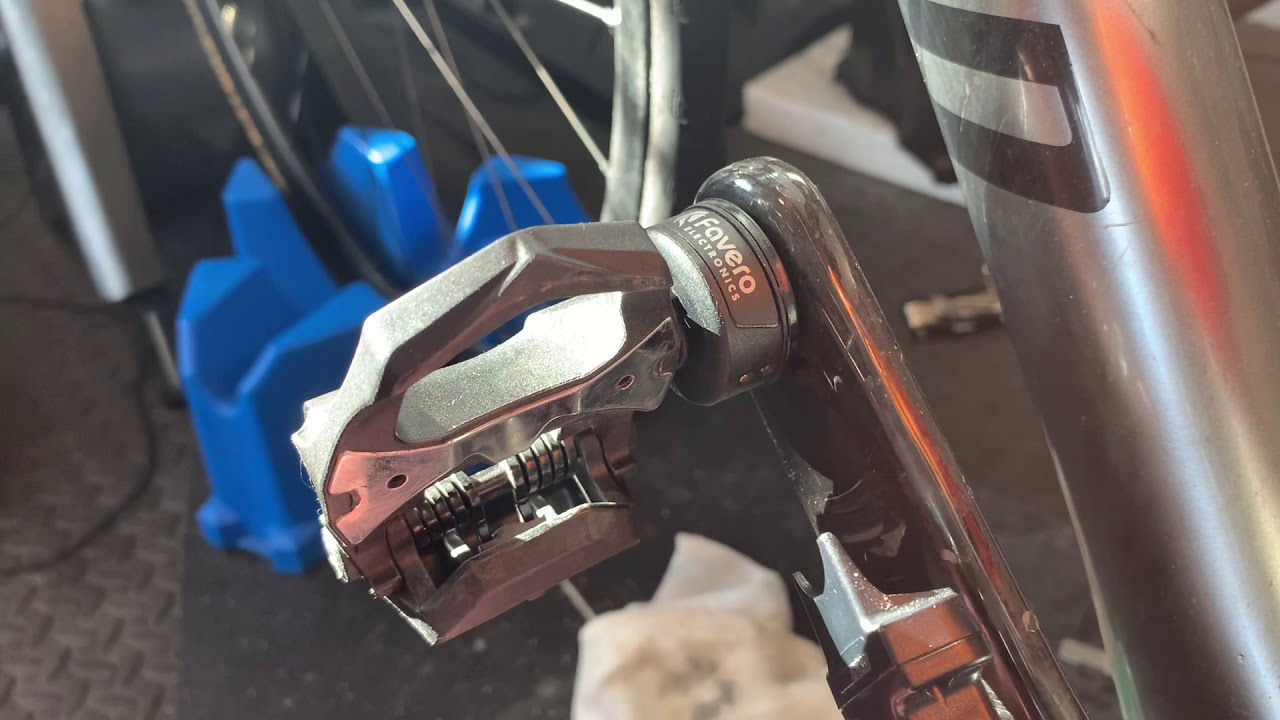
A full charge cycle takes about 6 hours. Hooking the pedals up to charge has become one of my simple pleasures in life, thanks to Favero’s magnetic charger design. Check it out:
Battery Life
Favero says the batteries will last approximately 50 hours on a charge. I find it’s even more than that – closer to 60 hours.
One valid concern with a built-in battery is: what happens if it goes bad? The good news is, it’s a replaceable part – Favero can send you a new sensor unit. But you should never need it, because according to Favero the batteries are good for ~500 recharge cycles. And that’s 500 cycles at 50+ hours per charge, before it may decrease by up to 20% below that 50 hour mark!
If you do the math, 500 recharges at 50 hours per charge is 25000 hours of riding. If you ride 10 hours a week, that’s 25000/10/52=48 years of battery life.
User Experience
The pedals have performed flawlessly across hundreds of hours of Zwifting and outdoor riding.
I’ve used them mostly in conjunction with my Wahoo KICKR v4 (2018 model), then with my Wahoo KICKR v5 (2020 model). I also used them a bit on Monica’s OG Tacx NEO, as well as outdoor rides. Across all setups, they never failed to broadcast reliably and accurately.
Power Accuracy
Here are two sample rides that show the sort of data I’m typically seeing when riding with my KICKR 5 on Zwift while recording the Assioma data via my Wahoo ELEMNT bike computer:
- Ride 1: ZRL Race
- Ride 2: Crit City Race
I generally see the Assioma average power being 1.5-2.5% higher than the KICKR v5 power. Given the Assioma’s +-1% accuracy and the KICKR 5’s 1% accuracy, we’re well within spec given that drivetrain losses can easily amount to 2%.
One nice thing about the Assioma hardware is it uses Instantaneous Angular Velocity to computer power – which means they are accurate on oval chainrings. That’s something Garmin Vectors cannot do, although Powertap says their pedals are capable of it.
If you want to dig into power accuracy more you can always check out GPLama’s review or DC Rainmaker’s review.
Sticky Watts
One thing worth mentioning is Zwift’s sticky watts issue which affects anyone using an event-based power meter as their Zwift power source.
The summarize the issue: if you’re using an event-based power meter as your power source in Zwift (this would be any pedal, crank, or spider-based power meter) you’ll find your watts “stick” for 2-4 seconds when you suddenly stop pedaling. For the details on why this is and how it affects the Zwift experience, read Sticky Watts: Why They Exist, and How They Affect the Zwift Experience.
To be clear, this isn’t a weakness of the Assioma – but it is an issue Zwifters will encounter due to how Zwift works. For me, it’s annoying enough that I’ve moved to using my KICKR v5 as my main power source, with the Assioma as my backup source.
Cycling Dynamics
If you have certain Garmin head units (I don’t), the IAV Cycling Dynamics supported by the Assioma may interest you. Specifically, the Assioma detects and transmits two advanced metrics:
- IAV Power Phase: detects where in your pedal stroke the power is being applied
- IAV Rider Position: shows often often you are seated or standing
To the following Garmin head units: Edge 520 Plus, 530, 820, 830, 1030; Forerunner 935, 945; Fenix 5 Series, 5 Plus Series, MARQ Series.
These metrics are ANT+ only, and (as far as I know) only available on Garmin head units. It’s up to the creators of the head units to support these metrics. For more on this topic, here’s an in-depth post from DC Rainmaker.
More on the Assioma App
Favero’s iOS/Android app for the pedals works great, which is a welcome thing in a world where cycling apps are often sub-par (I’m looking at you, Tacx Utility!)
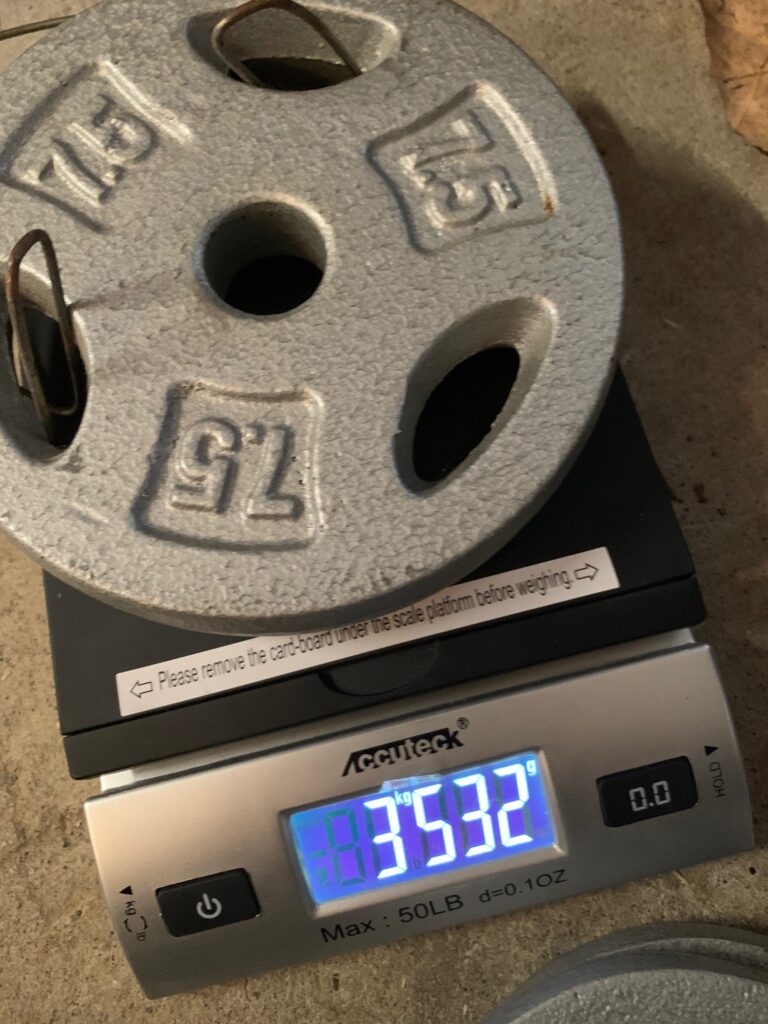
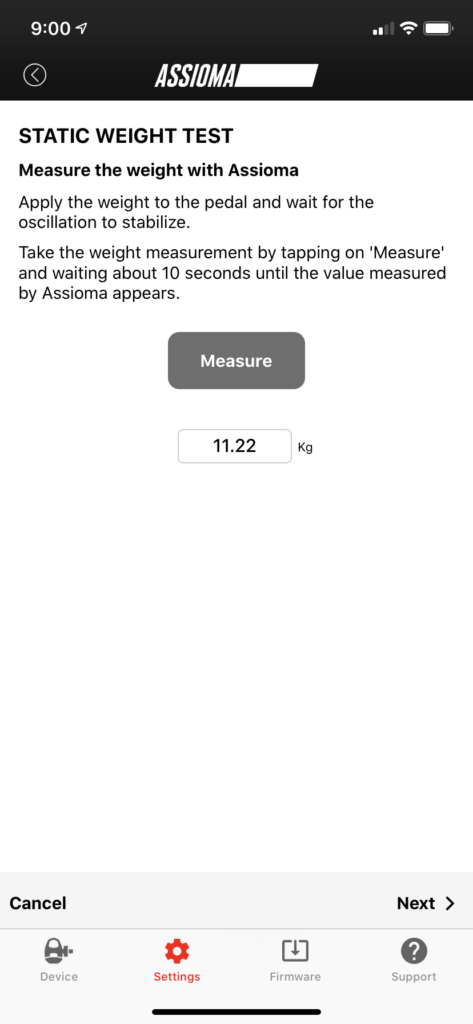
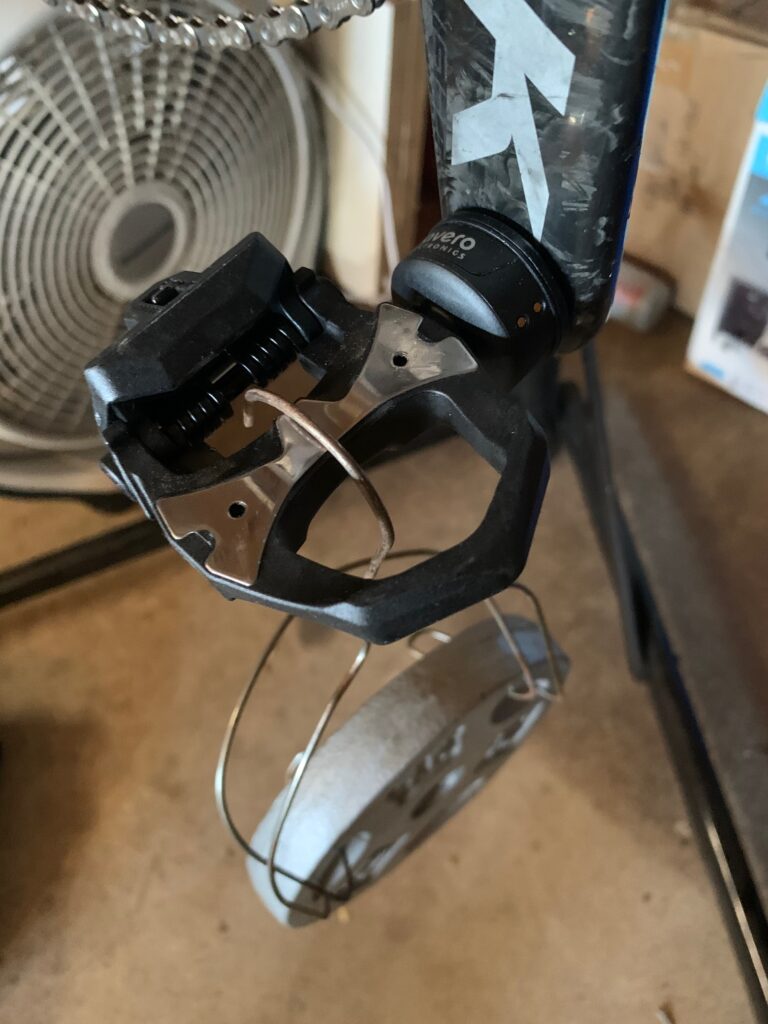
Along with allowing you to activate and zero offset your pedals, the app also lets you configure crank length and perform a static-weight calibration, which I tried just for the fun of it. This involves hanging a known weight from each pedal, which overrides the factory calibration.
Serviceability
Pedals, like other moving bike parts, can wear out. Favero has designed the Assioma so the pedal body is separate from the (much more expensive) electrical parts, so you can purchase an entire replacement pedal body (bearings, oil seal and closing parts) for €59.90.
You can also replace or lubricate the pedal bearings, just like other high-end pedals.
Two Negatives
There are just two negatives in my experience with the Assioma, and both feel a bit silly and minor. Still, here they are:
- Xpedo? Really? Assioma uses the Xpedo cleat instead of Look, which is just different enough that you can feel a bit of tightness when riding the Xpedo cleat on Look pedals. This won’t matter at all for people with only one road bike. If you’re like me (with an indoor bike and outdoor bike), I’ve found that using the Xpedo cleats on my Look pedals just feels a bit tighter than I’m used to – but not a big enough deal for me to fuss about. Still, it would be nice if the pedals used a more common standard.
- No Cycling Dynamics for Wahoo Head Units: this is a Wahoo problem and not a Favero one… but I’m still annoyed that I can’t get IAV Cycling Dynamics on my Wahoo ELEMNT head unit! If anyone knows a way for me to access the Assioma cycling dynamics via a PC, iOS app, or my ELEMNT, I’m all ears. Comment below!
Concluding Thoughts
With impressive accuracy and the best price of any pedal power meter on the market, it’s no surprise that Zwifters love the Assioma. I wouldn’t hesitate to recommend them as my first choice for anyone looking for a pedal-based power meter.
Where to Buy
The Favero Assioma can be purchased direct from Favero (based in Italy) or at these Zwift Insider affiliate partners:
Questions or Comments?
Share below!


Unrelated but do you know what was included in the most recent update that just came out on PC/Mac? All I could find was Tour de Zwift sign up…
https://zwiftinsider.com/update-1-0-60239/
While the battery may be rated to 500 charge/discharge cycles, it is still going to be subject to the usual capacity erosion property of all lithium ion batteries. Over a few years, the battery capacity will noticeably drop even if you have only charged a handful of times.
Batteries due suffer reduced capacity due to age and charging cycles – but at up to 50 hours between charges most people are only going to be charging every 1-3 months – so just 4-12 charges a year. Plus the 500 charge cycles is usually to 75-80% of original capacity (not to complete failure).
Favero actually says it’ll do 500 cycles at 50+ hours per cycle, before it may drop below that! Impressive.
I have had my Assioma pedals for just under 4 years now, ride about 12-60 hours a week, and have yet to see a decline.
Thanks For this review.
I am using my new assiomas with love, but you are saying that they should read higher power than the trainer..in my case (even after cleaning anf lupine the chain) its the oposite
https://www.zwiftpower.com/profile.php?z=885157&sid=e8927e4aec87f992172f5a642
9d08d5d
I’d recalibrate both (if your trainer supports it) and re-test. The Assiomas could be (more) right and it’s the trainer reading too high as typically pedal based power meters do read slightly higher as they are not seeing drivetrain losses.
You can validate your Assiomas with known weight as Eric did (just need at least 20kg for accurate results). So if it will be ok, then your Core is wrong. Btw my experience is lots of Cores are overmeasuring the power a bit (even after a good spin-down calibration…)
In the UK, you’ll find them at £629, down from £699 on Sigma Sports (highly respected retailer) for the Assioma Duo. That’s USD $854 with currency conversion. The US have got a bargain at those prices you mention in the post!!
One relevant factor here is that they ship to the US without charging sales tax while customers in the EU/UK have VAT added. If you remove VAT, they are actually cheaper in the EU/UK than in the US.
I just picked mine up for $673 USD directly from Assioma for the duo. Super happy with this price.
I bought mine in the UK at just over £520 but 4 years ago, and have bought some for friends. I have noticed that if I had bought them in Italy, they would have been cheaper, bit there is no bike shops close to me in Aosta that stocks them 🙄
I’ve been using a pair of assioma duos for over 18months now although outdoors only. I think they are fabulous. They can be swapped between bikes in seconds if needed and are accurate in terms of data (in comparison to the readings I’ve had from my SRM and also my wahoo kickr). The app is great so you can easily check battery life and charge as needed. Battery life has been fine so far and I’ve not noticed any loss of life in the batteries. I use look cleats with all my shoes and they work fine. I don’t notice the difference from swapping cleats between look or xpedo. The only minor issue is I noticed you need to twist your foot a little further to unclip than with look pedals so I have to run the tension a little less. First time I rode on them I struggled to get my foot out which was an interesting experience 🙄. I really can’t rate them highly enough. One of my best ever cycling buys
Been using assioma duo in my outdoor bike. Love them. Reliable, pairing with zero issues, long battery life. I think I’ll swap over for the winter training to my indoor set up…
Good review, thanks as I’ve just bought a pair. Any idea how to turn those leds off, I’m sure my wife will notice
Been using Assimoa Duos for a couple of years now on outdoor bikes. Think they are great, have had lots of wear in tough Scottish conditions. Sometimes use them on indoor bike too but only from time to time to check calibration against trainer. Easily swapped between bikes without the need for torque wrench or much fuss. If you have many bikes then not sure why you wouldn’t want a pair of these. If they offered a version for crank Bros cleats I’d buy a pair for my gravel bike too. Also useful to use them on rollers indoor with zwift for a change from being locked I to the TT.
Another thing that’s quite cool but I hope you never need it is the remote service. Favero can look at your pedals data etc to check what’s wrong with them when you connect to the Assioma App.
Yes – they actually showed me this! Super cool.
I love my Assioma pedals. As for cleats, the cleats are known to be tight. It was recommended to use the Look Keo Gray cleats. I have been doing this for 2.5 years now (10,000) miles with no problems. They aren’t quite as tight and would work with your pedals on your other bike.
I ride Look Gray cleats but I have been reluctant to get the Assioma pedals because Look cleats are not recommended. You have been good with them? Do they float more than on Look pedals?
I rode mine with the grey Keo cleats. Never any issues and, to me, they feel just like the Looks.
I wish that the cleat system was interchangeable, I love my Speedplay pedals and have them on all my bikes so I don’t’ have to switch the pedals between them. My opinion is that the first true power pedals to allow cleats of the riders choosing will put the rest to bed.
Cough… https://www.youtube.com/watch?v=ybAFIhKahnM
Right now, I just have the UNO but I notice whenever I sit up in the saddle or back down to the bars my power dips by about 15-20% each time for about 5 seconds. It’s really strange and it caused me to be dropped in my first Zwift race when I sat up to grab some water off a nearby table. Maybe it’s an UNO problem or maybe I’m missing something.
Quote – “I generally see the Assioma average power being 1.5-2.5% higher than the KICKR v5 power. Given the Assioma’s +-1% accuracy and the KICKR 5’s 1% accuracy, we’re well within spec given that drivetrain losses can easily amount to 2%.”
that’s not what the +- accuracy means. The +- accuracy is the variable difference in accuracy from one pedal stroke reading to the next on the SAME power meter. Not the +- accuracy to an industry standard. Even if two different power meters where rated at +-0% – you could get a difference of 3% between them and they’d both be at their advertised spec of -0%.
They’re also measuring power at different points. It would be like measuring electrical power at the generator versus at the house — some is lost in the wires. In the case of a bike, some is lost in the drivetrain.
I’m not sure I’m understanding you, Benjamin. By your logic, could there be a difference of 10% between the 2, but they’re still within spec of +-1%?
I see accuracy as being the results of test against a known standard – like perhaps an SRM power meter at the manufacturer’s test site.
After 8 months of use my inner bearings went out and were toast. I tried to get the company to warranty them, but they were too slow. I figured out the bearing size and bought some at the local Remote control store, they use the same size in RC cars. The inner are 10x15x4 you will need two per pedal and the single outter is 6x13x5. I got good sealed ones and then packed them with good grease. This process makes them so much easier to get into the pedals as they don’t spin 500rpms if you miss. Replacing the bearings is an easy process, so low stress. You will need a 10mm socket to remove the end nut, then poke out the bearings using a plastic ink pen, clean the inside, regrease, pack in the bearings and retighten (I forget the torque spec) they will be slightly loose until you put on the dust cover. So if your pedal has a slight play on the axel, check the bearings and replace ASAP. you can order the bearings on ebay in bulk and get them dirt cheap, mine at the RC shop were 1/2 $ compared to the 40$ from them.
Nice! Good to know. Serviceable bearings are always a plus.
I love my pedals too but find that when they connect to zwift it resets the crankarm length in the app to the default 172.5. Anyone else have this happen consistently?
Yes, although the recent app update seems to have ended this.
How long has this bug been going on?
Great review, as always, Eric. I’ve owned my Duos for 2.5 years now and they’ve been great. I had a problem with one of the batteries losing charge. Favero tech support was first rate. They gave me diagnostic checks to run and pulled diagnostic data from the app., they then sent me a new firmware to try with revised battery management and when that didn’t work they sent me a new sensor unit. No problems with the pedals since. I’ve used them on the trainer to verify trainer power measurements a couple of times, but I’d be reluctant to use them for the long term. I’ve noticed the pods containing the sensors scuff and could be easily damaged, so I’d avoid any unnecessary wear and tear or degradation of battery life.
The difference between Assioma and Kickr Watts is due to the chain/system friction.
It is more or less 8-10Watts. It can’t be equal!
That is why the Pro’s has to use the Kickr/Flux power source at first place to become equal and use the crank/pedal system as 2nd source to a Wahoo/Garmin Unit
I had the original bePros, and while I really liked them to begin with, but I had two substantial issues. First, I went to plug the charger into one pedal and something happened that melted the pins inside the pedal and caused the pod to swell. I didn’t do anything different than I would plugging in a cell phone. After several back and forths with Favero including shipping the pedal back at my expense, they said I must have done something to it and wouldn’t honor the warranty. I bit the bullet and bought a replacement pod.
Second was a substantial jump in power readings. I had performed a static calibration (weight hanging) and everything was fine, but within a few months, something just seemed off. I tried another calibration and checking against my coach’s equipment and the pedals were reading 8-9% high. Again, several back and forths, firmware upgrades, data files, and Favero’s response was that it was unusual and that I must have done something to the pedals to cause the problem. At that point, I had enough, their sitting in a box now.
I know several people that have the Assioma’s and are very pleased and maybe my case was isolated, but I was extremely disappointed in the customer service and their unwillingness to honor the warranty or work with me at all. If there was obvious damage, I could understand, but I’m meticulous about bike maintenance and care.
Just my experience.
So how easy is it to unclip from these in real life riding? I broke my arm a couple months ago when I couldn’t unclip so having pedals where I can adjust the ease of unclipping is important to me. Is there an adjustment on them to make it easier to unclip? (Thx for the review – so appreciated)
There is an adjustment on the pedals, yea. I never used it, but I would think you could make it nice and easy for yourself.
Another interesting article! I would like some power pedals, too, to take measurements outside. But I just like the Speedplay pedals so much that I would not want to switch back to Look. Haven’t found any Speedplay power pedals so far, though…
What pedals do the FA cleats work with? I would like to have a spare pair of pedals around in case my FAs need maintenance.
Look pedals.
Great review, and thanks for bringing up the sticky watts issue again, would like to see more transparency about this moving forward, racing off pedals with as much as a 10% error and not switching to to a smart trainer can spoil the experience for those who do.
thanks for the review. I have Assioma‘s Duo and Garmin‘s Vector 3. Both appear to have quite some lag betreten left and Right. The right Pedal collects the Data From the left which sends it to the Head Unit. For both I observiert a permanent lag of some 3-5 Percent Points.
This May be related to My pedalling physics. However, I have also a crank based Meter and the Neo2T Feature. Both of the latter suggest constant 50/50 percent balance.
Any Comments, please?
Sorry, left Pedal collects from Right. Right always is behind for Assioma and Vector.
My guess is that they use the Xpedo to save a few $$ over licensing of the Look standard.
Hi Eric,
thanks for your review.
I am a owner of UNO and thinking about updating to DUO. (main Focus Spin Bike, Zwift via Apple TV and Bluetooth) I just read that Data is transmitted in one channel / dataset to Zwift. I am asking myself if updating makes sense? (Accuracy) What is your opinion?
Depends on your situation. Is your Left/Right balance very close, or not? Do you want to use the pedals with a head unit as well (which will show L/R power, unlike Zwift?) Those are the two questions that come to mind…
I fully agree with your review, dear Eric, except on one point: the link with my Wahoo Elemnt Roam. I have them now for a little more than a year and I use the duos to limit losing power of my left leg due to a Parkinson disease (I’m 56). I could easily link both pedals to my Wahoo Elemnt Roam. I bought this Wahoo especially because it can show the division of power between both legs. Which allows me to focus on my left leg and keep it running. The division (35/65%) has remained the same since. No further loss! And still a lot of pleasure on my bikes. By the way, congrats with your site!
Excellent review Eric!!
A quick question, do you have any news about the IAV Cycling Dynamics in Wahoo?
I’m thinking about changing my Assioma UNO to DUOs, but since I use a Wahoo Bolt I’m not sure if I’m going to be able to squeeze the full potential of these DUO pedals.
What are your thoughts in the case Wahoo has not given an answer to this? Would you recommend me on migrating to another cycling head unit? Which one would you recommend overall best cost/benefit?
Thank you in advance.
I have some experience with this. I use WKO5 program which downloads data from Training Peaks. A free account on Training Peaks is all that one needs to use it as a storage depository similar to free version of Strava. WKO5 requires a one-time payment for the software license (about $70 or so, no subscription, license is perpetual). I really like this program and believe it is the best tool for analysis of cycling data available on the market. There is tons of analytics in it, much more than in subscription version of the Training Peaks (and you can analyze data for multiple cyclists, as it is designed with coaches in mind). While you cannot get a full Garmin analytics analysis for pedaling without a Garmin head unit, with Wahoo bike computer you can get a good set of pedaling related cycling dynamics parameters in WKO5. WKO5 uses their own metrics which Dr. Coggan believes are more useful and meaningful, e.g.,, Gross Power Released for left and right, Gross Power Absorbed for left and right, Kurtosis Index. Of course you can see left/right balance. You can graph these parameters vs time or as power duration curves, for example. These metrics are described in blog posts by the authors of the software and in their book “Training and Racing with a Power Meter”. The most notable thing which is missing with Wahoo (and requires a Garmin head unit to upload to WKO5) is angles where power phase on each pedal begins and ends. Being a Wahoo user myself, I am not certain how much added value is in those Garmin-specific parameters.
Hi,
I’m looking from assistance please. I have a pair of assioma duo which I currently use on a spin bike until I get home in December. I am working abroad at the minute. I connected the pedals to zwift and head off for a cycle but my power numbers struggled to get over 100watts but when I connected the pedals to my garmin watch it was showing between 180 and 200 Watts OK. Any suggestions on what I may have done wrong?
Thanks in advance.
Sounds like only one pedal is paired. Make sure they’ve both got a good charge, firmware is up to date, and try re-pairing in Zwift?
Hi Eric
I just bought the assioma duo and every thing is excellent except for the fact that i cannot connect them to my zwift. I have the assioma app, I activated both of them and did the manual calibration. I tired to use both dual channel and single channel settings but nothing shows up on my zwift. I’m using an iphone 13 for all of this. Not sure what the problem is?
Make sure they aren’t connected to your phone or the Assioma app when you’re trying to connect them to Zwift… probably they only support 1 Bluetooth connection.
Also, try to connect them as the power source in Zwift, before cadence. These days often items don’t show up as pairable for cadence unless you’ve already connected them as the power source too.
Hi @eric
Can I ask a question that I am struggling to find an answer to? I have the Uno pedals and have recently set these up for Zwift.
I run the via the companion app with my Suito as controllable. It has resulted in me being able to produce and hold much higher watts (FTP from 3.8 w/kg to 4.2 w/kg) with my 1,5 and 20 min power going up.
I can find no rhyme or reason as to why this is the case, if you can help
thanks
What is the recommended settings for an Uno set up? Should we set the “double power” button to on or off while on Zwift. I’ve read explanations for being on and for being off. Does Zwift already know that it needs to double the power coming off of that left pedal?
Thanks, love the page and this was a great article.
I bought mine over Christmas 2021 and it was quite a bargain. Great company.
Hi is there more then one generation of the assioma favor duo pedals? I thought they made a few tweaks a few years ago…could be wrong…what I the most recent model number? Thanks.
PS do you think an update version is imminent–streamlined body with no more pod?