
Facebook Instagram Twitter Youtube
  • Get Started
    • Create Zwift Account
    • How To Get Started On Zwift
    • Zwift Course Maps
    • How to Race on Zwift (Setup, Strategy, and More)
    • Women’s Racing on Zwift
    • Links Every Zwifter Must Have
    • More “Get Started” Posts
  • Tips & Tricks
    • Training & Nutrition
    • Racing
    • Zwift Hacks
  • Reference
    • How Zwift Works
    • Course Calendar
    • RoboPacer Calendar
    • Weekly Challenges Calendar
    • Climb Portal Calendar
    • Upcoming Events
    • Game Updates
    • Smart Trainer Index
      • Current Models
      • Exhaustive Trainer List
    • Achievements & Unlocks
      • XP Basics for Riders
      • XP Basics for Runners
      • Kit Unlock Codes
    • Frames & Wheels
    • Routes & Maps
      • Master List: Routes
      • Master List: Climb Portal
      • Master List: KOMs
      • Master List: Sprints
      • Master List: Rebel Routes
      • Downloadable Watopia Map
      • Printable List of Routes by Difficulty
    • Speed Tests
    • Tiny Races
  • Women
    • Race Calendar
    • Why race?
    • Women’s Teams
    • Racer Spotlights
    • More Women’s Racing posts
  • Shop
    • Watopia Map and Other Posters
    • ZI Indoor Cycling Kit
Search
Logo
Logo
  • Get Started
    • Create Zwift Account
    • How To Get Started On Zwift
    • Zwift Course Maps
    • How to Race on Zwift (Setup, Strategy, and More)
    • Women’s Racing on Zwift
    • Links Every Zwifter Must Have
    • More “Get Started” Posts
  • Tips & Tricks
    • Training & Nutrition
    • Racing
    • Zwift Hacks
  • Reference
    • How Zwift Works
    • Course Calendar
    • RoboPacer Calendar
    • Weekly Challenges Calendar
    • Climb Portal Calendar
    • Upcoming Events
    • Game Updates
    • Smart Trainer Index
      • Current Models
      • Exhaustive Trainer List
    • Achievements & Unlocks
      • XP Basics for Riders
      • XP Basics for Runners
      • Kit Unlock Codes
    • Frames & Wheels
    • Routes & Maps
      • Master List: Routes
      • Master List: Climb Portal
      • Master List: KOMs
      • Master List: Sprints
      • Master List: Rebel Routes
      • Downloadable Watopia Map
      • Printable List of Routes by Difficulty
    • Speed Tests
    • Tiny Races
  • Women
    • Race Calendar
    • Why race?
    • Women’s Teams
    • Racer Spotlights
    • More Women’s Racing posts
  • Shop
    • Watopia Map and Other Posters
    • ZI Indoor Cycling Kit
More
    Zwift Hacks

    Return to Zwift’s Old Font with this Hack (PC/Mac)

    Eric Schlange
    By Eric Schlange
    September 12, 2022
    LAST UPDATED September 12, 2022
    18

    Last week’s update rolled out a new font face across all of Zwift. And while it’s grown on me, I’m also seeing a lot of Zwifters saying they prefer the old font.

    If you’d like the old font back, here’s a simple hack for Mac and PC users, from Zwifter Youry_Pershin. (This was originally shared in the Zwift forum.)
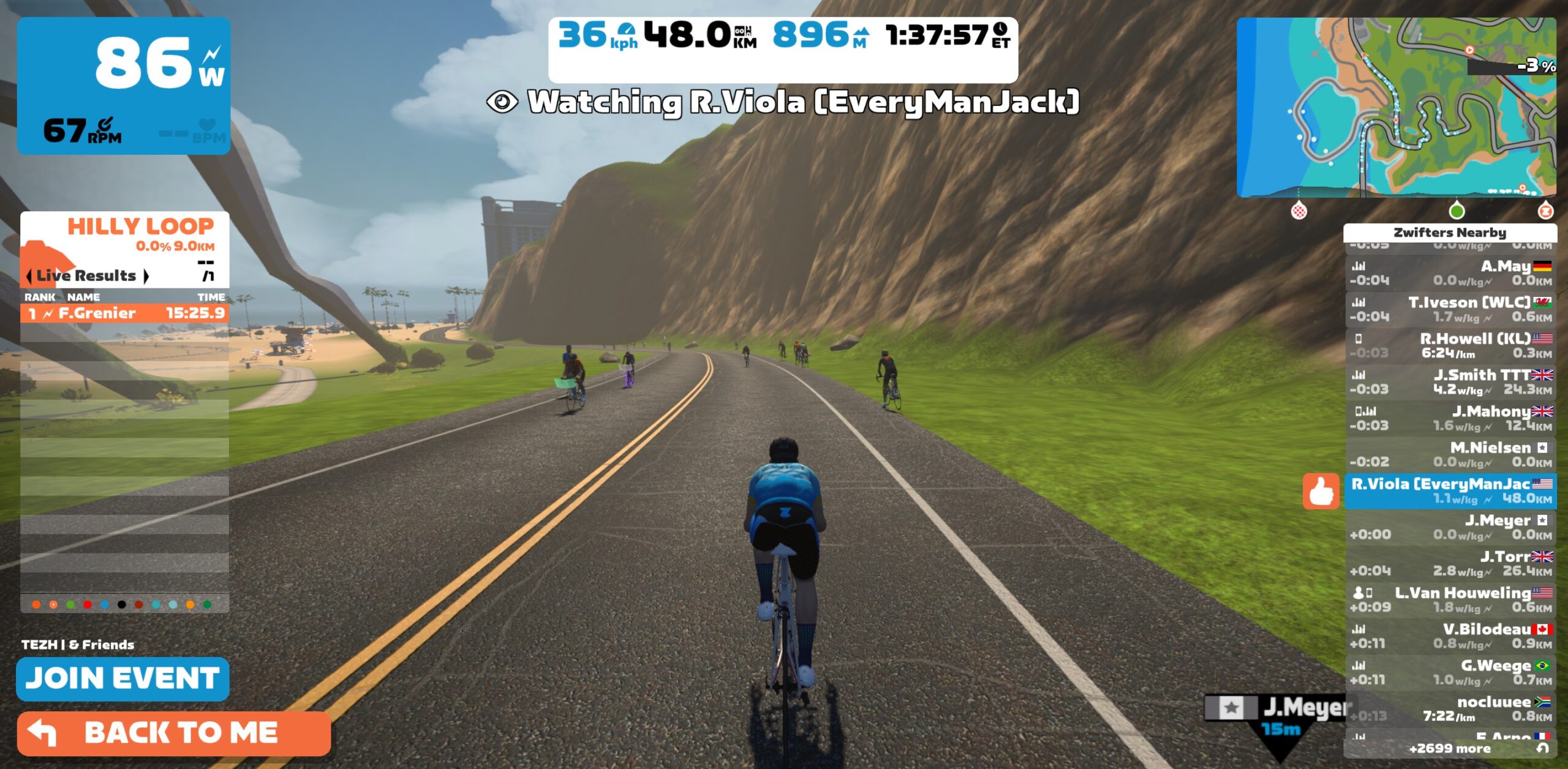
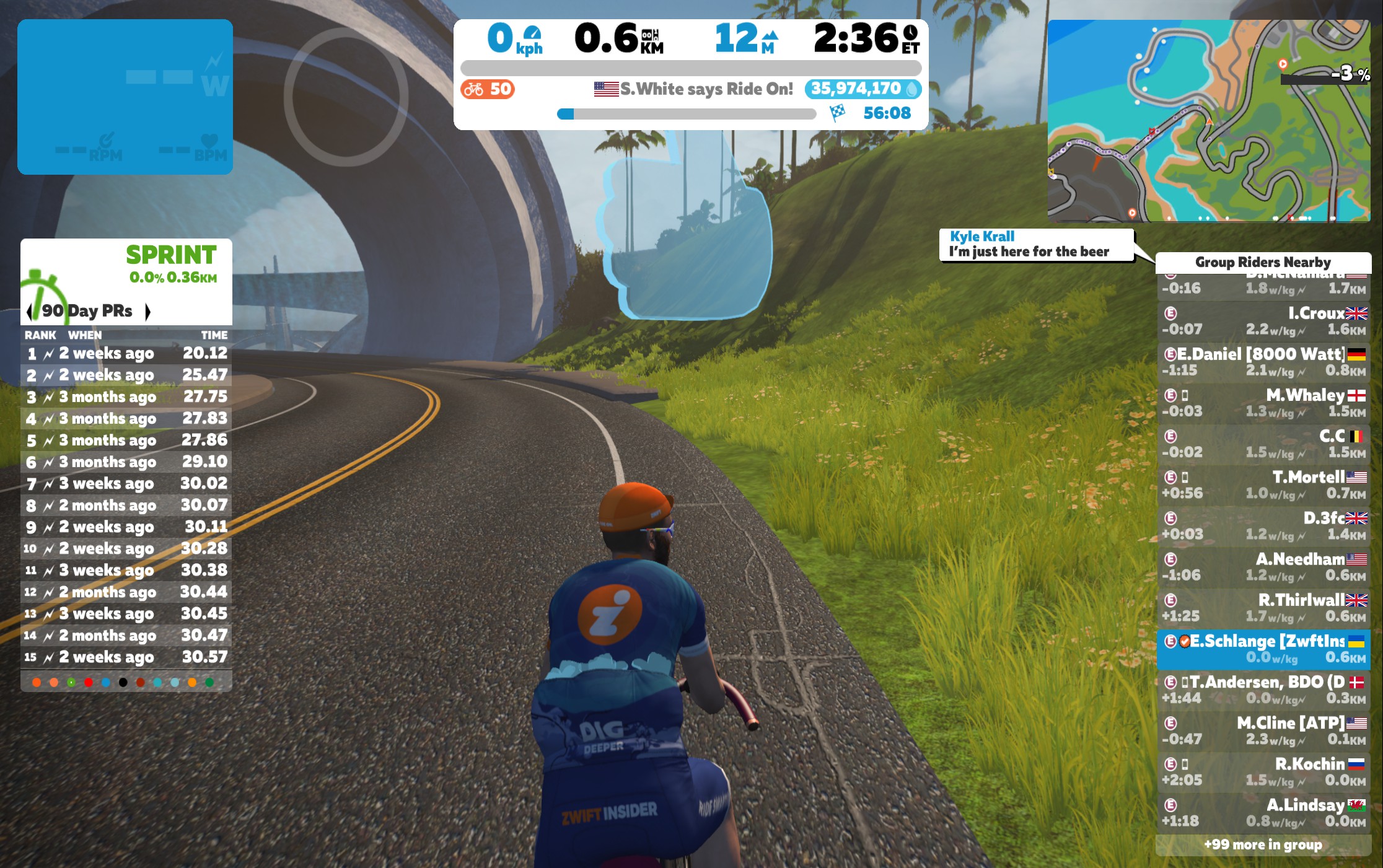
    New font
    Old font

    Disclaimer: this hack involves replacing some of the files in your Zwift install, much like some Zwifters did back in 2018 to pave New York’s glass roads. This means that future Zwift updates could overwrite your workaround, forcing you to do it again. It also means if you do it wrong, you could mess up your Zwift install and be forced to reinstall the program.

    First, you’ll need the old fonts and related files. You can grab those from Youry’s Google drive here.

    Mac Instructions

    Make sure Zwift is not currently open, then do the following:

    • In Library/Application Support/Zwift/assets/fonts
      make a backup of the font.wad file in this folder
      replace the file with font.wad from the Google drive linked above
    • In Library/Application Support/Zwift/assets/Noesis/Blend_Data
      make a backup of the noesis.wad file in this folder
      replace the file with noesis.wad from the Google drive linked above
    • In Library/Application Support/Zwift/data/fonts
      make a backup of all .ztx files in there (8 in total)
      replace all files with the .ztx files from the Google drive linked above

    Open Zwift and you should have the old font back.

    PC Instructions

    Same as above, except Zwift is installed in a different folder on PC.

    Make sure Zwift is not currently open, then do the following:

    • In Program Files (x86)/Zwift/assets/fonts
      make a backup of the font.wad file in this folder
      replace the file with font.wad from the Google drive linked above
    • In Program Files (x86)/Zwift/assets/Noesis/Blend_Data
      make a backup of the noesis.wad file in this folder
      replace the file with noesis.wad from the Google drive linked above
    • In Program Files (x86)/Zwift/data/fonts
      make a backup of all .ztx files in there (8 in total)
      replace all files with the .ztx files from the Google drive linked above

    Open Zwift and you should have the old font back.

    Questions or Comments?

    Post below!

    Related Posts

    Facebook
    Twitter
    Pinterest
    ReddIt
      Eric Schlange
      Eric Schlangehttp://www.zwiftinsider.com
      Eric runs Zwift Insider in his spare time when he isn't on the bike or managing various business interests. He lives in Northern California with his beautiful wife, two kids and dog. Follow on Strava

      18 COMMENTS

      Subscribe
      Notify of
      guest

      guest

      18 Comments
      Oldest
      Newest Most Voted
      Inline Feedbacks
      View all comments
      wpdiscuz   wpDiscuz

      Get Started on Zwift

      Sign Up (Free Trial)
      Buy Zwift Ride
      Buy KICKR CORE One
      Read More...

      Newest Featured Posts

      Next Up: Thoughts on Zwift’s Personalized Recommendations Beta

      Game Updates

      “Hudson Hustle” Route Details

      Routes & Maps

      Support This Site

      Write a post, shop through us, donate or advertise. Learn more

      NEWSLETTER SIGNUP

      Zwift tips and news every 2 weeks! Click to subscribe.

      More Posts

      “Kaze Kicker” Route Details

      Routes & Maps

      Zwift Racing League Week 5 Guide: Cobbled Climbs (Points Race)

      Racing

      Zwift Update Version 1.106 (158210) Released

      Game Updates

      Zwift Adds “Sofia” RoboPacer and Modifies RoboPacer Route Schedule

      How Zwift Works

      This community-driven site is maintained by Eric Schlange and a team of Zwift enthusiasts. Zwift Insider is independent of Zwift corporate (www.zwift.com), although Zwift does provide funding to help defray site costs.

      This site contains affiliate links to Amazon, Wahoo, and other brands. Zwift Insider makes a small commission on purchases made from these links, so please shop through them to support our efforts.

      Terms of Use/DMCA Copyright Policy

      Privacy Policy | Privacy Consent

      [email protected]

      Latest articles

      Next Up: Thoughts on Zwift’s Personalized Recommendations Beta

      Notable Zwift Events for the Weekend of January 31-February 1

      “Hudson Hustle” Route Details

      Popular Categories

      • Racing1610
      • Events1123
      • News843
      • Training & Nutrition751
      • Interviews570
      • Routes & Maps490
      Comment Author Info
      18
      0
      Would love your thoughts, please comment.x
      ()
      x
      | Reply
      You are going to send email to

      Move Comment

    • Related Posts